|
Tags: Mobile edit Mobile web edit |
| Line 1: |
Line 1: |
| ===DM1 DM2=== | | ==Functionality Description== |
| {| class="wikitable"
| | |
| |+
| | For proper functionality, the device requires ignition to be active. Source of ignition and voltage level can be selected from '''System''' tab. |
| ! rowspan="2" style="width:10%; border: 1px solid white; border-bottom: 2px solid #0054A6; background: white; color: #0054A6; text-align: center;" |Property ID in AVL packet
| | |
| ! rowspan="2" style="width:20%; border: 1px solid white; border-bottom: 2px solid #0054A6; background: white; color: #0054A6; text-align: center;" |Property Name
| | Ignition has to be active for at least 14 sec to start generating the DTC list. If ignition is turned off, the device will clean all DM1 and DM2 codes and functionality will not be working. |
| ! rowspan="2" style="width:5%; border: 1px solid white; border-bottom: 2px solid #0054A6; background: white; color: #0054A6; text-align: center;" |Bytes
| | |
| ! rowspan="2" style="width:5%; border: 1px solid white; border-bottom: 2px solid #0054A6; background: white; color: #0054A6; text-align: center;" |Type
| | [[File:DTC_Ignition.png]] |
| ! colspan="2" style="width:10%; border: 1px solid white; border-bottom: 2px solid #0054A6; background: white; color: #0054A6; text-align: center;" |Value range
| | |
| ! rowspan="2" style="width:5%; border: 1px solid white; border-bottom: 2px solid #0054A6; background: white; color: #0054A6; text-align: center;" |Multiplier
| | After the device is connected to the Configurator, there will be '''DM1 / DM2''' tab made available. There is a configurable DM1 / DM2 Data source parameter. This parameter selects the CAN source based on which device will parse DM data from. Based on selected data source, device will also call a request for DTCs. |
| ! rowspan="2" style="width:5%; border: 1px solid white; border-bottom: 2px solid #0054A6; background: white; color: #0054A6; text-align: center;" |Units
| | |
| ! rowspan="2" style="width:25%; border: 1px solid white; border-bottom: 2px solid #0054A6; background: white; color: #0054A6; text-align: center;" |Description
| | '''Note:''' The functionality is completely separated from the FMS source. |
| ! rowspan="2" style="width:5%; border: 1px solid white; border-bottom: 2px solid #0054A6; background: white; color: #0054A6; text-align: center;" |HW Support
| | |
| ! rowspan="2" style="width:10%; border: 1px solid white; border-bottom: 2px solid #0054A6; background: white; color: #0054A6; text-align: center;" |Parameter Group
| | [[File:DTC Data source selection.png]] |
| |-
| | |
| ! style="width:5%; border: 1px solid white; border-bottom: 2px solid #0054A6; background: white; color: #0054A6; text-align: center;" |Min
| | *NONE – Device will not use any CAN as data source |
| ! style="width:5%; border: 1px solid white; border-bottom: 2px solid #0054A6; background: white; color: #0054A6; text-align: center;" |Max
| | *CAN1 – Device will use CAN1 as data source |
| |-
| | *CAN2 – Device will use CAN2 as data source |
| | style="border: 1px solid white; border-bottom: 2px solid #E8E8E8; background: white; text-align: center;" |10493
| | *BOTH – Device will use CAN1 and CAN2 as data source |
| | style="border: 1px solid white; border-bottom: 2px solid #E8E8E8; background: white; text-align: center;" |DTC DM1
| | |
| | style="border: 1px solid white; border-bottom: 2px solid #E8E8E8; background: white; text-align: center;" |4
| | Bellow '''Data source''' parameters there is a list of configurable IOs |
| | style="border: 1px solid white; border-bottom: 2px solid #E8E8E8; background: white; text-align: center;" |Unsigned
| | |
| | style="border: 1px solid white; border-bottom: 2px solid #E8E8E8; background: white; text-align: center;" |0
| | [[File:DTC Configurable IOs.png]] |
| | style="border: 1px solid white; border-bottom: 2px solid #E8E8E8; background: white; text-align: center;" |4294967295
| | |
| | style="border: 1px solid white; border-bottom: 2px solid #E8E8E8; background: white; text-align: center;" | -
| | „DTC DM1“ and “DTC DM2“ shows the last DTC that has been detected. „Active DM1 List“ and „Active DM2 List“ provides a list of all active DTCs for a given source. |
| | style="border: 1px solid white; border-bottom: 2px solid #E8E8E8; background: white; text-align: center;" | -
| | |
| | style="border: 1px solid white; border-bottom: 2px solid #E8E8E8; background: white; text-align: center;" |DTC DM1
| | Example of generating DM1 / DM2 list: To register DM1 code, there is a need to send command using ( pgn 0xFEFA ). Device will first check if such DTC code exist in the system (MCUID and CAN Source has to be unique for each DTC). Otherwise, DTC will be rejected. |
| | style="border: 1px solid white; border-bottom: 2px solid #E8E8E8; background: white; text-align: center;" |[[FMB640]]
| | |
| | style="border: 1px solid white; border-bottom: 2px solid #E8E8E8; background: white; text-align: center;" |FMS elements
| | [[File:DTC Configurator outputs.png]] |
| |-
| | |
| |-
| | <span style="color:green;">9D000301:<span style="color:blue;">01:<span style="color:red;">01 |
| | style="border: 1px solid white; border-bottom: 2px solid #E8E8E8; background: white; text-align: center;" |10494
| | *<span style="color:green;">9D000301</span> – DTC in hexadecimal format |
| | style="border: 1px solid white; border-bottom: 2px solid #E8E8E8; background: white; text-align: center;" |DTC Time DM1
| | *<span style="color:blue;">01</span> – MCU source that reported the DTC |
| | style="border: 1px solid white; border-bottom: 2px solid #E8E8E8; background: white; text-align: center;" |4
| | *<span style="color:red;">01</span> – Device CAN source used (00 - CAN1, 01 - CAN2) |
| | style="border: 1px solid white; border-bottom: 2px solid #E8E8E8; background: white; text-align: center;" |Unsigned
| | |
| | style="border: 1px solid white; border-bottom: 2px solid #E8E8E8; background: white; text-align: center;" |0
| | <span style="color:green;">9D000302:<span style="color:blue;">02:<span style="color:red;">01 |
| | style="border: 1px solid white; border-bottom: 2px solid #E8E8E8; background: white; text-align: center;" |4294967295
| | *<span style="color:green;">9D000302</span> – DTC in hexadecimal format |
| | style="border: 1px solid white; border-bottom: 2px solid #E8E8E8; background: white; text-align: center;" | -
| | *<span style="color:blue;">02</span> – MCU source that reported the DTC |
| | style="border: 1px solid white; border-bottom: 2px solid #E8E8E8; background: white; text-align: center;" | s
| | *<span style="color:red;">01</span> – Device CAN source used (00 - CAN1, 01 - CAN2) |
| | style="border: 1px solid white; border-bottom: 2px solid #E8E8E8; background: white; text-align: center;" |DTC Time DM1
| | |
| | style="border: 1px solid white; border-bottom: 2px solid #E8E8E8; background: white; text-align: center;" |[[FMB640]]
| | Based on configured „Priority“, „Event Only“ and „Operand“ device will add this parameter to record. |
| | style="border: 1px solid white; border-bottom: 2px solid #E8E8E8; background: white; text-align: center;" |FMS elements
| | |
| |-
| | [[File:DTC Terminal logs.png]] |
| | style="border: 1px solid white; border-bottom: 2px solid #E8E8E8; background: white; text-align: center;" |10495
| | |
| | style="border: 1px solid white; border-bottom: 2px solid #E8E8E8; background: white; text-align: center;" |DTC DM2
| | To remove one of the DTC from DM1 list, DM2 code ( pgn 0xFEFB ) is required. Device will check if the sent DTC code exists in the system (MCUID and CAN Source has to be unique for each DTC). If sent DTC does not exist in the system, it will be rejected. |
| | style="border: 1px solid white; border-bottom: 2px solid #E8E8E8; background: white; text-align: center;" |4
| | |
| | style="border: 1px solid white; border-bottom: 2px solid #E8E8E8; background: white; text-align: center;" |Unsigned
| | Based on previous example, sending DTC 9D000301 with MCUID 01 on CAN2, device remove this DTC from the system, as the result, this DTC is removed from „Active DM1 List“ and added to the „Active DM2 List“. |
| | style="border: 1px solid white; border-bottom: 2px solid #E8E8E8; background: white; text-align: center;" |0
| | |
| | style="border: 1px solid white; border-bottom: 2px solid #E8E8E8; background: white; text-align: center;" |4294967295
| | [[File:DTC Configurator outputs 2.png]] |
| | style="border: 1px solid white; border-bottom: 2px solid #E8E8E8; background: white; text-align: center;" | -
| | |
| | style="border: 1px solid white; border-bottom: 2px solid #E8E8E8; background: white; text-align: center;" | -
| | Log example: |
| | style="border: 1px solid white; border-bottom: 2px solid #E8E8E8; background: white; text-align: center;" |DTC DM2
| | |
| | style="border: 1px solid white; border-bottom: 2px solid #E8E8E8; background: white; text-align: center;" |[[FMB640]]
| | [[File:DTC Terminal logs 2.png]] |
| | style="border: 1px solid white; border-bottom: 2px solid #E8E8E8; background: white; text-align: center;" |FMS elements
| | |
| |-
| | That DTCs will be added to record and would be accessible on server. Data on server need to be converted from HEX to ASCII. |
| | style="border: 1px solid white; border-bottom: 2px solid #E8E8E8; background: white; text-align: center;" |10496
| | |
| | style="border: 1px solid white; border-bottom: 2px solid #E8E8E8; background: white; text-align: center;" |DTC Time DM2
| | [[File:DTC Outputs from server.png]] |
| | style="border: 1px solid white; border-bottom: 2px solid #E8E8E8; background: white; text-align: center;" |4
| | |
| | style="border: 1px solid white; border-bottom: 2px solid #E8E8E8; background: white; text-align: center;" |Unsigned
| | '''39443030303330323A30323A30313B''' -> (after conversion from hex to ANSCII) '''9D000302:02:01'''; |
| | style="border: 1px solid white; border-bottom: 2px solid #E8E8E8; background: white; text-align: center;" |0
| | |
| | style="border: 1px solid white; border-bottom: 2px solid #E8E8E8; background: white; text-align: center;" |4294967295
| | '''39443030303330313A30313A30313B''' -> (after conversion from hex to ANSCII) '''9D000301:01:01'''; |
| | style="border: 1px solid white; border-bottom: 2px solid #E8E8E8; background: white; text-align: center;" | -
| | |
| | style="border: 1px solid white; border-bottom: 2px solid #E8E8E8; background: white; text-align: center;" | s
| | ==Functionality Diagram== |
| | style="border: 1px solid white; border-bottom: 2px solid #E8E8E8; background: white; text-align: center;" |DTC Time DM2
| |
| | style="border: 1px solid white; border-bottom: 2px solid #E8E8E8; background: white; text-align: center;" |[[FMB640]]
| |
| | style="border: 1px solid white; border-bottom: 2px solid #E8E8E8; background: white; text-align: center;" |FMS elements
| |
| |}
| |
Functionality Description
For proper functionality, the device requires ignition to be active. Source of ignition and voltage level can be selected from System tab.
Ignition has to be active for at least 14 sec to start generating the DTC list. If ignition is turned off, the device will clean all DM1 and DM2 codes and functionality will not be working.

After the device is connected to the Configurator, there will be DM1 / DM2 tab made available. There is a configurable DM1 / DM2 Data source parameter. This parameter selects the CAN source based on which device will parse DM data from. Based on selected data source, device will also call a request for DTCs.
Note: The functionality is completely separated from the FMS source.

- NONE – Device will not use any CAN as data source
- CAN1 – Device will use CAN1 as data source
- CAN2 – Device will use CAN2 as data source
- BOTH – Device will use CAN1 and CAN2 as data source
Bellow Data source parameters there is a list of configurable IOs

„DTC DM1“ and “DTC DM2“ shows the last DTC that has been detected. „Active DM1 List“ and „Active DM2 List“ provides a list of all active DTCs for a given source.
Example of generating DM1 / DM2 list: To register DM1 code, there is a need to send command using ( pgn 0xFEFA ). Device will first check if such DTC code exist in the system (MCUID and CAN Source has to be unique for each DTC). Otherwise, DTC will be rejected.

9D000301:01:01
- 9D000301 – DTC in hexadecimal format
- 01 – MCU source that reported the DTC
- 01 – Device CAN source used (00 - CAN1, 01 - CAN2)
9D000302:02:01
- 9D000302 – DTC in hexadecimal format
- 02 – MCU source that reported the DTC
- 01 – Device CAN source used (00 - CAN1, 01 - CAN2)
Based on configured „Priority“, „Event Only“ and „Operand“ device will add this parameter to record.

To remove one of the DTC from DM1 list, DM2 code ( pgn 0xFEFB ) is required. Device will check if the sent DTC code exists in the system (MCUID and CAN Source has to be unique for each DTC). If sent DTC does not exist in the system, it will be rejected.
Based on previous example, sending DTC 9D000301 with MCUID 01 on CAN2, device remove this DTC from the system, as the result, this DTC is removed from „Active DM1 List“ and added to the „Active DM2 List“.

Log example:
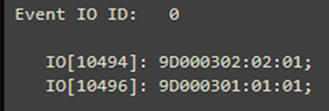
That DTCs will be added to record and would be accessible on server. Data on server need to be converted from HEX to ASCII.

39443030303330323A30323A30313B -> (after conversion from hex to ANSCII) 9D000302:02:01;
39443030303330313A30313A30313B -> (after conversion from hex to ANSCII) 9D000301:01:01;
Functionality Diagram



