
Template:FTX First Start: Difference between revisions
Irmantas.K (talk | contribs) No edit summary |
Wiki | FTx308 pages preparation GTPGTM-12129 - New product page creation |
||
| (201 intermediate revisions by 5 users not shown) | |||
| Line 1: | Line 1: | ||
<b> | <b> | ||
{{#switch: {{{model}}} | {{#switch: {{{model}}} | ||
| FTC881 = | | FTC881 = Next-generation high voltage 4G LTE Cat 1 battery-mounted vehicle GPS tracker with enhanced GNSS accuracy and IP69K resistance. | ||
| FTC921 = | | FTC921 = Next-generation high voltage 4G LTE Cat 1 vehicle GPS tracker with enhanced GNSS accuracy. | ||
| FTC961 = | | FTC961 = Next-generation high voltage 4G LTE Cat 1 vehicle GPS tracker with enhanced GNSS accuracy and IP69K resistance. | ||
| FTC305 = Small 4G LTE (CAT 1) tracker for e-bikes, e-scooters and e-forklifts with CAN interface and 10-97 V power supply range | | FTC305 = Small 4G LTE (CAT 1) tracker for e-bikes, e-scooters and e-forklifts with CAN interface and 10-97 V power supply range | ||
| FTM305 = Small 4G LTE (CAT M1) tracker for e-bikes, e-scooters and e-forklifts with CAN interface and 10-97 V power supply range | | FTM305 = Small 4G LTE (CAT M1) tracker for e-bikes, e-scooters and e-forklifts with CAN interface and 10-97 V power supply range | ||
}} | }} | ||
</b> | </b> | ||
| Line 12: | Line 11: | ||
<!-- If model has more than 1 case version, show more images --> | <!-- If model has more than 1 case version, show more images --> | ||
{{#switch: {{{model}}} | {{#switch: {{{model}}} | ||
| #default = <!-- Default case, show 1 image for all other models --> | | #default = <!-- Default case, show 1 image for all other models --> | ||
[[Image:{{{model}}} side.png|thumb|400x300px|right|upright=0.35|{{{model}}}]] | [[Image:{{{model}}} side.png|thumb|400x300px|right|upright=0.35|{{{model}}}]] | ||
| FTC305 = | | FTC305 = | ||
[[Image:{{{model}}} casing side.png|thumb|400x300px|right|upright=0.35|{{{model}}} casing version]] | [[Image:{{{model}}} casing side.png|thumb|400x300px|right|upright=0.35|{{{model}}} casing version]] | ||
| Line 23: | Line 24: | ||
<!-- If model has more than 1 case version, show a bigger image --> | <!-- If model has more than 1 case version, show a bigger image --> | ||
{{#switch: {{{model}}} | {{#switch: {{{model}}} | ||
| #default = <!-- Default case, show a smaller picture for all other models --> | | #default = <!-- Default case, show a smaller picture for all other models --> | ||
[[Image:{{{model}}} know your device.png|400px]] | [[Image:{{{model}}} know your device.png|400px]] | ||
| FTC305 = | |||
[[Image:{{{model}}} know your device.png|centre|1000px]] | |||
| FTC887 | |||
| FTM887 = | |||
[[Image:{{{model}}} know your device.png|centre|1000px]] | |||
|FTM880 | |||
|FTC880 | |||
|FTC921 | |||
|FTC961 = | |||
[[Image:{{{model}}} know your device.png|centre|1000px]] | |||
| FTC134 | |||
| FTM134 = | |||
[[Image:{{{model}}} know your device.png|centre|1000px]] | |||
| ATC700 | |||
| ATM700 = | |||
[[Image:{{{model}}} know your device.png|centre|1000px]] | |||
| FTM927 = | |||
[[Image:{{{model}}} know your device.png|centre|750px]] | |||
| FTC164 = | |||
[[File:{{{model}}} know your device.png|centre|750px]] | |||
| FTC308 = | |||
[[File:{{{model}}} know your device.png|centre|1000px]] | |||
| FTM308 = | |||
[[File:{{{model}}} know your device.png|centre|1000px]] | |||
}} | }} | ||
=='''SET UP YOUR DEVICE'''== | =='''SET UP YOUR DEVICE'''== | ||
{{#switch: {{{model}}} | |||
| #default = <!-- Default case for devices with external power --> | |||
<table class="wikitable" style="background-color: white;"> | |||
<tr> | |||
<td> [[Image:Alert.png|center|50px]] </td> | |||
<td> <b> Physical SIM card insertion/removal must be performed when device is powered off – external voltage disconnected. Otherwise, the SIM card might be damaged or device will not detect it.</b> </td> | |||
</tr> | |||
</table> | |||
| ATM704 | |||
| ATC704 | |||
| ATM700 | |||
| ATC700 = <!-- For devices without external power --> | |||
<table class="wikitable" style="background-color: white;"> | |||
<tr> | |||
<td> [[Image:Alert.png|center|50px]] </td> | |||
<td> <b> Physical SIM card insertion/removal must be performed when device is powered off. Otherwise, the SIM card might be damaged or device will not detect it.</b> </td> | |||
</tr> | |||
</table> | |||
<table class="wikitable" style="background-color: white;"> | <table class="wikitable" style="background-color: white;"> | ||
<tr> | <tr> | ||
<td> [[Image:Alert.png|center|50px]] </td> | <td> [[Image:Alert.png|center|50px]] </td> | ||
<td> <b> | <td> <b> The asset tracker enclosure fits tightly. It has four locking clips that may require firm, individual pressure to snap into place. This applies only to the pilot batch and will be improved in future production.</b> </td> | ||
</tr> | </tr> | ||
</table> | </table> | ||
}} | |||
<!-- If model has more than 1 case version, show more images --> | <!-- If model has more than 1 case version, show more images --> | ||
{{#switch: {{{model}}} | {{#switch: {{{model}}} | ||
| #default = | | #default = <!-- Default case, show 1 picture for all other models --> | ||
[[Image:{{{model}}} setup.png| | [[Image:{{{model}}} setup.png|1000px|left]] | ||
<div style="clear:left;"></div> | |||
| FTC308 | |||
| FTC305 = | | FTC305 = | ||
'''{{{model}}} CASING VERSION'''<br> | '''{{{model}}} CASING VERSION'''<br> | ||
[[Image:{{{model}}}_casing_setup.png| | [[Image:{{{model}}}_casing_setup.png|1000px|left]] | ||
'''{{{model}}} NO-CASING VERSION'''<br> | <div style="clear:left;"></div> | ||
[[Image:{{{model}}} | '''{{{model}}} NO-CASING VERSION''' | ||
[[Image:{{{model}}}_no-casing_setup.png|1000px|left]] | |||
<div style="clear:left;"></div> | |||
|FTC921= | |||
[[Image:{{{model}}}_setup.png|1000px]]<br> | |||
|FTC881 | |||
|FTM880 | |||
|FTC880 | |||
|FTC961 = | |||
[[Image:{{{model}}}_setup.png|1000px]]<br> | |||
|FTC134 | |||
|FTM134 = | |||
[[Image:{{{model}}}_setup.png|1000px]]<br> | |||
|ATC700 | |||
|ATM700 = | |||
[[Image:{{{model}}}_setup.png|1000px]]<br> | |||
}} | }} | ||
{{#switch: {{{model}}} | |||
| #default = <!-- Default case, show 1 picture for all other models --> | |||
== '''HOW TO REMOVE COVER''' == | |||
<table class="wikitable" style="background-color: white;"> | |||
<tr> | |||
<td> [[Image:Alert.png|center|50px]] </td> | |||
<td> <b> Device casing is designed to be water-proof and match requirements for IP69K. Please note that once the cover is fully clipped it will require additional plastic pry tools to be opened! Please make sure to review short walkthrough video for more details:</b></td> | |||
</tr> | |||
</table> | |||
<youtube>https://www.youtube.com/watch?v=fgOQtk6X0nw</youtube> | |||
| FTC134 | |||
| FTC305 | |||
| FTM305 = | |||
| ATM704 | |||
| ATC704 | |||
| ATM700 | |||
| ATC700 = <!-- Case for ATx devices with IP68 Rating --> | |||
== '''HOW TO REMOVE COVER''' == | |||
<table class="wikitable" style="background-color: white;"> | |||
<tr> | |||
<td> [[Image:Alert.png|center|50px]] </td> | |||
<td> <b> Device casing is designed to be water-proof and match requirements for IP68. Please note that once the cover is fully clipped it will require additional plastic pry tools to be opened!</b></td> | |||
</tr> | |||
</table> | |||
}} | |||
{{#switch: {{{model}}} | |||
| #default = <!-- Default value for devices with pinouts --> | |||
=='''PINOUT'''== | =='''PINOUT'''== | ||
<table class="nd-othertables_2" style="width:80%; margin-bottom: 30px;"> | <table class="nd-othertables_2" style="width:80%; margin-bottom: 30px;"> | ||
<tr> | <tr> | ||
| Line 59: | Line 162: | ||
[[Image:{{{model}}}_pinout.png|400px|center]] | [[Image:{{{model}}}_pinout.png|400px|center]] | ||
</th> | </th> | ||
| ATM704 | |||
| ATC704 | |||
| ATM700 | |||
| ATC700 = | |||
}} | |||
{{#switch: {{{model}}} | {{#switch: {{{model}}} | ||
| FTM887 | |||
| FTC887 | |||
| FTC880 | |||
| FTM880 = | |||
<tr> | |||
<td style="text-align: left;">1</td> | |||
<td style="text-align: left; color:#FF0000;"><strong>VCC</strong></td> | |||
<td style="text-align: left;">(Red) Power supply (+10-30 V DC) (+).</td> | |||
</tr> | |||
<tr> | |||
<td style="text-align: left;">2</td> | |||
<td style="text-align: left; color:#000000;"><strong>GND</strong></td> | |||
<td style="text-align: left;">(Black) Ground (-).</td> | |||
</tr> | |||
</table> | |||
| FTC881 = | | FTC881 = | ||
| Line 76: | Line 199: | ||
| FTC921 | | FTC921 | ||
| FTC961 = | | FTC961 | ||
| FTC965 = | |||
<tr> | <tr> | ||
<td style="text-align: left;">1</td> | <td style="text-align: left;">1</td> | ||
| Line 104: | Line 228: | ||
</table> | </table> | ||
| | | FTC920 | ||
| | | FTC924 | ||
| FTC927 | |||
| FTM927 = | |||
<tr> | <tr> | ||
<td style="text-align: left;">1</td> | <td style="text-align: left;">1</td> | ||
<td style="text-align: left; color:#FF0000;"><strong>VCC</strong></td> | <td style="text-align: left; color:#FF0000;"><strong>VCC</strong></td> | ||
<td style="text-align: left;">(Red) Power supply (+10- | <td style="text-align: left;">(Red) Power supply (+10-30 V DC) (+).</td> | ||
</tr> | </tr> | ||
<tr> | <tr> | ||
| Line 118: | Line 244: | ||
<tr> | <tr> | ||
<td style="text-align: left;">3</td> | <td style="text-align: left;">3</td> | ||
<td style="text-align: left; color:#FFD700;"><strong>DIN1 | <td style="text-align: left; color:#FFD700;"><strong>DIN1</strong></td> | ||
<td style="text-align: left;">(Yellow) Digital input channel 1 | <td style="text-align: left;">(Yellow) Digital input, channel 1. DEDICATED FOR IGNITION INPUT Input range: 7.5-30 V DC.</td> | ||
</tr> | </tr> | ||
<tr> | <tr> | ||
<td style="text-align: left;">4</td> | <td style="text-align: left;">4</td> | ||
<td style="text-align: left; color:#808080;"><strong> | <td style="text-align: left; color:#808080;"><strong>DIN 2/AIN 1/DGS</strong></td> | ||
<td style="text-align: left;">(Grey) Digital | <td style="text-align: left;">(Grey) Input range: 0-30 V DC / Digital input, | ||
channel 2 / GND Sense input | |||
</tr> | </tr> | ||
<tr> | <tr> | ||
<td style="text-align: left;">5</td> | <td style="text-align: left;">5</td> | ||
<td style="text-align: left; color:#E0E0E0;"><strong> | <td style="text-align: left; color:#E0E0E0;"><strong>DOUT1</strong></td> | ||
<td style="text-align: left;">(White) Digital output, | <td style="text-align: left;">(White) Digital output. Open collector output. Max. 0,5 A DC.</td> | ||
</tr> | </tr> | ||
</table> | |||
| FTC305 | |||
| FTM305 = | |||
<tr> | <tr> | ||
<td style="text-align: left;">6</td> | <td style="text-align: left;">1</td> | ||
<td style="text-align: left; color:#FF0000;"><strong>VCC</strong></td> | |||
<td style="text-align: left;">(Red) Power supply (+10-97 V DC) (+).</td> | |||
</tr> | |||
<tr> | |||
<td style="text-align: left;">2</td> | |||
<td style="text-align: left; color:#000000;"><strong>GND</strong></td> | |||
<td style="text-align: left;">(Black) Ground (-).</td> | |||
</tr> | |||
<tr> | |||
<td style="text-align: left;">3</td> | |||
<td style="text-align: left; color:#FFD700;"><strong>DIN1 / AIN1 / 1-W</strong></td> | |||
<td style="text-align: left;">(Yellow) Digital input channel 1 / Analog input channel 1 / Data channel for 1-Wire devices.<br>'''Note: AIN1 / 1-Wire only available from 3.7.x. firmware version.'''</td> | |||
</tr> | |||
<tr> | |||
<td style="text-align: left;">4</td> | |||
<td style="text-align: left; color:#808080;"><strong>DOUT1</strong></td> | |||
<td style="text-align: left;">(Grey) Digital output, channel 1.</td> | |||
</tr> | |||
<tr> | |||
<td style="text-align: left;">5</td> | |||
<td style="text-align: left; color:#E0E0E0;"><strong>DOUT2</strong></td> | |||
<td style="text-align: left;">(White) Digital output, channel 2.</td> | |||
</tr> | |||
<tr> | |||
<td style="text-align: left;">6</td> | |||
<td style="text-align: left; color:#7E4B3C;"><strong>CA</strong><span style="color:#E0E0E0;"><strong>N H</strong></span></td> | <td style="text-align: left; color:#7E4B3C;"><strong>CA</strong><span style="color:#E0E0E0;"><strong>N H</strong></span></td> | ||
<td style="text-align: left;">(Brown/White) CAN interface High.</td> | <td style="text-align: left;">(Brown/White) CAN interface High.</td> | ||
| Line 143: | Line 299: | ||
</table> | </table> | ||
| FTC308 | |||
| FTM308 = | |||
== | <tr> | ||
<td style="text-align: left;">1</td> | |||
<td style="text-align: left; color:#FF0000;"><strong>VCC</strong></td> | |||
<td style="text-align: left;">(Red) Power supply (+10-97 V DC) (+).</td> | |||
</tr> | |||
<tr> | |||
<td style="text-align: left;">2</td> | |||
<td style="text-align: left; color:#000000;"><strong>GND</strong></td> | |||
<td style="text-align: left;">(Black) Ground (-).</td> | |||
</tr> | |||
<tr> | |||
<td style="text-align: left;">3</td> | |||
<td style="text-align: left; color:#FFD700;"><strong>DIN1 / AIN1</strong></td> | |||
<td style="text-align: left;">(Yellow) Digital input channel 1 / Analog input channel 1</td> | |||
</tr> | |||
<tr> | |||
<td style="text-align: left;">4</td> | |||
<td style="text-align: left; color:#808080;"><strong>DOUT1</strong></td> | |||
<td style="text-align: left;">(Grey) Digital output, channel 1.</td> | |||
</tr> | |||
<tr> | |||
<td style="text-align: left;">5</td> | |||
<td style="text-align: left; color:#E0E0E0;"><strong>DOUT2</strong></td> | |||
<td style="text-align: left;">(White) Digital output, channel 2.</td> | |||
</tr> | |||
<tr> | |||
<td style="text-align: left;">6</td> | |||
<td style="text-align: left; color:#7E4B3C;"><strong>DOUT3</strong></span></td> | |||
<td style="text-align: left;">(Brown/White) Digital output, channel 3.</td> | |||
</tr> | |||
<tr> | |||
<td style="text-align: left;">7</td> | |||
<td style="text-align: left; color:#7E4B3C;"><strong>DIN1 / AIN1 / 1-W</strong></td> | |||
<td style="text-align: left;">(Brown) Digital input channel 2 / Analog input channel 2 / Data channel for 1-Wire devices.</td> | |||
</tr> | |||
</table> | |||
| FTM134 | |||
| FTC134 = | |||
| | <tr> | ||
<td style="text-align: left;">1</td> | |||
<td style="text-align: left; color:#FF0000;"><strong>VCC</strong></td> | |||
# Power- | <td style="text-align: left;">(Red) Power supply (+8-32V V DC) (+).</td> | ||
# | </tr> | ||
<tr> | |||
<td style="text-align: left;">2</td> | |||
# | <td style="text-align: left; color:#5e5e5e;"><strong>DOUT3</strong></td> | ||
# | <td style="text-align: left;">(Grey) Digital output channel 3.</td> | ||
</tr> | |||
<tr> | |||
<td style="text-align: left;">3</td> | |||
== | <td style="text-align: left; color:#cecece;"><strong>DIN3/AIN3</strong></td> | ||
<td style="text-align: left;">(White) Digital input channel 3 / Analog input channel 3.</td> | |||
# | </tr> | ||
# | <tr> | ||
# | <td style="text-align: left;">4</td> | ||
# | <td style="text-align: left; color:#009e5e;"><strong>DIN4/AI</strong><span style="color:#cecece;"><strong>N4/DGS</strong></span></td> | ||
<td style="text-align: left;">(White/Green) Digital input channel 4 / Ground sense / Analog input channel 4.</td> | |||
</tr> | |||
<tr> | |||
<td style="text-align: left;">5</td> | |||
<td style="text-align: left; color:#ffde3b;"><strong>DIN1/AIN1</strong></td> | |||
<td style="text-align: left;">(Yellow) Digital input 1 / Analog input 1.</td> | |||
</tr> | |||
<tr> | |||
<td style="text-align: left;">6</td> | |||
<td style="text-align: left; color:#1355b7;"><strong>INP</strong><span style="color:#cecece;"><strong>UT6</strong></span></td> | |||
<td style="text-align: left;">(White/Blue) TX EXT (LVCAN – TX).</td> | |||
</tr> | |||
<tr> | |||
<td style="text-align: left;">7</td> | |||
<td style="text-align: left; color:#000000;"><strong>GND</strong></td> | |||
<td style="text-align: left;">(Black) Ground (-).</td> | |||
</tr> | |||
<tr> | |||
<td style="text-align: left;">8</td> | |||
<td style="text-align: left; color:#ff4e26;"><strong>DOU</strong><span style="color:#cecece;"><strong>T1</strong></span></td> | |||
<td style="text-align: left;">(White/Orange) Digital output channel 1.</td> | |||
</tr> | |||
<tr> | |||
<td style="text-align: left;">9</td> | |||
<td style="text-align: left; color:#46007c;"><strong>DOUT2</strong></td> | |||
<td style="text-align: left;">(Purple) Digital output channel 2.</td> | |||
</tr> | |||
<tr> | |||
<td style="text-align: left;">10</td> | |||
<td style="text-align: left; color:#1355b7;"><strong>1WIRE POWER</strong></td> | |||
<td style="text-align: left;">(Blue) +3.8 V output for 1-Wire devices.</td> | |||
</tr> | |||
<tr> | |||
<td style="text-align: left;">11</td> | |||
<td style="text-align: left; color:#009e5e;"><strong>DIN2/AIN2/1WIRE DATA</strong></td> | |||
<td style="text-align: left;">(Green) Digital input channel 2 / Analog input 2 / Data for 1-Wire devices.</td> | |||
</tr> | |||
<tr> | |||
<td style="text-align: left;">12</td> | |||
<td style="text-align: left; color:#ffde3b;"><strong>INP</strong><span style="color:#cecece;"><strong>UT5</strong></span></td> | |||
<td style="text-align: left;">(White/Yellow) RX EXT (LVCAN – RX).</td> | |||
</tr> | |||
</table> | |||
| FTC164 | |||
| FTM164 = | |||
<tr> | |||
<td style="text-align: left;">1</td> | |||
< | <td style="text-align: left; color:#FF0000;"><strong>VCC</strong></td> | ||
<td style="text-align: left;">(Red) Power supply (+8-32V V DC) (+).</td> | |||
< | </tr> | ||
< | <tr> | ||
< | <td style="text-align: left;">2</td> | ||
<td style="text-align: left; color:#000000;"><strong>GND</strong></td> | |||
<td style="text-align: left;">(Black) Ground (-).</td> | |||
</tr> | |||
<td style="text-align: left;">3</td> | |||
<td style="text-align: left; color:#ffde3b;"><strong>DIN1/AIN1</strong></td> | |||
<td style="text-align: left;">(Yellow) Digital input 1 / Analog input 1.</td> | |||
</tr> | </tr> | ||
<tr> | |||
< | <td style="text-align: left;">4</td> | ||
<td style=" | <td style="text-align: left; color:#009e5e;"><strong>DIN2/AIN2/1WIRE</strong></span></td> | ||
<td style=" | <td style="text-align: left;">(Green) Digital input channel 2 / Analog input channel 2 / 1-WIRE.</td> | ||
</tr> | </tr> | ||
<tr> | |||
< | <td style="text-align: left;">5</td> | ||
<td style="text-align: left; color:#FF0000;"><strong>DIN3/</strong><span style="color:#cecece;"><strong>AIN3</strong></span></td> | |||
<td style=" | <td style="text-align: left;">(Red/White) Digital input channel 3 / Ground sense / Analog input channel 3.</td> | ||
<td style=" | |||
</tr> | </tr> | ||
<tr> | <tr> | ||
< | <td style="text-align: left;">6</td> | ||
<td style=" | <td style="text-align: left; color:#009e5e;"><strong>DIN4/AI</strong><span style="color:#cecece;"><strong>N4/DGS</strong></span></td> | ||
<td style=" | <td style="text-align: left;">(White/Green) Digital input channel 4 / Ground sense / Analog input channel 4.</td> | ||
</tr> | </tr> | ||
<tr> | |||
< | <td style="text-align: left;">7</td> | ||
<td style=" | <td style="text-align: left; color:#1355b7;"><strong>DIN5/</strong><span style="color:#cecece;"><strong>AIN5</strong></span></td> | ||
<td style=" | <td style="text-align: left;">(White/Blue) Digital input channel 5 / Ground sense / Analog input channel 5.</td> | ||
</td> | </tr> | ||
<tr> | |||
<td style="text-align: left;">8</td> | |||
<td style="text-align: left; color:#1355b7;"><strong>1WIRE POWER</strong></td> | |||
<td style="text-align: left;">(Blue) +3.8 V output for 1-Wire devices.</td> | |||
<tr> | |||
<td style="text-align: left;">9</td> | |||
<td style="text-align: left; color:#ff4e26;"><strong>DOU</strong><span style="color:#cecece;"><strong>T1</strong></span></td> | |||
<td style="text-align: left;">(White/Orange) Digital output channel 1.</td> | |||
</tr> | |||
<tr> | |||
<td style="text-align: left;">10</td> | |||
<td style="text-align: left; color:#46007c;"><strong>DOUT2</strong></td> | |||
<td style="text-align: left;">(Dark Grey) Digital output channel 2.</td> | |||
</tr> | |||
<tr> | |||
<td style="text-align: left;">11</td> | |||
<td style="text-align: left; color:#5A5A5A;"><strong>DOU<span style="color:#cecece;"><strong>T3</strong></td> | |||
<td style="text-align: left;">(Black/White) Digital output channel 3.</td> | |||
</tr> | </tr> | ||
<tr> | <tr> | ||
< | <td style="text-align: left;">12</td> | ||
<td style=" | <td style="text-align: left; color:#cecece;"><strong>DOUT4</td> | ||
<td style=" | <td style="text-align: left;">(Light Grey) Digital output channel 4 .</td> | ||
</tr> | </tr> | ||
</table> | </table> | ||
== | }} | ||
=='''PC CONNECTION (WINDOWS)'''== | |||
{{#switch: {{{model}}} | {{#switch: {{{model}}} | ||
| FTC881 | |||
| FTC921 | |||
| FTC961 = | |||
# Power-up {{{model}}} with DC voltage (10-90V) power supply using power wires. LEDs should start blinking, see "[[#LED_behaviour_description|'''LED BEHAVIOUR DESCRIPTION''']]". | |||
# Connect device to computer using USB Type-C cable and install USB driver, see "[[#How to install USB drivers (Windows)|'''HOW TO INSTALL USB DRIVERS (WINDOWS)''']]". | |||
| FTC920 | |||
| FTC924 | |||
| FTC927 = | |||
# Power-up {{{model}}} with DC voltage (10-30V) power supply using power wires. LEDs should start blinking, see "[[#LED_behaviour_description|'''LED BEHAVIOUR DESCRIPTION''']]". | |||
# Connect device to computer using USB Type-C cable and install USB driver, see "[[#How to install USB drivers (Windows)|'''HOW TO INSTALL USB DRIVERS (WINDOWS)''']]". | |||
| ATM704 | |||
| ATC704 | |||
| ATM700 | |||
| ATC700 = | |||
# Connect device to computer using USB Type-C cable. <br> | |||
# Install USB driver, see "[[#How to install USB drivers (Windows)|'''HOW TO INSTALL USB DRIVERS (WINDOWS)''']]". | |||
| FTC305 | | FTC305 | ||
| FTM305 | | FTM305 | ||
| FTM308 | |||
| FTC308 = | |||
# Connect device to computer using USB Type-C cable. <br> <b>Please note:</b> {{{model}}} device does not require an external power supply for configuration. However, without external power, data sending and other cellular connectivity functions will not work. If you want to test the device on a table, it is advised to power up {{{model}}} with a DC voltage (10-97V) power supply using power wires. | |||
# Install USB driver, see "[[#How to install USB drivers (Windows)|'''HOW TO INSTALL USB DRIVERS (WINDOWS)''']]". | |||
< | |||
</ | |||
| | | FTM880 = | ||
# Connect device to computer using USB Type-C cable. <br> <b>Please note:</b> {{{model}}} device does not require an external power supply for configuration. However, without external power, data sending and other cellular connectivity functions will not work. If you want to test the device on a table, it is advised to power up {{{model}}} with a DC voltage (10-30V) power supply using power wires. | |||
# Install USB driver, see "[[#How to install USB drivers (Windows)|'''HOW TO INSTALL USB DRIVERS (WINDOWS)''']]". | |||
# | |||
= | | FTC880 = | ||
# Connect device to computer using USB Type-C cable. <br> <b>Please note:</b> {{{model}}} device does not require an external power supply for configuration. However, without external power, data sending and other cellular connectivity functions will not work. If you want to test the device on a table, it is advised to power up {{{model}}} with a DC voltage (10-30V) power supply using power wires. | |||
# Install USB driver, see "[[#How to install USB drivers (Windows)|'''HOW TO INSTALL USB DRIVERS (WINDOWS)''']]". | |||
| FTM134 | |||
| FTC134 = | |||
# Power-up {{{model}}} with DC voltage (8-32 V) power supply using power wires. LEDs should start blinking, see "[[#LED_behaviour_description|'''LED BEHAVIOUR DESCRIPTION''']]". | |||
# Connect device to computer using USB Type-C cable and install USB driver, see "[[#How to install USB drivers (Windows)|'''HOW TO INSTALL USB DRIVERS (WINDOWS)''']]". | |||
}} | |||
=='''HOW TO INSTALL USB DRIVERS (WINDOWS)'''== | |||
# Please download COM port drivers from '''[[Media:TeltonikaCOMDriver.zip|here]]'''. | |||
[[ | # Extract and run '''TeltonikaCOMDriver.exe'''. | ||
# Click '''Next''' in driver installation window. | |||
# In the following window click '''Install''' button. | |||
# Setup will continue installing the driver and eventually the confirmation window will appear. Click '''Finish''' to complete the setup. | |||
==''' | =='''CONFIGURATION (WINDOWS)'''== | ||
Most Teltonika devices are shipped with default factory settings. Use [https://wiki.teltonika-gps.com/view/Telematics_Configuration_Tool_(TCT) Telematics Configuration Tool (TCT)] to change these settings according to your needs. | |||
<table class="nd-othertables_2" style="width:60%;"> | |||
<tr> | |||
<th rowspan="1" style="width:30%; vertical-align: middle; text-align: left;"></th> | |||
<th rowspan="1" style="width:40%; vertical-align: middle; text-align: left;">TCT</th> | |||
</tr> | |||
<tr> | |||
<th style="border-bottom: 1px solid #E8E8E8; vertical-align: middle; text-align: left; color:black">Operating system</th> | |||
<td style="vertical-align: middle; text-align: left; ">Windows 10<br>Windows 11</td> | |||
</tr> | |||
<tr> | |||
<th style="border-bottom: 1px solid #E8E8E8; vertical-align: middle; text-align: left; color:black">MS .NET Framework | |||
version</th> | |||
<td style="vertical-align: middle; text-align: left; ">MS .NET framework 6.0</td> | |||
</tr> | |||
<tr> | |||
<th style="border-bottom: 1px solid #E8E8E8; vertical-align: middle; text-align: left; color:black">Version</th> | |||
<td style="vertical-align: middle; text-align: left; ">64 bit</td> | |||
</tr> | |||
<tr> | |||
<th style="border-bottom: 1px solid #E8E8E8; vertical-align: middle; text-align: left; color:black">Disk Storage</th> | |||
<td style="vertical-align: middle; text-align: left; ">1 GB of free disk space | |||
</td> | |||
</tr> | |||
<tr> | |||
<th style="border-bottom: 1px solid #E8E8E8; vertical-align: middle; text-align: left; color:black">Internet</th> | |||
<td style="vertical-align: middle; text-align: left; ">Ethernet port or Wi-Fi w/ network access for auto-update</td> | |||
</tr> | |||
</table> | |||
===TCT=== | |||
<!-- Switch for specific TCT evaluation key if needed --> | |||
{{#switch: {{{model}}} | |||
| #default = <!-- Default case, model does not use TCT evaluation key --> | |||
# Download the TCT (compressed archive). | |||
# Extract the archive and launch the executable. The TCT will be installed. | |||
# Launch the TCT. | |||
# In the Discovered devices list, select your device and press '''Configure'''. | |||
# The Device status window opens. It contains device, GNSS and Cellular information.[[Image:FTX device status.png]]<br>[[Image:FTX buttons.png|left|120px]] | |||
Save to device – saves configuration to device.<br><br> | |||
Upload file – loads configuration from file.<br><br> | |||
Save to file – saves configuration to file.<br><br> | |||
Update – update device firmware.<br><br> | |||
Reset configuration – sets device configuration to default.<br><br> | |||
<br> | |||
Most important configuration sections are [https://wiki.teltonika-gps.com/view/{{{model}}}_Mobile_network Mobile network] (Server, Mobile network settings) and [https://wiki.teltonika-gps.com/view/{{{model}}}_Tracking_settings Tracking settings] (data collection parameters). More details about {{{model}}} configuration using TCT can be found [https://wiki.teltonika-gps.com/view/{{{model}}}_Configuration here]. | |||
| FTC881 = | |||
# Download the TCT (compressed archive). | |||
# Extract the archive and launch the executable. The TCT will be installed. | |||
# Launch the TCT. | |||
# In the Discovered devices list, select your device and press '''Configure'''. | |||
# The Device status window opens. It contains device, GNSS and Cellular information.[[Image:{{{model}}} device status.png]]<br>[[Image:FTX buttons.png|left|120px]] | |||
''' | Save to device – saves configuration to device.<br><br> | ||
Upload file – loads configuration from file.<br><br> | |||
Save to file – saves configuration to file.<br><br> | |||
Update – update device firmware.<br><br> | |||
Reset configuration – sets device configuration to default.<br><br> | |||
<br> | |||
Most important configuration sections are [https://wiki.teltonika-gps.com/view/{{{model}}}_Mobile_network Mobile network] (Server, Mobile network settings) and [https://wiki.teltonika-gps.com/view/{{{model}}}_Tracking_settings Tracking settings] (data collection parameters). More details about {{{model}}} configuration using TCT can be found [https://wiki.teltonika-gps.com/view/{{{model}}}_Configuration here]. | |||
| | | ATC700 | ||
| | | ATM700 = | ||
''' | <ol> | ||
<li>Download the TCT (compressed archive).</li> | |||
<li>Extract the archive and launch the executable. The TCT will be installed.</li> | |||
<li>Launch the TCT.</li> | |||
<li>Go to '''Settings''' -> '''User keys''', copy the <u>'''full key text from "BEGIN TCT KEY" to "END TCT KEY"'''</u> and paste in '''Add new key''' field, then press '''Add key''':<br> | |||
<pre style="margin-left: 0px;"> | |||
''' | BEGIN TCT KEY | ||
description: ATx700 with development firmware | |||
type: ExpFWKey | |||
key: 196b94ad-b3e4-4ab2-b092-258cc8c5fdb9 | |||
expires: 2026-11-01 | |||
signature: v1|NRRBW8v8SlMvI6ICGtZAobRukuFVE1SUQYgBdZxqQmqsypy7Hxy/dw7TTjA0y8i09dtTjxBapLZAESIUT1T1XF29/nvb5jtNsjQKdQ3uzYYL1tlulAZ5l09JxrvEA28+aJEIHl91RgEZt0cmXbt9U5uQq0Yudf/3RlzGvrdc1tU4GqgO+yAvaSNO99ERFxTjVpRtJknx+4666LxBMZlNeOBupMdFupPZmxLwcrF+EBPf3wiDJVNl2SLwKAOpx1bR0yx5Ofk2zVfeRGO8OwifzcDDiUjBRw2vwFULbn6jjVEGCDOXqV84zqy0SE/ClLjJ1+7Alk49KR+nS+qCQKT+Fw== | |||
END TCT KEY | |||
</pre> | |||
'''Note:''' This TCT key will expire on 2026-11-01. Please contact us via HelpDesk to receive a new one before the expiration date.<br> | |||
[[Image:ATX700 TCT key.png|500px]] | |||
</li> | |||
</ol> | |||
<ol start="5"> | |||
<li>Go to '''Settings''' -> '''Select firmware''', then select '''ATx700 with development firmware''' and press '''Apply''':[[Image:ATX700 select firmware.png|500px]] | |||
</li> | |||
<li>In the Discovered devices list, select your device and press '''Configure'''.</li> | |||
<li>The Device status window opens. It contains device, GNSS, and Cellular information.[[Image:{{{model}}} device status.png|1000px]]<br>[[Image:FTX buttons.png|left|120px]] | |||
Save to device – saves configuration to device.<br><br> | |||
Upload file – loads configuration from file.<br><br> | |||
Save to file – saves configuration to file.<br><br> | |||
Update – update device firmware.<br><br> | |||
Reset configuration – sets device configuration to default.<br><br> | |||
<br> | |||
Most important configuration sections are [https://wiki.teltonika-gps.com/view/{{{model}}}_Mobile_network Mobile network] (Server, Mobile network settings) and [https://wiki.teltonika-gps.com/view/{{{model}}}_Tracking_settings Tracking settings] (data collection parameters). More details about {{{model}}} configuration using TCT can be found [https://wiki.teltonika-gps.com/view/{{{model}}}_Configuration here]. | |||
</li> | |||
</ol> | |||
<!-- FTx305 with TCT User key requirement | |||
| FTC305 | |||
| FTM305 = | |||
<ol> | |||
<li>Download the TCT (compressed archive).</li> | |||
<li>Extract the archive and launch the executable. The TCT will be installed.</li> | |||
<li>Launch the TCT.</li> | |||
''' | <li>Go to '''Settings''' -> '''User keys''', copy the <u>'''full key text from "BEGIN TCT KEY" to "END TCT KEY"'''</u> and paste in '''Add new key''' field, then press '''Add key''':<br> | ||
<pre style="margin-left: 0px;"> | |||
BEGIN TCT KEY | |||
description: FTx305 with develop version firmware | |||
type: ExpFWKey | |||
key: 7394b05f-f32a-4648-bd03-d61e7dfd0175 | |||
expires: 2025-12-31 | |||
signature: v1|U2GAiWlZfOQkMN0pBeXDFhKZb6XES5ZvtCzcsfm9kyBkbPBaiwOl53v5uDRiefxqgIR6rJ4pAP2yg0bCZ77pO47iV8manPG/rMt5bKBJOgil8psW+Z58gwgZfZkU7q30EZy7prvAidsup92dnQ16tRefu+8EsUXS2rS0Uz8g0vVcJOPIwzWWRyVNCgW7zBXDl+bsZLXR2XHMhe0ftLy6MQoq6b3wlLMQuXCtd8/D5wnR/q5zPl9jVKJ3YUszRSxHLYlIht5vtb1uE0973WRdjvHlSqrKhjrEPrAgLueOWrDlMhYWWQVaMkWX41/Xd+r8M1oIhZlrBjONPWBWc2brAw== | |||
END TCT KEY | |||
</pre> | |||
'''Note:''' This TCT key will expire on '''2025-12-31'''. Please contact us via HelpDesk to receive a new one before the expiration date.<br> | |||
<br>[[Image:FTX305 TCT key.png|1000px]] | |||
</li> | |||
</ol> | |||
<ol start="5"> | |||
<li>Go to '''Settings''' -> '''Select firmware''', then select '''FTx305 with develop version firmware''' and press '''Apply''':[[Image:FTX305 select firmware.png|1000px]] | |||
</li> | |||
<li>In the Discovered devices list, select your device and press '''Configure'''.</li> | |||
<li>The Device status window opens. It contains device, GNSS, and Cellular information.[[Image:FTX device status.png|1000px]]<br>[[Image:FTX buttons.png|left|120px]] | |||
Save to device – saves configuration to device.<br><br> | |||
Upload file – loads configuration from file.<br><br> | |||
Save to file – saves configuration to file.<br><br> | |||
Update – update device firmware.<br><br> | |||
Reset configuration – sets device configuration to default.<br><br> | |||
<br> | <br> | ||
Most important configuration sections are [https://wiki.teltonika-gps.com/view/{{{model}}}_Mobile_network Mobile network] (Server, Mobile network settings) and [https://wiki.teltonika-gps.com/view/{{{model}}}_Tracking_settings Tracking settings] (data collection parameters). More details about {{{model}}} configuration using TCT can be found [https://wiki.teltonika-gps.com/view/{{{model}}}_Configuration here]. | |||
</li> | |||
</ol> | |||
--> | |||
{{ | |FTC880 | ||
|FTM880 = | |||
# Download the TCT (compressed archive). | |||
# Extract the archive and launch the executable. The TCT will be installed. | |||
# Launch the TCT. | |||
# In the Discovered devices list, select your device and press '''Configure'''. | |||
# The Device status window opens. It contains device, GNSS and Cellular information.[[Image:{{{model}}} device status.png]]<br>[[Image:FTX buttons.png|left|120px]] | |||
Save to device – saves configuration to device.<br><br> | |||
Upload file – loads configuration from file.<br><br> | |||
Save to file – saves configuration to file.<br><br> | |||
Update – update device firmware.<br><br> | |||
Reset configuration – sets device configuration to default.<br><br> | |||
<br> | |||
Most important configuration sections are [https://wiki.teltonika-gps.com/view/{{{model}}}_Mobile_network Mobile network] (Server, Mobile network settings) and [https://wiki.teltonika-gps.com/view/{{{model}}}_Tracking_settings Tracking settings] (data collection parameters). More details about {{{model}}} configuration using TCT can be found [https://wiki.teltonika-gps.com/view/{{{model}}}_Configuration here]. | |||
| | | FTM887 = | ||
# Download the TCT (compressed archive). | |||
# Extract the archive and launch the executable. The TCT will be installed. | |||
# Launch the TCT. | |||
# In the Discovered devices list, select your device and press '''Configure'''. | |||
''' | # The Device status window opens. It contains device, GNSS and Cellular information.[[Image:{{{model}}} device status.png]]<br>[[Image:FTX buttons.png|left|120px]] | ||
Save to device – saves configuration to device.<br><br> | |||
Upload file – loads configuration from file.<br><br> | |||
Save to file – saves configuration to file.<br><br> | |||
Update – update device firmware.<br><br> | |||
Reset configuration – sets device configuration to default.<br><br> | |||
<br> | |||
Most important configuration sections are [https://wiki.teltonika-gps.com/view/{{{model}}}_Mobile_network Mobile network] (Server, Mobile network settings) and [https://wiki.teltonika-gps.com/view/{{{model}}}_Tracking_settings Tracking settings] (data collection parameters). More details about {{{model}}} configuration using TCT can be found [https://wiki.teltonika-gps.com/view/{{{model}}}_Configuration here]. | |||
| FTC887 = | |||
# Download the TCT (compressed archive). | |||
# Extract the archive and launch the executable. The TCT will be installed. | |||
# Launch the TCT. | |||
# In the Discovered devices list, select your device and press '''Configure'''. | |||
# The Device status window opens. It contains device, GNSS and Cellular information.[[Image:{{{model}}} device status.png]]<br>[[Image:FTX buttons.png|left|120px]] | |||
Save to device – saves configuration to device.<br><br> | |||
Upload file – loads configuration from file.<br><br> | |||
Save to file – saves configuration to file.<br><br> | |||
Update – update device firmware.<br><br> | |||
Reset configuration – sets device configuration to default.<br><br> | |||
< | |||
<br> | <br> | ||
''' | Most important configuration sections are [https://wiki.teltonika-gps.com/view/{{{model}}}_Mobile_network Mobile network] (Server, Mobile network settings) and [https://wiki.teltonika-gps.com/view/{{{model}}}_Tracking_settings Tracking settings] (data collection parameters). More details about {{{model}}} configuration using TCT can be found [https://wiki.teltonika-gps.com/view/{{{model}}}_Configuration here]. | ||
}} | |||
=='''QUICK SMS CONFIGURATION'''== | |||
The default configuration ensures best track quality and optimal data usage.<br> | |||
Quickly set up your device by sending this SMS command to it: <br> | |||
[[Image:FTX quick sms configuration.png|left|800px]] | |||
<div style="clear:left;"></div> | |||
=='''DEFAULT CONFIGURATION SETTINGS'''== | |||
{{#switch: {{{model}}} | {{#switch: {{{model}}} | ||
| | | #default = | ||
= | [[Image:FTX default configuration settings.png|left|800px]] | ||
<div style="clear:left;"></div> | |||
After successful SMS configuration, {{{model}}} device will synchronize time and update records to configured server. Time | |||
intervals and default I/O elements can be changed by using [https://wiki.teltonika-gps.com/view/{{{model}}}_Configuration TCT] or [https://wiki.teltonika-gps.com/view/{{{model}}}_Parameter_list Parameter list]. | |||
| ATM704 | |||
| ATC704 | |||
| ATM700 | |||
| ATC700 = | |||
=== RECORDS SENDING TO SERVER === | |||
A record with location will be transmitted to the server every 15 minutes, regardless of the product's movement status. | |||
=== SLEEP MODE === | |||
The device is configured with Power Off Sleep mode enabled by default to ensure maximum operating time.The device will not send any records until the server parameters (Domain, and port) are configured. During this time, all records are stored in the device’s internal memory. Once configured, the stored data is automatically transmitted to the specified server. | |||
Time intervals and default I/O elements can be changed by using [https://wiki.teltonika-gps.com/view/{{{model}}}_Configuration TCT], [https://wiki.teltonika-gps.com/view/{{{model}}}_Parameter_list Parameter list] or FOTA Web. | |||
}} | |||
=='''MOUNTING RECOMMENDATIONS'''== | |||
{{#switch: {{{model}}} | |||
| FTC887 | |||
| FTM887 | |||
| FTC881 = | |||
'''DEVICE FASTENING''' | |||
* Locate the battery in your vehicle. If present remove the battery cover to access the battery. | |||
* There is a double sided tape on the back of the device, use it to attach the device on the battery, so that the GNSS antenna and LEDs indicators are facing up. | |||
'''CONNECTING POWER SOURCE''' | |||
* Device power wire is designed to be directly connected to the positive terminal fastener of the vehicle battery. | |||
'''CONNECTING GROUND WIRE''' | |||
* Device ground wire is designed to be directly connected to the negative terminal fastener of the vehicle battery. | |||
| FTC920 | |||
| FTC921 | |||
| FTC924 | |||
| FTC927 | |||
| FTC965 | |||
| FTC961 = | |||
'''CONNECTING WIRES''' | |||
* Wires should be fastened to stable wires or other non-moving parts. Any heat emitting and/or moving objects should be kept away from the wires. | |||
* There should be no exposed wires. If factory isolation was removed while connecting wires, the isolation material should be applied. | |||
* If the wires are placed in the exterior or in places where they can be damaged or exposed to heat, humidity, dirt, etc., additional isolation should be applied and the wires should not be loose.<br /> | |||
* Wires cannot be connected to the board computers or control units. | |||
'''CONNECTING POWER SOURCE''' | |||
* Be sure that after the car computer goes to sleep mode, power might be still available on the power wires. Depending on car, this may happen in 5 to 30 minutes period. | |||
* When module is connected, measure voltage again to make sure it did not decrease. | |||
* It is recommended to connect to the main power cable in the fuse box. | |||
* 3 A, 125 V external fuse shall be used. | |||
'''CONNECTING GROUND WIRE''' | |||
* Ground wire is connected to the vehicle frame or metal parts that are fixed to the frame. | |||
* If the wire is fixed with the bolt, the loop must be connected to the end of the wire. | |||
* For better contact scrub paint from the spot where loop is going to be connected. | |||
| FTC305 | |||
| FTM305 | |||
| FTM308 | |||
| FTC308 = | |||
'''CONNECTING WIRES''' | |||
* Wires should be fastened to the other wires or nonmoving parts. Do not place the wires near moving or heat-emitting objects. | |||
* All electrical connections must be properly isolated. No bare wires should be visible. Re-apply isolation to wires if you removed factory isolation during installation. | |||
* If the wires are placed in the exterior or in places where they can be damaged or exposed to heat, humidity, dirt, etc., additional isolation should be applied. | |||
'''CONNECTING POWER SOURCE''' | |||
* Ensure that after the vehicle computer falls asleep, power is still available on chosen wire. Depending on vehicle, this may happen in 5 to 30 minutes period. | |||
* When module is connected, measure voltage again to make sure it did not decrease. | |||
* It is recommended to connect main power cable to the main battery of the vehicle. | |||
'''CONNECTING IGNITION WIRE''' | |||
* Make sure that you have selected the correct wire for ignition signal - the electrical signal from the wire should be present after starting the engine. | |||
* Check if this is not an ACC wire (when key is in the first position, most of the vehicle electronics are ON). | |||
* Check if power is still available when you turn off any of vehicles devices. | |||
* Ignition is connected to the ignition relay output. As alternative, any other relay, which has power output when ignition is on, may be chosen. | |||
'''CONNECTING GROUND WIRE''' | |||
* Ground wire must be connected to the vehicle frame or metal parts that are fixed to the frame. | |||
* If the wire is fixed with the bolt, the loop must be connected to the end of the wire. | |||
* For better contact scrub paint from the spot where loop is going to be connected. | |||
| FTC880 | |||
| FTM880 = | |||
'''CONNECTING WIRES''' | |||
* Wires should be fastened to the other wires or nonmoving parts. Do not place the wires near moving or heat-emitting objects. | |||
* All electrical connections must be properly isolated. No bare wires should be visible. Re-apply isolation to wires if you removed factory isolation during installation. | |||
* If the wires are placed in the exterior or in places where they can be damaged or exposed to heat, humidity, dirt, etc., additional isolation should be applied. | |||
<tr> | |||
<th rowspan="1" style="width: | '''CONNECTING POWER SOURCE''' | ||
<th rowspan="1" style="width: | * Ensure that after the vehicle computer falls asleep, power is still available on chosen wire. Depending on vehicle, this may happen in 5 to 30 minutes period. | ||
* When module is connected, measure voltage again to make sure it did not decrease. | |||
* It is recommended to connect main power cable to the main battery of the vehicle. | |||
'''CONNECTING GROUND WIRE''' | |||
* Ground wire must be connected to the vehicle frame or metal parts that are fixed to the frame. | |||
* If the wire is fixed with the bolt, the loop must be connected to the end of the wire. | |||
* For better contact scrub paint from the spot where loop is going to be connected. | |||
| FTM134 | |||
| FTC134 = | |||
'''CONNECTING WIRES''' | |||
* Wires should be fastened to stable wires or other non-moving parts. Any heat emitting and/or moving objects should be kept away from the wires. | |||
* There should be no exposed wires. If factory isolation was removed while connecting wires, the isolation material should be applied. | |||
* If the wires are placed in the exterior or in places where they can be damaged or exposed to heat, humidity, dirt, etc., additional isolation should be applied and the wires should not be loose. | |||
* Wires cannot be connected to the board computers or control units. | |||
'''CONNECTING POWER SOURCE''' | |||
* Be sure that after the car computer goes to sleep mode, power might be still available on the power wires. Depending on car, this may happen in 5 to 30 minutes period. | |||
* When module is connected, measure voltage again to make sure it did not decrease. | |||
* It is recommended to connect to the main power cable in the fuse box. | |||
* 3 A, 125 V external fuse shall be used. | |||
'''CONNECTING GROUND WIRE''' | |||
* Ground wire is connected to the vehicle frame or metal parts that are fixed to the frame. | |||
* If the wire is fixed with the bolt, the loop must be connected to the end of the wire. | |||
* For better contact scrub paint from the spot where loop is going to be connected. | |||
| ATM700 | |||
| ATC700 = | |||
[[File:{{{model}}} Mounting recommendations.png]] | |||
}} | |||
=='''LED INDICATIONS'''== | |||
This section is an explanation of LED indications on {{{model}}} device. | |||
<br> | |||
{{#switch: {{{model}}} | |||
| FTM308 | |||
| FTC308 | |||
| FTC164 | |||
| FTC887 | |||
| FTM887 | |||
| FTM134 | |||
| FTC134 | |||
| FTC880 | |||
| FTM880 | |||
| FTC881 | |||
| FTC921 | |||
| FTC961 | |||
| FTC305 | |||
| FTM305 = | |||
'''NAVIGATION LED INDICATIONS''' | |||
<table class="nd-othertables_2" style="width:60%;"> | |||
<tr> | |||
<th rowspan="1" style="width:50%; vertical-align: middle; text-align: center;">Behaviour</th> | |||
<th rowspan="1" style="width:50%; vertical-align: middle; text-align: center;">Meaning</th> | |||
</tr> | </tr> | ||
<tr> | |||
<th style="border-bottom: 1px solid #E8E8E8; vertical-align: middle; text-align: left; color:black"> | <th style="border-bottom: 1px solid #E8E8E8; vertical-align: middle; text-align: left; color:black">Blinking every second</th> | ||
<td style="vertical-align: middle; text-align: left; "> | <td style="vertical-align: middle; text-align: left;">GNSS module is working, GNSS fix is acquired (normal operation)</td> | ||
</tr> | </tr> | ||
<tr> | |||
<th style="border-bottom: 1px solid #E8E8E8; vertical-align: middle; text-align: left; color:black"> | <th style="border-bottom: 1px solid #E8E8E8; vertical-align: middle; text-align: left; color:black">Permanently switched on</th> | ||
<td style="vertical-align: middle; text-align: left; "> | <td style="vertical-align: middle; text-align: left; ">GNSS module is working, but fix is not acquired (no position)</td> | ||
</tr> | </tr> | ||
<tr> | |||
<th style="border-bottom: 1px solid #E8E8E8; vertical-align: middle; text-align: left; color:black"> | <th style="border-bottom: 1px solid #E8E8E8; vertical-align: middle; text-align: left; color:black">Off</th> | ||
<td style="vertical-align: middle; text-align: left; "> | <td style="vertical-align: middle; text-align: left;">GNSS module is off because: (a) the device is not working or (b) the device is in sleep mode</td> | ||
</tr> | </tr> | ||
</table> | |||
<th style=" | <br> | ||
< | '''STATUS LED INDICATIONS''' | ||
<table class="nd-othertables_2" style="width:60%;"> | |||
<tr> | |||
<th rowspan="1" style="width:50%; vertical-align: middle; text-align: center;">Behaviour</th> | |||
<th rowspan="1" style="width:50%; vertical-align: middle; text-align: center;">Meaning</th> | |||
</tr> | </tr> | ||
<tr> | |||
<th style="border-bottom: 1px solid #E8E8E8; vertical-align: middle; text-align: left; color:black"> | <th style="border-bottom: 1px solid #E8E8E8; vertical-align: middle; text-align: left; color:black">Blinking every second</th> | ||
<td style="vertical-align: middle; text-align: left; "> | <td style="vertical-align: middle; text-align: left;">Device is working, GPRS session is active (normal operation)</td> | ||
</tr> | </tr> | ||
<tr> | |||
<th style="border-bottom: 1px solid #E8E8E8; vertical-align: middle; text-align: left; color:black"> | <th style="border-bottom: 1px solid #E8E8E8; vertical-align: middle; text-align: left; color:black">On</th> | ||
<td style="vertical-align: middle; text-align: left; "> | <td style="vertical-align: middle; text-align: left;">Device is working, no active GPRS sessions</td> | ||
</tr> | </tr> | ||
<tr> | |||
<th style="border-bottom: 1px solid #E8E8E8; vertical-align: middle; text-align: left; color:black"> | <th style="border-bottom: 1px solid #E8E8E8; vertical-align: middle; text-align: left; color:black">Off</th> | ||
<td style="vertical-align: middle; text-align: left; "> | <td style="vertical-align: middle; text-align: left;">Device is not working</td> | ||
</tr> | </tr> | ||
<tr> | </table> | ||
< | | ATM704 | ||
| ATC704 | |||
| ATM700 | |||
| ATC700 = | |||
<table class="nd-othertables_2" style="width:80%;"> | |||
<tr> | |||
<th rowspan="1" style="width:30%; vertical-align: middle; text-align: center;">Meaning</th> | |||
<th rowspan="1" style="width:10%; vertical-align: middle; text-align: center;">Colour</th> | |||
<th rowspan="1" style="width:30%; vertical-align: middle; text-align: center;">Behaviour</th> | |||
<th rowspan="1" style="width:30%; vertical-align: middle; text-align: center;">Duration</th> | |||
</tr> | |||
<tr> | |||
<th style="border-bottom: 1px solid #E8E8E8; vertical-align: middle; text-align: center; color:black">Power On</th> | |||
<td style="vertical-align: middle; text-align: center;">Green</td> | |||
<td style="vertical-align: middle; text-align: center;">Steady</td> | |||
<td style="vertical-align: middle; text-align: center;">3 s</td> | |||
</tr> | |||
<tr> | |||
<th style="border-bottom: 1px solid #E8E8E8; vertical-align: middle; text-align: center; color:black">Low Battery</th> | |||
<td style="vertical-align: middle; text-align: center;">Red</td> | |||
<td style="vertical-align: middle; text-align: center;">Blinking - 1 s ON / 1 s OFF</td> | |||
<td style="vertical-align: middle; text-align: center;">Until power off</td> | |||
</tr> | |||
<tr> | |||
<th style="border-bottom: 1px solid #E8E8E8; vertical-align: middle; text-align: center; color:black">Charging</th> | |||
<td style="vertical-align: middle; text-align: center;">Yellow</td> | |||
<td style="vertical-align: middle; text-align: center;">Pulsing - fade in 2 s / fade out 2 s</td> | |||
<td style="vertical-align: middle; text-align: center;">Until charged or USB disconnected</td> | |||
</tr> | |||
<tr> | |||
<th style="border-bottom: 1px solid #E8E8E8; vertical-align: middle; text-align: center; color:black">100% charged</th> | |||
<td style="vertical-align: middle; text-align: center;">Green</td> | |||
<td style="vertical-align: middle; text-align: center;">Steady</td> | |||
<td style="vertical-align: middle; text-align: center;">Until USB disconnected</td> | |||
</tr> | |||
<tr> | |||
<th style="border-bottom: 1px solid #E8E8E8; vertical-align: middle; text-align: center; color:black">FW update</th> | |||
<td style="vertical-align: middle; text-align: center;">Blue</td> | |||
<td style="vertical-align: middle; text-align: center;">Blinking - 0.1 s ON / 0.1 s OFF </td> | |||
<td style="vertical-align: middle; text-align: center;">Until update finished</td> | |||
</tr> | |||
<tr> | |||
<th style="border-bottom: 1px solid #E8E8E8; vertical-align: middle; text-align: center; color:black">CFG uploading</th> | |||
<td style="vertical-align: middle; text-align: center;">Blue</td> | |||
<td style="vertical-align: middle; text-align: center;">Steady</td> | |||
<td style="vertical-align: middle; text-align: center;">3 s</td> | |||
</tr> | |||
<tr> | |||
<th style="border-bottom: 1px solid #E8E8E8; vertical-align: middle; text-align: center; color:black">Periodic record sending</th> | |||
<td style="vertical-align: middle; text-align: center;">Yellow</td> | |||
<td style="vertical-align: middle; text-align: center;">Blinking - 0.2 s ON / 2 s OFF</td> | |||
<td style="vertical-align: middle; text-align: center;">Until record is sent or failed</td> | |||
</tr> | |||
<tr> | |||
<th style="border-bottom: 1px solid #E8E8E8; vertical-align: middle; text-align: center; color:black">Record sent with GNSS fix</th> | |||
<td style="vertical-align: middle; text-align: center;">Blue</td> | |||
<td style="vertical-align: middle; text-align: center;">Steady</td> | |||
<td style="vertical-align: middle; text-align: center;">3 s</td> | |||
</tr> | |||
<tr> | |||
<th style="border-bottom: 1px solid #E8E8E8; vertical-align: middle; text-align: center; color:black">Record sent no GNSS fix</th> | |||
<td style="vertical-align: middle; text-align: center;">Yellow</td> | |||
<td style="vertical-align: middle; text-align: center;">Steady</td> | |||
<td style="vertical-align: middle; text-align: center;">3 s</td> | |||
</tr> | |||
<tr> | |||
<th style="border-bottom: 1px solid #E8E8E8; vertical-align: middle; text-align: center; color:black">Record sending failed and GNSS failed</th> | |||
<td style="vertical-align: middle; text-align: center;">Red</td> | |||
<td style="vertical-align: middle; text-align: center;">Steady</td> | |||
<td style="vertical-align: middle; text-align: center;">3 s</td> | |||
</tr> | |||
<tr> | |||
<th style="border-bottom: 1px solid #E8E8E8; vertical-align: middle; text-align: center; color:black">GNSS OK, but record sending failed</th> | |||
<td style="vertical-align: middle; text-align: center;">Red</td> | |||
<td style="vertical-align: middle; text-align: center;">Blinking - 0.5 s ON / 0.5 s OFF</td> | |||
<td style="vertical-align: middle; text-align: center;">3 s</td> | |||
</tr> | |||
<tr> | |||
<th style="border-bottom: 1px solid #E8E8E8; vertical-align: middle; text-align: center; color:black">Alarm</th> | |||
<td style="vertical-align: middle; text-align: center;">Red</td> | |||
<td style="vertical-align: middle; text-align: center;">Pulsing - 0.5 s fade in / 0.5 s fade out</td> | |||
<td style="vertical-align: middle; text-align: center;">6 s</td> | |||
</tr> | |||
<tr> | |||
<th style="border-bottom: 1px solid #E8E8E8; vertical-align: middle; text-align: center; color:black">Normal operation </th> | |||
<td style="vertical-align: middle; text-align: center;">Blue</td> | |||
<td style="vertical-align: middle; text-align: center;">Blinking - 0.5 s ON / 1 min OFF</td> | |||
<td style="vertical-align: middle; text-align: center;">In Idle</td> | |||
</tr> | |||
<tr> | |||
<th style="border-bottom: 1px solid #E8E8E8; vertical-align: middle; text-align: center; color:black">Power OFF</th> | |||
<td style="vertical-align: middle; text-align: center;">Red</td> | |||
<td style="vertical-align: middle; text-align: center;">Steady</td> | |||
<td style="vertical-align: middle; text-align: center;">2 s</td> | |||
</tr> | |||
</table> | |||
}} | |||
=='''BASIC CHARACTERISTICS'''== | |||
{{#switch: {{{model}}} | |||
| FTM305 | |||
| FTC305 | |||
| FTC308 | |||
| FTM308 | |||
| FTM164 = | |||
See the official [[Media:DS-{{{model}}}.pdf|'''device datasheet''']] for detailed characteristics and specifications. | |||
| FTM800 = | |||
<table class="nd-othertables_2" style="width:90%;"> | |||
<tr> | |||
<th rowspan="1" style="width:30%; vertical-align: middle; text-align: left;">Product</th> | |||
<th rowspan="1" style="width:60%; vertical-align: middle; text-align: left;"></th> | |||
</tr> | </tr> | ||
<tr> | |||
<th | <th style="border-bottom: 1px solid #E8E8E8; vertical-align: middle; text-align: left; color:black">Name</th> | ||
< | <td style="vertical-align: middle; text-align: left; ">'''FTM800-Q3AB0'''</td> | ||
</tr> | </tr> | ||
<tr> | |||
<th style=" | <tr> | ||
< | <th rowspan="1" style="width:30%; vertical-align: middle; text-align: left;">Module</th> | ||
<th rowspan="1" style="width:60%; vertical-align: middle; text-align: left;"></th> | |||
</tr> | |||
</tr> | <tr> | ||
<th style="border-bottom: 1px solid #E8E8E8; vertical-align: middle; text-align: left; color:black">Name</th> | |||
<th style="border-bottom: 1px solid #E8E8E8; vertical-align: middle; text-align: left; color:black"> | <td style="vertical-align: middle; text-align: left; ">'''FTM800-Q3AB0:''' Quectel BG95-M3 with AG3335 </td> | ||
<td style="vertical-align: middle; text-align: left; ">''' | |||
</tr> | </tr> | ||
<tr> | <tr> | ||
<th rowspan="1" style="width:15%; vertical-align: middle; text-align: left;"> | <th style="border-bottom: 1px solid #E8E8E8; vertical-align: middle; text-align: left; color:black">Technology</th> | ||
<td style="vertical-align: middle; text-align: left; ">LTE CAT M1/NB-IoT/GSM/GPRS/GNSS</td> | |||
</tr> | |||
<tr> | |||
<th rowspan="1" style="width:15%; vertical-align: middle; text-align: left;">GNSS</th> | |||
<th rowspan="1" style="width:35%; vertical-align: middle; text-align: left;"></th> | <th rowspan="1" style="width:35%; vertical-align: middle; text-align: left;"></th> | ||
</tr> | </tr> | ||
<tr> | <tr> | ||
<th style="border-bottom: 1px solid #E8E8E8; vertical-align: middle; text-align: left; color:black"> | <th style="border-bottom: 1px solid #E8E8E8; vertical-align: middle; text-align: left; color:black">GNSS</th> | ||
<td style="vertical-align: middle; text-align: left; "> | <td style="vertical-align: middle; text-align: left; ">GPS, GLONASS, GALILEO, BEIDOU</td> | ||
</tr> | </tr> | ||
<tr> | <tr> | ||
<th style="border-bottom: 1px solid #E8E8E8; vertical-align: middle; text-align: left; color:black"> | <th style="border-bottom: 1px solid #E8E8E8; vertical-align: middle; text-align: left; color:black">Receiver</th> | ||
<td style="vertical-align: middle; text-align: left; "> | <td style="vertical-align: middle; text-align: left; ">L1: 75 channel</td> | ||
</tr> | </tr> | ||
<tr> | <tr> | ||
<th style="border-bottom: 1px solid #E8E8E8; vertical-align: middle; text-align: left; color:black"> | <th style="border-bottom: 1px solid #E8E8E8; vertical-align: middle; text-align: left; color:black">Tracking sensitivity</th> | ||
<td style="vertical-align: middle; text-align: left; "> | <td style="vertical-align: middle; text-align: left; ">-165 dBm</td> | ||
</tr> | </tr> | ||
<tr> | <tr> | ||
<th style="border-bottom: 1px solid #E8E8E8; vertical-align: middle; text-align: left; color:black"> | <th style="border-bottom: 1px solid #E8E8E8; vertical-align: middle; text-align: left; color:black">Position Accuracy</th> | ||
<td style="vertical-align: middle; text-align: left; "> | <td style="vertical-align: middle; text-align: left; ">< 1.8 m CEP</td> | ||
</tr> | </tr> | ||
<tr> | <tr> | ||
<th style="border-bottom: 1px solid #E8E8E8; vertical-align: middle; text-align: left; color:black"> | <th style="border-bottom: 1px solid #E8E8E8; vertical-align: middle; text-align: left; color:black">Velocity Accuracy</th> | ||
<td style="vertical-align: middle; text-align: left; ">< 0.1 m/s (within +/- 15% error)</td> | |||
<td style="vertical-align: middle; text-align: left; ">0 | |||
</tr> | </tr> | ||
<tr> | <tr> | ||
<th style="border-bottom: 1px solid #E8E8E8; vertical-align: middle; text-align: left; color:black"> | <th style="border-bottom: 1px solid #E8E8E8; vertical-align: middle; text-align: left; color:black">Hot start</th> | ||
<td style="vertical-align: middle; text-align: left; ">- | <td style="vertical-align: middle; text-align: left; ">-</td> | ||
</tr> | |||
<tr> | |||
<th style="border-bottom: 1px solid #E8E8E8; vertical-align: middle; text-align: left; color:black">Warm start</th> | |||
<td style="vertical-align: middle; text-align: left; ">-</td> | |||
</tr> | </tr> | ||
<tr> | <tr> | ||
<th style="border-bottom: 1px solid #E8E8E8; vertical-align: middle; text-align: left; color:black"> | <th style="border-bottom: 1px solid #E8E8E8; vertical-align: middle; text-align: left; color:black">Hot start</th> | ||
<td style="vertical-align: middle; text-align: left; ">-</td> | |||
<td style="vertical-align: middle; text-align: left; "> | |||
</tr> | </tr> | ||
<th rowspan="1" style="width:15%; vertical-align: middle; text-align: left;">Cellular</th> | |||
<th rowspan="1" style="width:15%; vertical-align: middle; text-align: left;"> | |||
<th rowspan="1" style="width:35%; vertical-align: middle; text-align: left;"></th> | <th rowspan="1" style="width:35%; vertical-align: middle; text-align: left;"></th> | ||
<tr> | |||
<th style="border-bottom: 1px solid #E8E8E8; vertical-align: middle; text-align: left; color:black">Technology</th> | |||
<td style="vertical-align: middle; text-align: left; ">LTE CAT M1/NB-IoT/GSM</td> | |||
</tr> | </tr> | ||
<tr> | <tr> | ||
<th style="border-bottom: 1px solid #E8E8E8; vertical-align: middle; text-align: left; color:black"> | <th style="border-bottom: 1px solid #E8E8E8; vertical-align: middle; text-align: left; color:black">2G bands</th> | ||
<td style="vertical-align: middle; text-align: left; "> | <td style="vertical-align: middle; text-align: left; ">'''FTC800-QJAB0:''' GSM: B2/B3/B5/B8 </td> | ||
</tr> | </tr> | ||
<tr> | <tr> | ||
<th | <th style="border-bottom: 1px solid #E8E8E8; vertical-align: middle; text-align: left; color:black">4G bands</th> | ||
< | <td style="vertical-align: middle; text-align: left; "> '''FTM800-Q3AB0:'''<br>LTE FDD (CAT M1): B1/B2/B3/B4/B5/B8/B12/B13/B18/B19/B20/B25/B26/B27/B28/B66/B85 | ||
<br> LTE-TDD (CAT NB2): B1/B2/B3/B4/B5/B8/B12/B13/B18/B19/B20/B25/B28/B66/B71/B85 </td> | |||
</tr> | </tr> | ||
<tr> | <tr> | ||
<th style="border-bottom: 1px solid #E8E8E8; vertical-align: middle; text-align: left; color:black"> | <th style="border-bottom: 1px solid #E8E8E8; vertical-align: middle; text-align: left; color:black">Data transfer</th> | ||
<td style="vertical-align: middle; text-align: left; "> | <td style="vertical-align: middle; text-align: left; ">LTE FDD (CAT 1): Max. 10 Kbps (DL) / Max. 5 Kbps (UL) <br>GSM (GPRS): Max. 85.6 Kbps (DL) / Max. 85.6 Kbps (UL)</td> | ||
</tr> | </tr> | ||
<tr> | <tr> | ||
<th style="border-bottom: 1px solid #E8E8E8; vertical-align: middle; text-align: left; color:black"> | <th style="border-bottom: 1px solid #E8E8E8; vertical-align: middle; text-align: left; color:black">Transmit power</th> | ||
<td style="vertical-align: middle; text-align: left; "> | <td style="vertical-align: middle; text-align: left; ">Class 5 for GSM850/900: 30±5dBm Class 3 for GSM1800/1900: 29±5dBm <br> Class 3 for LTE-FDD: 26±5dBm</td> | ||
</tr> | </tr> | ||
<tr> | <tr> | ||
<th style="border-bottom: 1px solid #E8E8E8; vertical-align: middle; text-align: left; color:black"> | <th style="border-bottom: 1px solid #E8E8E8; vertical-align: middle; text-align: left; color:black">Data support</th> | ||
<td style="vertical-align: middle; text-align: left; "> | <td style="vertical-align: middle; text-align: left; ">SMS (TEXT, PDU), Network protocols (TCP, UDP)</td> | ||
</tr> | |||
<tr> | |||
<th rowspan="1" style="width:15%; vertical-align: middle; text-align: left;">Power</th> | |||
<th rowspan="1" style="width:35%; vertical-align: middle; text-align: left;"></th> | |||
</tr> | </tr> | ||
<tr> | <tr> | ||
<th style="border-bottom: 1px solid #E8E8E8; vertical-align: middle; text-align: left; color:black"> | <th style="border-bottom: 1px solid #E8E8E8; vertical-align: middle; text-align: left; color:black">Input voltage range</th> | ||
<td style="vertical-align: middle; text-align: left; "> | <td style="vertical-align: middle; text-align: left; ">10 - 30 V DC</td> | ||
</tr> | </tr> | ||
<tr> | <tr> | ||
<th style="border-bottom: 1px solid #E8E8E8; vertical-align: middle; text-align: left; color:black"> | <th style="border-bottom: 1px solid #E8E8E8; vertical-align: middle; text-align: left; color:black">Back-up battery</th> | ||
<td style="vertical-align: middle; text-align: left; "> | <td style="vertical-align: middle; text-align: left; ">100mAh Li-Ion battery 3.7V (0.37 Wh) </td> | ||
</tr> | </tr> | ||
<tr> | <tr> | ||
<th style="border-bottom: 1px solid #E8E8E8; vertical-align: middle; text-align: left; color:black"> | <th style="border-bottom: 1px solid #E8E8E8; vertical-align: middle; text-align: left; color:black">Internal fuse</th> | ||
<td style="vertical-align: middle; text-align: left; "> | <td style="vertical-align: middle; text-align: left; ">3A</td> | ||
</tr> | </tr> | ||
<tr> | |||
<th style="border-bottom: 1px solid #E8E8E8; vertical-align: middle; text-align: left; color:black">Power Consumption</th> | |||
<td style="vertical-align: middle; text-align: left; "> TBA </td> | |||
<th | |||
< | |||
</tr> | </tr> | ||
<tr> | <tr> | ||
<th rowspan="1" style="width:15%; vertical-align: middle; text-align: left;">Interface</th> | |||
<th rowspan="1" style="width:15%; vertical-align: middle; text-align: left;"> | |||
<th rowspan="1" style="width:35%; vertical-align: middle; text-align: left;"></th> | <th rowspan="1" style="width:35%; vertical-align: middle; text-align: left;"></th> | ||
</tr> | </tr> | ||
<tr> | <tr> | ||
<th style="border-bottom: 1px solid #E8E8E8; vertical-align: middle; text-align: left; color:black">GNSS</th> | <th style="border-bottom: 1px solid #E8E8E8; vertical-align: middle; text-align: left; color:black">GNSS antenna</th> | ||
<td style="vertical-align: middle; text-align: left; "> | <td style="vertical-align: middle; text-align: left; ">Internal High Gain </td> | ||
</tr> | </tr> | ||
<tr> | <tr> | ||
<th style="border-bottom: 1px solid #E8E8E8; vertical-align: middle; text-align: left; color:black"> | <th style="border-bottom: 1px solid #E8E8E8; vertical-align: middle; text-align: left; color:black">GSM antenna</th> | ||
<td style="vertical-align: middle; text-align: left; "> | <td style="vertical-align: middle; text-align: left; ">Internal High Gain </td> | ||
</tr> | </tr> | ||
<tr> | <tr> | ||
<th style="border-bottom: 1px solid #E8E8E8; vertical-align: middle; text-align: left; color:black"> | <th style="border-bottom: 1px solid #E8E8E8; vertical-align: middle; text-align: left; color:black">USB</th> | ||
<td style="vertical-align: middle; text-align: left; ">- | <td style="vertical-align: middle; text-align: left; ">2.0 USB Type-C</td> | ||
</tr> | </tr> | ||
<tr> | <tr> | ||
<th style="border-bottom: 1px solid #E8E8E8; vertical-align: middle; text-align: left; color:black"> | <th style="border-bottom: 1px solid #E8E8E8; vertical-align: middle; text-align: left; color:black">LED indication</th> | ||
<td style="vertical-align: middle; text-align: left; "> | <td style="vertical-align: middle; text-align: left; ">2 status LED lights</td> | ||
</tr> | </tr> | ||
<tr> | <tr> | ||
<th style="border-bottom: 1px solid #E8E8E8; vertical-align: middle; text-align: left; color:black"> | <th style="border-bottom: 1px solid #E8E8E8; vertical-align: middle; text-align: left; color:black">SIM</th> | ||
<td style="vertical-align: middle; text-align: left; "> | <td style="vertical-align: middle; text-align: left; ">Nano-SIM</td> | ||
</tr> | </tr> | ||
<tr> | <tr> | ||
<th style="border-bottom: 1px solid #E8E8E8; vertical-align: middle; text-align: left; color:black"> | <th style="border-bottom: 1px solid #E8E8E8; vertical-align: middle; text-align: left; color:black">Memory</th> | ||
<td style="vertical-align: middle; text-align: left; "> | <td style="vertical-align: middle; text-align: left; ">128MB internal flash memory</td> | ||
</tr> | </tr> | ||
<tr> | |||
<th rowspan="1" style="width:15%; vertical-align: middle; text-align: left;">Physical Specification</th> | |||
<th rowspan="1" style="width:15%; vertical-align: middle; text-align: left;"> | |||
<th rowspan="1" style="width:35%; vertical-align: middle; text-align: left;"></th> | <th rowspan="1" style="width:35%; vertical-align: middle; text-align: left;"></th> | ||
</tr> | </tr> | ||
<tr> | <tr> | ||
<th style="border-bottom: 1px solid #E8E8E8; vertical-align: middle; text-align: left; color:black"> | <th style="border-bottom: 1px solid #E8E8E8; vertical-align: middle; text-align: left; color:black">Dimensions</th> | ||
<td style="vertical-align: middle; text-align: left; "> | <td style="vertical-align: middle; text-align: left; ">TBA</td> | ||
</tr> | </tr> | ||
<tr> | <tr> | ||
<th style="border-bottom: 1px solid #E8E8E8; vertical-align: middle; text-align: left; color:black"> | <th style="border-bottom: 1px solid #E8E8E8; vertical-align: middle; text-align: left; color:black">Weight</th> | ||
<td style="vertical-align: middle; text-align: left; "> | <td style="vertical-align: middle; text-align: left; ">TBA</td> | ||
</tr> | </tr> | ||
<tr> | <tr> | ||
<th rowspan="1" style="width:15%; vertical-align: middle; text-align: left;"> | <th rowspan="1" style="width:15%; vertical-align: middle; text-align: left;">Operating Environment</th> | ||
<th rowspan="1" style="width:35%; vertical-align: middle; text-align: left;"></th> | <th rowspan="1" style="width:35%; vertical-align: middle; text-align: left;"></th> | ||
</tr> | </tr> | ||
<tr> | <tr> | ||
<th style="border-bottom: 1px solid #E8E8E8; vertical-align: middle; text-align: left; color:black"> | <th style="border-bottom: 1px solid #E8E8E8; vertical-align: middle; text-align: left; color:black">Operating temperature (without battery)</th> | ||
<td style="vertical-align: middle; text-align: left; "> | <td style="vertical-align: middle; text-align: left; ">-30 °C to +85 °C</td> | ||
</tr> | </tr> | ||
<tr> | <tr> | ||
<th style="border-bottom: 1px solid #E8E8E8; vertical-align: middle; text-align: left; color:black"> | <th style="border-bottom: 1px solid #E8E8E8; vertical-align: middle; text-align: left; color:black">Storage temperature (without battery)</th> | ||
<td style="vertical-align: middle; text-align: left; "> | <td style="vertical-align: middle; text-align: left; ">-30 °C to +85 °C</td> | ||
</tr> | </tr> | ||
<tr> | <tr> | ||
<th style="border-bottom: 1px solid #E8E8E8; vertical-align: middle; text-align: left; color:black"> | <th style="border-bottom: 1px solid #E8E8E8; vertical-align: middle; text-align: left; color:black">Operating temperature (with battery)</th> | ||
<td style="vertical-align: middle; text-align: left; "> | <td style="vertical-align: middle; text-align: left; ">0 °C to +45 °C</td> | ||
</tr> | </tr> | ||
<tr> | <tr> | ||
<th style="border-bottom: 1px solid #E8E8E8; vertical-align: middle; text-align: left; color:black"> | <th style="border-bottom: 1px solid #E8E8E8; vertical-align: middle; text-align: left; color:black">Storage temperature (with battery)</th> | ||
<td style="vertical-align: middle; text-align: left; "> | <td style="vertical-align: middle; text-align: left; ">-20 °C to +45 °C for 1 month <br> -20 °C to +35 °C for 6 months</td> | ||
</tr> | </tr> | ||
<tr> | <tr> | ||
<th style="border-bottom: 1px solid #E8E8E8; vertical-align: middle; text-align: left; color:black"> | <th style="border-bottom: 1px solid #E8E8E8; vertical-align: middle; text-align: left; color:black">Operating humidity</th> | ||
<td style="vertical-align: middle; text-align: left; ">5 | <td style="vertical-align: middle; text-align: left; ">5% to 95% non-condensing</td> | ||
</tr> | </tr> | ||
<tr> | <tr> | ||
<th style="border-bottom: 1px solid #E8E8E8; vertical-align: middle; text-align: left; color:black"> | <th style="border-bottom: 1px solid #E8E8E8; vertical-align: middle; text-align: left; color:black">Ingress protection rating</th> | ||
<td style="vertical-align: middle; text-align: left; "> | <td style="vertical-align: middle; text-align: left; ">IP41</td> | ||
</tr> | </tr> | ||
<tr> | <tr> | ||
<th style="border-bottom: 1px solid #E8E8E8; vertical-align: middle; text-align: left; color:black"> | <th style="border-bottom: 1px solid #E8E8E8; vertical-align: middle; text-align: left; color:black">Battery charge | ||
<td style="vertical-align: middle; text-align: left; "> | temperature</th> | ||
<td style="vertical-align: middle; text-align: left; ">0 °C to +45 °C</td> | |||
</tr> | </tr> | ||
<tr> | <tr> | ||
<th style="border-bottom: 1px solid #E8E8E8; vertical-align: middle; text-align: left; color:black"> | <th style="border-bottom: 1px solid #E8E8E8; vertical-align: middle; text-align: left; color:black">Battery discharge temperature</th> | ||
<td style="vertical-align: middle; text-align: left; "> | <td style="vertical-align: middle; text-align: left; ">-20 °C to +60 °C</td> | ||
</tr> | </tr> | ||
<tr> | <tr> | ||
<th style="border-bottom: 1px solid #E8E8E8; vertical-align: middle; text-align: left; color:black"> | <th style="border-bottom: 1px solid #E8E8E8; vertical-align: middle; text-align: left; color:black">Battery storage | ||
<td style="vertical-align: middle; text-align: left; ">1</td> | conditions</th> | ||
<td style="vertical-align: middle; text-align: left; ">-10 °C to +50 °C for 1 month<br> -10 °C to +35 °C for 3 months<br> 0 °C to +30 °C for 1 year </td> | |||
</tr> | |||
<tr> | |||
<th rowspan="1" style="width:15%; vertical-align: middle; text-align: left;">Data Codec</th> | |||
<th rowspan="1" style="width:35%; vertical-align: middle; text-align: left;"></th> | |||
</tr> | </tr> | ||
<tr> | <tr> | ||
<th style="border-bottom: 1px solid #E8E8E8; vertical-align: middle; text-align: left; color:black"> | <th style="border-bottom: 1px solid #E8E8E8; vertical-align: middle; text-align: left; color:black">Codec support</th> | ||
<td style="vertical-align: middle; text-align: left; ">1</ | <td style="vertical-align: middle; text-align: left; ">[https://wiki.teltonika-gps.com/view/Codec#Codec_8_Extended Codec 8 Extended]</td> | ||
</tr> | |||
<tr> | |||
<th rowspan="1" style="width:15%; vertical-align: middle; text-align: left;">Features</th> | |||
<th rowspan="1" style="width:35%; vertical-align: middle; text-align: left;"></th> | |||
</tr> | </tr> | ||
<tr> | <tr> | ||
<th style="border-bottom: 1px solid #E8E8E8; vertical-align: middle; text-align: left; color:black"> | <th style="border-bottom: 1px solid #E8E8E8; vertical-align: middle; text-align: left; color:black">Sensors</th> | ||
<td style="vertical-align: middle; text-align: left; "> | <td style="vertical-align: middle; text-align: left; ">Accelerometer</td> | ||
</tr> | </tr> | ||
<tr> | <tr> | ||
<th style="border-bottom: 1px solid #E8E8E8; vertical-align: middle; text-align: left; color:black"> | <th style="border-bottom: 1px solid #E8E8E8; vertical-align: middle; text-align: left; color:black">Scenarios</th> | ||
<td style="vertical-align: middle; text-align: left; "> | <td style="vertical-align: middle; text-align: left; ">Crash Detection, Over Speeding, Trip, Odometer, Eco Driving, Excessive idling, Network Jamming Detection, Unplug Detection, Auto Geofence, Towing Detection, Static Navigation, Custom Scenario </td> | ||
</tr> | </tr> | ||
<tr> | <tr> | ||
<th style="border-bottom: 1px solid #E8E8E8; vertical-align: middle; text-align: left; color:black"> | <th style="border-bottom: 1px solid #E8E8E8; vertical-align: middle; text-align: left; color:black">Sleep modes</th> | ||
<td style="vertical-align: middle; text-align: left; "> | <td style="vertical-align: middle; text-align: left; ">[https://wiki.teltonika-gps.com/view/FTC305_Sleep_modes Online sleep, Deep sleep, Power off sleep]</td> | ||
</tr> | </tr> | ||
<tr> | <tr> | ||
<th style="border-bottom: 1px solid #E8E8E8; vertical-align: middle; text-align: left; color:black"> | <th style="border-bottom: 1px solid #E8E8E8; vertical-align: middle; text-align: left; color:black">Configuration and firmware update</th> | ||
<td style="vertical-align: middle; text-align: left; "> | <td style="vertical-align: middle; text-align: left; ">[https://wiki.teltonika-gps.com/view/FOTA_WEB FOTA WEB], [https://wiki.teltonika-gps.com/view/Telematics_Configuration_Tool_(TCT) Telematics Configuration Tool (TCT)]</td> | ||
</tr> | </tr> | ||
<tr> | <tr> | ||
<th style="border-bottom: 1px solid #E8E8E8; vertical-align: middle; text-align: left; color:black"> | <th style="border-bottom: 1px solid #E8E8E8; vertical-align: middle; text-align: left; color:black">SMS</th> | ||
<td style="vertical-align: middle; text-align: left; "> | <td style="vertical-align: middle; text-align: left; ">Configuration, Debug</td> | ||
</tr> | </tr> | ||
<tr> | <tr> | ||
<th style="border-bottom: 1px solid #E8E8E8; vertical-align: middle; text-align: left; color:black"> | <th style="border-bottom: 1px solid #E8E8E8; vertical-align: middle; text-align: left; color:black">GPRS commands</th> | ||
<td style="vertical-align: middle; text-align: left; "> | <td style="vertical-align: middle; text-align: left; ">Configuration, Debug</td> | ||
</tr> | </tr> | ||
<tr> | |||
<th | <th style="border-bottom: 1px solid #E8E8E8; vertical-align: middle; text-align: left; color:black">Time Synchronization</th> | ||
< | <td style="vertical-align: middle; text-align: left; ">GNSS, NTP, NITZ</td> | ||
</tr> | </tr> | ||
<tr> | <tr> | ||
<th style="border-bottom: 1px solid #E8E8E8; vertical-align: middle; text-align: left; color:black"> | <th style="border-bottom: 1px solid #E8E8E8; vertical-align: middle; text-align: left; color:black">Ignition detection</th> | ||
<td style="vertical-align: middle; text-align: left; "> | <td style="vertical-align: middle; text-align: left; ">Accelerometer, External Power Voltage</td> | ||
</tr> | </tr> | ||
<tr> | <tr> | ||
<th rowspan="1" style="width:15%; vertical-align: middle; text-align: left;">Certification & approvals</th> | |||
<th rowspan="1" style="width:15%; vertical-align: middle; text-align: left;"> | |||
<th rowspan="1" style="width:35%; vertical-align: middle; text-align: left;"></th> | <th rowspan="1" style="width:35%; vertical-align: middle; text-align: left;"></th> | ||
</tr> | </tr> | ||
<tr> | <tr> | ||
<th style="border-bottom: 1px solid #E8E8E8; vertical-align: middle; text-align: left; color:black"> | <th style="border-bottom: 1px solid #E8E8E8; vertical-align: middle; text-align: left; color:black">Regulatory</th> | ||
<td style="vertical-align: middle; text-align: left; ">- | <td style="vertical-align: middle; text-align: left; ">-</td> | ||
</tr> | </tr> | ||
</table> | |||
<th style=" | |||
< | | FTC800 = | ||
<table class="nd-othertables_2" style="width:90%;"> | |||
<tr> | |||
<th rowspan="1" style="width:30%; vertical-align: middle; text-align: left;">Product</th> | |||
<th rowspan="1" style="width:60%; vertical-align: middle; text-align: left;"></th> | |||
</tr> | </tr> | ||
<tr> | |||
<th style="border-bottom: 1px solid #E8E8E8; vertical-align: middle; text-align: left; color:black"> | <th style="border-bottom: 1px solid #E8E8E8; vertical-align: middle; text-align: left; color:black">Name</th> | ||
<td style="vertical-align: middle; text-align: left; "> | <td style="vertical-align: middle; text-align: left; ">'''FTC800-QJAB0'''</td> | ||
</tr> | </tr> | ||
<tr> | |||
<th style=" | <tr> | ||
< | <th rowspan="1" style="width:30%; vertical-align: middle; text-align: left;">Module</th> | ||
<th rowspan="1" style="width:60%; vertical-align: middle; text-align: left;"></th> | |||
</tr> | </tr> | ||
<tr> | |||
<th style="border-bottom: 1px solid #E8E8E8; vertical-align: middle; text-align: left; color:black"> | <th style="border-bottom: 1px solid #E8E8E8; vertical-align: middle; text-align: left; color:black">Name</th> | ||
<td style="vertical-align: middle; text-align: left; ">'''FTC800-QJAB0:''' Quectel EG915U-EU with AG3335 </td> | |||
<td style="vertical-align: middle; text-align: left; "> | |||
</tr> | </tr> | ||
<tr> | |||
<th style="border-bottom: 1px solid #E8E8E8; vertical-align: middle; text-align: left; color:black"> | <th style="border-bottom: 1px solid #E8E8E8; vertical-align: middle; text-align: left; color:black">Technology</th> | ||
<td style="vertical-align: middle; text-align: left; "> | <td style="vertical-align: middle; text-align: left; ">LTE CAT 1/GSM/GPRS/GNSS</td> | ||
</tr> | </tr> | ||
<tr> | <tr> | ||
<th rowspan="1" style="width:15%; vertical-align: middle; text-align: left;">GNSS</th> | |||
<th rowspan="1" style="width:15%; vertical-align: middle; text-align: left;"> | |||
<th rowspan="1" style="width:35%; vertical-align: middle; text-align: left;"></th> | <th rowspan="1" style="width:35%; vertical-align: middle; text-align: left;"></th> | ||
</tr> | </tr> | ||
<tr> | <tr> | ||
<th style="border-bottom: 1px solid #E8E8E8; vertical-align: middle; text-align: left; color:black"> | <th style="border-bottom: 1px solid #E8E8E8; vertical-align: middle; text-align: left; color:black">GNSS</th> | ||
<td style="vertical-align: middle; text-align: left; "> | <td style="vertical-align: middle; text-align: left; ">GPS, GLONASS, GALILEO, BEIDOU</td> | ||
</tr> | </tr> | ||
<tr> | <tr> | ||
<th style="border-bottom: 1px solid #E8E8E8; vertical-align: middle; text-align: left; color:black">Receiver</th> | |||
<td style="vertical-align: middle; text-align: left; ">L1: 75 channel</td> | |||
</tr> | |||
<tr> | |||
<th style="border-bottom: 1px solid #E8E8E8; vertical-align: middle; text-align: left; color:black">Tracking sensitivity</th> | |||
<td style="vertical-align: middle; text-align: left; ">-165 dBm</td> | |||
</tr> | |||
<tr> | |||
<th style="border-bottom: 1px solid #E8E8E8; vertical-align: middle; text-align: left; color:black">Position Accuracy</th> | |||
<td style="vertical-align: middle; text-align: left; ">< 1.8 m CEP</td> | |||
</tr> | |||
<tr> | |||
<th style="border-bottom: 1px solid #E8E8E8; vertical-align: middle; text-align: left; color:black">Velocity Accuracy</th> | |||
<td style="vertical-align: middle; text-align: left; ">< 0.1 m/s (within +/- 15% error)</td> | |||
</tr> | |||
<tr> | |||
<th style="border-bottom: 1px solid #E8E8E8; vertical-align: middle; text-align: left; color:black">Hot start</th> | |||
<td style="vertical-align: middle; text-align: left; ">-</td> | |||
</tr> | |||
<tr> | |||
<th style="border-bottom: 1px solid #E8E8E8; vertical-align: middle; text-align: left; color:black">Warm start</th> | |||
<td style="vertical-align: middle; text-align: left; ">-</td> | |||
</tr> | |||
<tr> | |||
<th style="border-bottom: 1px solid #E8E8E8; vertical-align: middle; text-align: left; color:black">Hot start</th> | |||
<td style="vertical-align: middle; text-align: left; ">-</td> | |||
</tr> | |||
<th rowspan="1" style="width:15%; vertical-align: middle; text-align: left;">Cellular</th> | |||
<th rowspan="1" style="width:35%; vertical-align: middle; text-align: left;"></th> | |||
<tr> | |||
<th style="border-bottom: 1px solid #E8E8E8; vertical-align: middle; text-align: left; color:black">Technology</th> | |||
<td style="vertical-align: middle; text-align: left; ">LTE CAT 1/GSM</td> | |||
</tr> | |||
<tr> | |||
<th style="border-bottom: 1px solid #E8E8E8; vertical-align: middle; text-align: left; color:black">2G bands</th> | |||
<td style="vertical-align: middle; text-align: left; ">'''FTC800-QJAB0:''' GSM: B2/B3/B5/B8 </td> | |||
</tr> | |||
<tr> | |||
<th style="border-bottom: 1px solid #E8E8E8; vertical-align: middle; text-align: left; color:black">4G bands</th> | |||
<td style="vertical-align: middle; text-align: left; "> '''FTC800-QJAB0:''' LTE FDD (CAT 1): B1/B3/B5/B7/B8/B20/B28 </td> | |||
</tr> | |||
<tr> | |||
<th style="border-bottom: 1px solid #E8E8E8; vertical-align: middle; text-align: left; color:black">Data transfer</th> | |||
<td style="vertical-align: middle; text-align: left; ">LTE FDD (CAT 1): Max. 10 Kbps (DL) / Max. 5 Kbps (UL) <br>GSM (GPRS): Max. 85.6 Kbps (DL) / Max. 85.6 Kbps (UL)</td> | |||
</tr> | |||
<tr> | |||
<th style="border-bottom: 1px solid #E8E8E8; vertical-align: middle; text-align: left; color:black">Transmit power</th> | |||
<td style="vertical-align: middle; text-align: left; ">Class 5 for GSM850/900: 30±5dBm Class 3 for GSM1800/1900: 29±5dBm <br> Class 3 for LTE-FDD: 26±5dBm</td> | |||
</tr> | |||
<tr> | |||
<th style="border-bottom: 1px solid #E8E8E8; vertical-align: middle; text-align: left; color:black">Data support</th> | |||
<td style="vertical-align: middle; text-align: left; ">SMS (TEXT, PDU), Network protocols (TCP, UDP)</td> | |||
</tr> | |||
<tr> | |||
<th rowspan="1" style="width:15%; vertical-align: middle; text-align: left;">Power</th> | |||
<th rowspan="1" style="width:35%; vertical-align: middle; text-align: left;"></th> | |||
</tr> | |||
<tr> | |||
<th style="border-bottom: 1px solid #E8E8E8; vertical-align: middle; text-align: left; color:black">Input voltage range</th> | |||
<td style="vertical-align: middle; text-align: left; ">10 - 30 V DC</td> | |||
</tr> | |||
<tr> | |||
<th style="border-bottom: 1px solid #E8E8E8; vertical-align: middle; text-align: left; color:black">Back-up battery</th> | |||
<td style="vertical-align: middle; text-align: left; ">100mAh Li-Ion battery 3.7V (0.37 Wh) </td> | |||
</tr> | |||
<tr> | |||
<th style="border-bottom: 1px solid #E8E8E8; vertical-align: middle; text-align: left; color:black">Internal fuse</th> | |||
<td style="vertical-align: middle; text-align: left; ">3A</td> | |||
</tr> | |||
<tr> | |||
<th style="border-bottom: 1px solid #E8E8E8; vertical-align: middle; text-align: left; color:black">Power Consumption</th> | |||
<td style="vertical-align: middle; text-align: left; "> TBA </td> | |||
</tr> | |||
<tr> | |||
<th rowspan="1" style="width:15%; vertical-align: middle; text-align: left;">Interface</th> | |||
<th rowspan="1" style="width:35%; vertical-align: middle; text-align: left;"></th> | |||
</tr> | |||
<tr> | |||
<th style="border-bottom: 1px solid #E8E8E8; vertical-align: middle; text-align: left; color:black">GNSS antenna</th> | |||
<td style="vertical-align: middle; text-align: left; ">Internal High Gain </td> | |||
</tr> | |||
<tr> | |||
<th style="border-bottom: 1px solid #E8E8E8; vertical-align: middle; text-align: left; color:black">GSM antenna</th> | |||
<td style="vertical-align: middle; text-align: left; ">Internal High Gain </td> | |||
</tr> | |||
<tr> | |||
<th style="border-bottom: 1px solid #E8E8E8; vertical-align: middle; text-align: left; color:black">USB</th> | |||
<td style="vertical-align: middle; text-align: left; ">2.0 USB Type-C</td> | |||
</tr> | |||
<tr> | |||
<th style="border-bottom: 1px solid #E8E8E8; vertical-align: middle; text-align: left; color:black">LED indication</th> | |||
<td style="vertical-align: middle; text-align: left; ">2 status LED lights</td> | |||
</tr> | |||
<tr> | |||
<th style="border-bottom: 1px solid #E8E8E8; vertical-align: middle; text-align: left; color:black">SIM</th> | |||
<td style="vertical-align: middle; text-align: left; ">Nano-SIM</td> | |||
</tr> | |||
<tr> | |||
<th style="border-bottom: 1px solid #E8E8E8; vertical-align: middle; text-align: left; color:black">Memory</th> | |||
<td style="vertical-align: middle; text-align: left; ">128MB internal flash memory</td> | |||
</tr> | |||
<tr> | |||
<th rowspan="1" style="width:15%; vertical-align: middle; text-align: left;">Physical Specification</th> | |||
<th rowspan="1" style="width:35%; vertical-align: middle; text-align: left;"></th> | |||
</tr> | |||
<tr> | |||
<th style="border-bottom: 1px solid #E8E8E8; vertical-align: middle; text-align: left; color:black">Dimensions</th> | |||
<td style="vertical-align: middle; text-align: left; ">TBA</td> | |||
</tr> | |||
<tr> | |||
<th style="border-bottom: 1px solid #E8E8E8; vertical-align: middle; text-align: left; color:black">Weight</th> | |||
<td style="vertical-align: middle; text-align: left; ">TBA</td> | |||
</tr> | |||
<tr> | |||
<th rowspan="1" style="width:15%; vertical-align: middle; text-align: left;">Operating Environment</th> | |||
<th rowspan="1" style="width:35%; vertical-align: middle; text-align: left;"></th> | |||
</tr> | |||
<tr> | |||
<th style="border-bottom: 1px solid #E8E8E8; vertical-align: middle; text-align: left; color:black">Operating temperature (without battery)</th> | |||
<td style="vertical-align: middle; text-align: left; ">-30 °C to +85 °C</td> | |||
</tr> | |||
<tr> | |||
<th style="border-bottom: 1px solid #E8E8E8; vertical-align: middle; text-align: left; color:black">Storage temperature (without battery)</th> | |||
<td style="vertical-align: middle; text-align: left; ">-30 °C to +85 °C</td> | |||
</tr> | |||
<tr> | |||
<th style="border-bottom: 1px solid #E8E8E8; vertical-align: middle; text-align: left; color:black">Operating temperature (with battery)</th> | |||
<td style="vertical-align: middle; text-align: left; ">0 °C to +45 °C</td> | |||
</tr> | |||
<tr> | |||
<th style="border-bottom: 1px solid #E8E8E8; vertical-align: middle; text-align: left; color:black">Storage temperature (with battery)</th> | |||
<td style="vertical-align: middle; text-align: left; ">-20 °C to +45 °C for 1 month <br> -20 °C to +35 °C for 6 months</td> | |||
</tr> | |||
<tr> | |||
<th style="border-bottom: 1px solid #E8E8E8; vertical-align: middle; text-align: left; color:black">Operating humidity</th> | |||
<td style="vertical-align: middle; text-align: left; ">5% to 95% non-condensing</td> | |||
</tr> | |||
<tr> | |||
<th style="border-bottom: 1px solid #E8E8E8; vertical-align: middle; text-align: left; color:black">Ingress protection rating</th> | |||
<td style="vertical-align: middle; text-align: left; ">IP41</td> | |||
</tr> | |||
<tr> | |||
<th style="border-bottom: 1px solid #E8E8E8; vertical-align: middle; text-align: left; color:black">Battery charge | |||
temperature</th> | |||
<td style="vertical-align: middle; text-align: left; ">0 °C to +45 °C</td> | |||
</tr> | |||
<tr> | |||
<th style="border-bottom: 1px solid #E8E8E8; vertical-align: middle; text-align: left; color:black">Battery discharge temperature</th> | |||
<td style="vertical-align: middle; text-align: left; ">-20 °C to +60 °C</td> | |||
</tr> | |||
<tr> | |||
<th style="border-bottom: 1px solid #E8E8E8; vertical-align: middle; text-align: left; color:black">Battery storage | |||
conditions</th> | |||
<td style="vertical-align: middle; text-align: left; ">-10 °C to +50 °C for 1 month<br> -10 °C to +35 °C for 3 months<br> 0 °C to +30 °C for 1 year </td> | |||
</tr> | |||
<tr> | |||
<th rowspan="1" style="width:15%; vertical-align: middle; text-align: left;">Data Codec</th> | |||
<th rowspan="1" style="width:35%; vertical-align: middle; text-align: left;"></th> | |||
</tr> | |||
<tr> | |||
<th style="border-bottom: 1px solid #E8E8E8; vertical-align: middle; text-align: left; color:black">Codec support</th> | |||
<td style="vertical-align: middle; text-align: left; ">[https://wiki.teltonika-gps.com/view/Codec#Codec_8_Extended Codec 8 Extended]</td> | |||
</tr> | |||
<tr> | |||
<th rowspan="1" style="width:15%; vertical-align: middle; text-align: left;">Features</th> | <th rowspan="1" style="width:15%; vertical-align: middle; text-align: left;">Features</th> | ||
<th rowspan="1" style="width:35%; vertical-align: middle; text-align: left;"></th> | <th rowspan="1" style="width:35%; vertical-align: middle; text-align: left;"></th> | ||
</tr> | </tr> | ||
<tr> | <tr> | ||
<th style="border-bottom: 1px solid #E8E8E8; vertical-align: middle; text-align: left; color:black">Sensors</th> | <th style="border-bottom: 1px solid #E8E8E8; vertical-align: middle; text-align: left; color:black">Sensors</th> | ||
<td style="vertical-align: middle; text-align: left; ">Accelerometer</td> | <td style="vertical-align: middle; text-align: left; ">Accelerometer</td> | ||
</tr> | </tr> | ||
<tr> | <tr> | ||
<th style="border-bottom: 1px solid #E8E8E8; vertical-align: middle; text-align: left; color:black">Scenarios</th> | <th style="border-bottom: 1px solid #E8E8E8; vertical-align: middle; text-align: left; color:black">Scenarios</th> | ||
<td style="vertical-align: middle; text-align: left; "> | <td style="vertical-align: middle; text-align: left; ">Crash Detection, Over Speeding, Trip, Odometer, Eco Driving, Excessive idling, Network Jamming Detection, Unplug Detection, Auto Geofence, Towing Detection, Static Navigation, Custom Scenario </td> | ||
</tr> | </tr> | ||
<tr> | <tr> | ||
<th style="border-bottom: 1px solid #E8E8E8; vertical-align: middle; text-align: left; color:black">Sleep modes</th> | <th style="border-bottom: 1px solid #E8E8E8; vertical-align: middle; text-align: left; color:black">Sleep modes</th> | ||
<td style="vertical-align: middle; text-align: left; ">[https://wiki.teltonika-gps.com/view/FTC305_Sleep_modes Online sleep, Deep sleep, Power off sleep]</td> | <td style="vertical-align: middle; text-align: left; ">[https://wiki.teltonika-gps.com/view/FTC305_Sleep_modes Online sleep, Deep sleep, Power off sleep]</td> | ||
</tr> | </tr> | ||
<tr> | <tr> | ||
<th style="border-bottom: 1px solid #E8E8E8; vertical-align: middle; text-align: left; color:black">Configuration and firmware update</th> | <th style="border-bottom: 1px solid #E8E8E8; vertical-align: middle; text-align: left; color:black">Configuration and firmware update</th> | ||
<td style="vertical-align: middle; text-align: left; ">[https://wiki.teltonika-gps.com/view/FOTA_WEB FOTA WEB], [https://wiki.teltonika-gps.com/view/Telematics_Configuration_Tool_(TCT) Telematics Configuration Tool (TCT)]</td> | <td style="vertical-align: middle; text-align: left; ">[https://wiki.teltonika-gps.com/view/FOTA_WEB FOTA WEB], [https://wiki.teltonika-gps.com/view/Telematics_Configuration_Tool_(TCT) Telematics Configuration Tool (TCT)]</td> | ||
</tr> | </tr> | ||
<tr> | <tr> | ||
<th style="border-bottom: 1px solid #E8E8E8; vertical-align: middle; text-align: left; color:black"> | <th style="border-bottom: 1px solid #E8E8E8; vertical-align: middle; text-align: left; color:black">SMS</th> | ||
<td style="vertical-align: middle; text-align: left; "> | <td style="vertical-align: middle; text-align: left; ">Configuration, Debug</td> | ||
</tr> | </tr> | ||
<tr> | <tr> | ||
<th style="border-bottom: 1px solid #E8E8E8; vertical-align: middle; text-align: left; color:black"> | <th style="border-bottom: 1px solid #E8E8E8; vertical-align: middle; text-align: left; color:black">GPRS commands</th> | ||
<td style="vertical-align: middle; text-align: left; "> | <td style="vertical-align: middle; text-align: left; ">Configuration, Debug</td> | ||
</tr> | </tr> | ||
</ | <tr> | ||
<th style="border-bottom: 1px solid #E8E8E8; vertical-align: middle; text-align: left; color:black">Time Synchronization</th> | |||
<td style="vertical-align: middle; text-align: left; ">GNSS, NTP, NITZ</td> | |||
</tr> | |||
<tr> | |||
<th style="border-bottom: 1px solid #E8E8E8; vertical-align: middle; text-align: left; color:black">Ignition detection</th> | |||
<td style="vertical-align: middle; text-align: left; ">Accelerometer, External Power Voltage</td> | |||
</tr> | |||
<tr> | |||
<th rowspan="1" style="width:15%; vertical-align: middle; text-align: left;">Certification & approvals</th> | |||
<th rowspan="1" style="width:35%; vertical-align: middle; text-align: left;"></th> | |||
</tr> | |||
<tr> | |||
<th style="border-bottom: 1px solid #E8E8E8; vertical-align: middle; text-align: left; color:black">Regulatory</th> | |||
<td style="vertical-align: middle; text-align: left; ">-</td> | |||
</tr> | |||
</table> | |||
| FTM887 = | |||
<table class="nd-othertables_2" style="width:90%;"> | |||
<tr> | |||
<th rowspan="1" style="width:30%; vertical-align: middle; text-align: left;">Module</th> | |||
<th rowspan="1" style="width:60%; vertical-align: middle; text-align: left;"></th> | |||
</tr> | |||
<tr> | |||
<th style="border-bottom: 1px solid #E8E8E8; vertical-align: middle; text-align: left; color:black">Name</th> | |||
<td style="vertical-align: middle; text-align: left; ">'''FTM887-Q2AB0:''' Quectel BG95-M1 with AG3335 <br> F'''TM887-Q3AB0:''' Quectel BG95-M3 with AG3335 <br> '''FTM887-Q5AB0:''' Quectel BG95-M6 with AG333 | |||
<br> </td> | |||
</tr> | |||
<tr> | |||
<th style="border-bottom: 1px solid #E8E8E8; vertical-align: middle; text-align: left; color:black">Technology</th> | |||
<td style="vertical-align: middle; text-align: left; ">LTE CAT M1/NB-IoT/GPRS/GNSS</td> | |||
</tr> | |||
<tr> | |||
<th rowspan="1" style="width:15%; vertical-align: middle; text-align: left;">GNSS</th> | |||
<th rowspan="1" style="width:35%; vertical-align: middle; text-align: left;"></th> | |||
</tr> | |||
<tr> | |||
<th style="border-bottom: 1px solid #E8E8E8; vertical-align: middle; text-align: left; color:black">GNSS</th> | |||
<td style="vertical-align: middle; text-align: left; ">GPS, GLONASS, GALILEO, BEIDOU</td> | |||
</tr> | |||
<tr> | |||
<th style="border-bottom: 1px solid #E8E8E8; vertical-align: middle; text-align: left; color:black">Receiver</th> | |||
<td style="vertical-align: middle; text-align: left; ">L1: 75 channel</td> | |||
</tr> | |||
<tr> | |||
<th style="border-bottom: 1px solid #E8E8E8; vertical-align: middle; text-align: left; color:black">Tracking sensitivity</th> | |||
<td style="vertical-align: middle; text-align: left; ">-165 dBm</td> | |||
</tr> | |||
<tr> | |||
<th style="border-bottom: 1px solid #E8E8E8; vertical-align: middle; text-align: left; color:black">Position Accuracy</th> | |||
<td style="vertical-align: middle; text-align: left; ">< 1.5 m CEP</td> | |||
</tr> | |||
<tr> | |||
<th style="border-bottom: 1px solid #E8E8E8; vertical-align: middle; text-align: left; color:black">Velocity Accuracy</th> | |||
<td style="vertical-align: middle; text-align: left; ">< 0.1 m/s (within +/- 15% error)</td> | |||
</tr> | |||
<tr> | |||
<th style="border-bottom: 1px solid #E8E8E8; vertical-align: middle; text-align: left; color:black">Hot start</th> | |||
<td style="vertical-align: middle; text-align: left; ">< 1 s</td> | |||
</tr> | |||
<tr> | |||
<th style="border-bottom: 1px solid #E8E8E8; vertical-align: middle; text-align: left; color:black">Warm start</th> | |||
<td style="vertical-align: middle; text-align: left; ">< 25 s</td> | |||
</tr> | |||
<tr> | |||
<th style="border-bottom: 1px solid #E8E8E8; vertical-align: middle; text-align: left; color:black">Cold start</th> | |||
<td style="vertical-align: middle; text-align: left; ">< 35 s</td> | |||
</tr> | |||
<th rowspan="1" style="width:15%; vertical-align: middle; text-align: left;">Cellular</th> | |||
<th rowspan="1" style="width:35%; vertical-align: middle; text-align: left;"></th> | |||
<tr> | |||
<th style="border-bottom: 1px solid #E8E8E8; vertical-align: middle; text-align: left; color:black">Technology</th> | |||
<td style="vertical-align: middle; text-align: left; ">LTE CAT M1/NB-IoT/GSM</td> | |||
</tr> | |||
<tr> | |||
<th style="border-bottom: 1px solid #E8E8E8; vertical-align: middle; text-align: left; color:black">2G bands</th> | |||
<td style="vertical-align: middle; text-align: left; ">GSM: B2/B3/B5/B8</td> | |||
</tr> | |||
<tr> | |||
<th style="border-bottom: 1px solid #E8E8E8; vertical-align: middle; text-align: left; color:black">4G bands</th> | |||
<td style="vertical-align: middle; text-align: left; ">'''FTM887-Q2AB0 BG95-M1:''' <br> LTE FDD (CAT M1 Only): B1/B2/B3/B4/B5/B8/B12/B13/B18/B19/B20/ B25/B26/B27/B28/B66/B85 <br> '''FTM887-Q3AB0 BG95-M3:''' <br> LTE FDD (CAT M1): B1/B2/B3/B4/B5/B8/B12/B13/B18/B19/B20/B25/B26/B27/B28/B66/B85 LTE-TDD (CAT NB2): B1/B2/B3/B4/B5/B8/B12/B13/B18/B19/B20/B25/B28/B66/B71/B85 <br> '''FTM887-Q5AB0 BG95-M6:'''<br> LTE FDD (CAT M1): <br> B1/B2/B3/B4/B5/B8/B12/B13/B18/B19/B2/ B25/B26/B27/B28/B66/B85 LTE FDD (CAT NB2) B1/B2/B3/B4/B5/B8/B12/B13/B18/B19/B20/ B25/B28/B66/B71/B85 <br> </td> | |||
</tr> | |||
<tr> | |||
<th style="border-bottom: 1px solid #E8E8E8; vertical-align: middle; text-align: left; color:black">Data transfer</th> | |||
<td style="vertical-align: middle; text-align: left; "> '''FTM887-Q2AB0 BG95-M1:''' <br> LTE (CAT M1): Max. 588 kbps (DL) / Max. 1119 kbps (UL) <br> '''FTM887-Q3AB0 BG95-M3:'''<br> LTE (CAT M1): Max. 588 kbps (DL) / Max. 1119 kbps (UL) LTE (CAT NB2): Max. 127 kbps (DL) / Max. 158.5 kbps (UL) GPRS: Max. 107 kbps (DL) / Max. 85.6 kbps (UL) <br> '''FTM887-Q5AB0 BG95-M6:'''<br> LTE (CAT M1): Max. 588 kbps (DL) / Max. 1119 kbps (UL) LTE (CAT NB2): Max. 127 kbps (DL) / Max. 158.5 kbps (UL | |||
</td> | |||
</tr> | |||
<tr> | |||
<th style="border-bottom: 1px solid #E8E8E8; vertical-align: middle; text-align: left; color:black">Transmit power</th> | |||
<td style="vertical-align: middle; text-align: left; "> Class 4 for GSM850/900: 23±2dBm <br> Class 1 for GSM1800/1900: 20±2dBm <br> Class 3 for LTE-TDD: 23±2.7dBm <br> Class 3 for LTE-FDD: 23±2.7dBm </td> | |||
</tr> | |||
<tr> | |||
<th style="border-bottom: 1px solid #E8E8E8; vertical-align: middle; text-align: left; color:black">Data support</th> | |||
<td style="vertical-align: middle; text-align: left; ">SMS (TEXT, PDU), Network protocols (TCP, UDP)</td> | |||
</tr> | |||
<tr> | |||
<th rowspan="1" style="width:15%; vertical-align: middle; text-align: left;">Data Codec</th> | |||
<th rowspan="1" style="width:35%; vertical-align: middle; text-align: left;"></th> | |||
</tr> | |||
<tr> | |||
<th style="border-bottom: 1px solid #E8E8E8; vertical-align: middle; text-align: left; color:black">Codec support</th> | |||
<td style="vertical-align: middle; text-align: left; ">[https://wiki.teltonika-gps.com/view/Codec#Codec_8_Extended Codec 8 Extended]</td> | |||
</tr> | |||
<tr> | |||
<th rowspan="1" style="width:15%; vertical-align: middle; text-align: left;">Power</th> | |||
<th rowspan="1" style="width:35%; vertical-align: middle; text-align: left;"></th> | |||
</tr> | |||
<tr> | |||
<th style="border-bottom: 1px solid #E8E8E8; vertical-align: middle; text-align: left; color:black">Input voltage range</th> | |||
<td style="vertical-align: middle; text-align: left; ">10-30 V DC</td> | |||
</tr> | |||
<tr> | |||
<th style="border-bottom: 1px solid #E8E8E8; vertical-align: middle; text-align: left; color:black">Back-up battery</th> | |||
<td style="vertical-align: middle; text-align: left; ">320 mAh Li-Ion battery 3.7V (1.18 Wh) </td> | |||
</tr> | |||
<tr> | |||
<th style="border-bottom: 1px solid #E8E8E8; vertical-align: middle; text-align: left; color:black">Internal fuse</th> | |||
<td style="vertical-align: middle; text-align: left; ">3A</td> | |||
</tr> | |||
<tr> | |||
<th style="border-bottom: 1px solid #E8E8E8; vertical-align: middle; text-align: left; color:black">Power Consumption</th> | |||
<td style="vertical-align: middle; text-align: left; ">At 12V < 32.978mA Normal mode<br> At 12V < 10.019mA Online Deep Sleep mode<br>At 12V < 8.765mA Deep Sleep mode<br> At 12V < 3.943mA Power off Sleep</td> | |||
</tr> | |||
<tr> | |||
<th rowspan="1" style="width:15%; vertical-align: middle; text-align: left;">Bluetooth® Technology</th> | |||
<th rowspan="1" style="width:35%; vertical-align: middle; text-align: left;"></th> | |||
</tr> | |||
<tr> | |||
<th style="border-bottom: 1px solid #E8E8E8; vertical-align: middle; text-align: left; color:black">Specification</th> | |||
<td style="vertical-align: middle; text-align: left; ">5.3 + LE*</td> | |||
</tr> | |||
<tr> | |||
<th rowspan="1" style="width:15%; vertical-align: middle; text-align: left;">Physical Specification</th> | |||
<th rowspan="1" style="width:35%; vertical-align: middle; text-align: left;"></th> | |||
</tr> | |||
<tr> | |||
<th style="border-bottom: 1px solid #E8E8E8; vertical-align: middle; text-align: left; color:black">Dimensions</th> | |||
<td style="vertical-align: middle; text-align: left; ">118 x 48 x 18.5 mm (L x W x H)</td> | |||
</tr> | |||
<tr> | |||
<th style="border-bottom: 1px solid #E8E8E8; vertical-align: middle; text-align: left; color:black">Weight</th> | |||
<td style="vertical-align: middle; text-align: left; ">118 g</td> | |||
</tr> | |||
<tr> | |||
<th rowspan="1" style="width:15%; vertical-align: middle; text-align: left;">Operating Environment</th> | |||
<th rowspan="1" style="width:35%; vertical-align: middle; text-align: left;"></th> | |||
</tr> | |||
<tr> | |||
<th style="border-bottom: 1px solid #E8E8E8; vertical-align: middle; text-align: left; color:black">Operating temperature (without battery)</th> | |||
<td style="vertical-align: middle; text-align: left; ">-30 °C to +85 °C</td> | |||
</tr> | |||
<tr> | |||
<th style="border-bottom: 1px solid #E8E8E8; vertical-align: middle; text-align: left; color:black">Storage temperature (without battery)</th> | |||
<td style="vertical-align: middle; text-align: left; ">-30 °C to +85 °C</td> | |||
</tr> | |||
<tr> | |||
<th style="border-bottom: 1px solid #E8E8E8; vertical-align: middle; text-align: left; color:black">Operating temperature (with battery)</th> | |||
<td style="vertical-align: middle; text-align: left; ">0 °C to +40 °C</td> | |||
</tr> | |||
<tr> | |||
<th style="border-bottom: 1px solid #E8E8E8; vertical-align: middle; text-align: left; color:black">Storage temperature (with battery)</th> | |||
<td style="vertical-align: middle; text-align: left; ">-20 °C to +45 °C for 1 month <br> -20 °C to +35 °C for 6 months </td> | |||
</tr> | |||
<tr> | |||
<th style="border-bottom: 1px solid #E8E8E8; vertical-align: middle; text-align: left; color:black">Operating humidity</th> | |||
<td style="vertical-align: middle; text-align: left; ">5% to 95% non-condensing</td> | |||
</tr> | |||
<tr> | |||
<th style="border-bottom: 1px solid #E8E8E8; vertical-align: middle; text-align: left; color:black">Ingress protection rating</th> | |||
<td style="vertical-align: middle; text-align: left; ">IP69K</td> | |||
</tr> | |||
<tr> | |||
<th style="border-bottom: 1px solid #E8E8E8; vertical-align: middle; text-align: left; color:black">Battery charge | |||
temperature</th> | |||
<td style="vertical-align: middle; text-align: left; ">0 °C to +45 °C</td> | |||
</tr> | |||
<tr> | |||
<th style="border-bottom: 1px solid #E8E8E8; vertical-align: middle; text-align: left; color:black">Battery discharge temperature</th> | |||
<td style="vertical-align: middle; text-align: left; ">-20 °C to +60 °C</td> | |||
</tr> | |||
<tr> | |||
<th style="border-bottom: 1px solid #E8E8E8; vertical-align: middle; text-align: left; color:black">Battery storage | |||
conditions</th> | |||
<td style="vertical-align: middle; text-align: left; ">-10 °C to +50 °C for 1 month<br>-10 °C to +35 °C for 3 months<br>0 °C to +30 °C for 1 year</td> | |||
</tr> | |||
<tr> | |||
<th rowspan="1" style="width:15%; vertical-align: middle; text-align: left;">Interface</th> | |||
<th rowspan="1" style="width:35%; vertical-align: middle; text-align: left;"></th> | |||
</tr> | |||
<tr> | |||
<th style="border-bottom: 1px solid #E8E8E8; vertical-align: middle; text-align: left; color:black">Connection</th> | |||
<td style="vertical-align: middle; text-align: left; ">U-Type cable</td> | |||
</tr> | |||
<tr> | |||
<th style="border-bottom: 1px solid #E8E8E8; vertical-align: middle; text-align: left; color:black">GNSS antenna</th> | |||
<td style="vertical-align: middle; text-align: left; ">Internal High Gain </td> | |||
</tr> | |||
<tr> | |||
<th style="border-bottom: 1px solid #E8E8E8; vertical-align: middle; text-align: left; color:black">GSM antenna</th> | |||
<td style="vertical-align: middle; text-align: left; ">Internal High Gain </td> | |||
</tr> | |||
<tr> | |||
<th style="border-bottom: 1px solid #E8E8E8; vertical-align: middle; text-align: left; color:black">USB</th> | |||
<td style="vertical-align: middle; text-align: left; ">2.0 USB Type-C</td> | |||
</tr> | |||
<tr> | |||
<th style="border-bottom: 1px solid #E8E8E8; vertical-align: middle; text-align: left; color:black">LED indication</th> | |||
<td style="vertical-align: middle; text-align: left; ">2 status LED lights</td> | |||
</tr> | |||
<tr> | |||
<th style="border-bottom: 1px solid #E8E8E8; vertical-align: middle; text-align: left; color:black">SIM</th> | |||
<td style="vertical-align: middle; text-align: left; ">Nano-SIM</td> | |||
</tr> | |||
<tr> | |||
<th style="border-bottom: 1px solid #E8E8E8; vertical-align: middle; text-align: left; color:black">Memory</th> | |||
<td style="vertical-align: middle; text-align: left; ">128MB internal flash memory</td> | |||
</tr> | |||
<tr> | |||
<th rowspan="1" style="width:15%; vertical-align: middle; text-align: left;">Features</th> | |||
<th rowspan="1" style="width:35%; vertical-align: middle; text-align: left;"></th> | |||
</tr> | |||
<tr> | |||
<th style="border-bottom: 1px solid #E8E8E8; vertical-align: middle; text-align: left; color:black">Sensors</th> | |||
<td style="vertical-align: middle; text-align: left; ">Accelerometer</td> | |||
</tr> | |||
<tr> | |||
<th style="border-bottom: 1px solid #E8E8E8; vertical-align: middle; text-align: left; color:black">Scenarios</th> | |||
<td style="vertical-align: middle; text-align: left; ">Eco Driving, Over Speeding Detection, Excessive Idling Detection, Crash Detection, Trip, Odometer, Private/Business Mode, Unplug Detection, Network Jamming Detection, Towing Detection, Auto Geofence, Manual Geofence, Fall Down Detection, Custom Scenarios, Static Navigation, Ignition On Counter </td> | |||
</tr> | |||
<tr> | |||
<th style="border-bottom: 1px solid #E8E8E8; vertical-align: middle; text-align: left; color:black">Sleep modes</th> | |||
<td style="vertical-align: middle; text-align: left; ">[https://wiki.teltonika-gps.com/view/FTC305_Sleep_modes Online sleep, Deep sleep, Power off sleep]</td> | |||
</tr> | |||
<tr> | |||
<th style="border-bottom: 1px solid #E8E8E8; vertical-align: middle; text-align: left; color:black">Configuration and firmware update</th> | |||
<td style="vertical-align: middle; text-align: left; ">[https://wiki.teltonika-gps.com/view/FOTA_WEB FOTA WEB], [https://wiki.teltonika-gps.com/view/Telematics_Configuration_Tool_(TCT) Telematics Configuration Tool (TCT)]</td> | |||
</tr> | |||
<tr> | |||
<th style="border-bottom: 1px solid #E8E8E8; vertical-align: middle; text-align: left; color:black">SMS</th> | |||
<td style="vertical-align: middle; text-align: left; ">Configuration, Debug</td> | |||
</tr> | |||
<tr> | |||
<th style="border-bottom: 1px solid #E8E8E8; vertical-align: middle; text-align: left; color:black">GPRS commands</th> | |||
<td style="vertical-align: middle; text-align: left; ">Configuration, Debug</td> | |||
</tr> | |||
<tr> | |||
<th style="border-bottom: 1px solid #E8E8E8; vertical-align: middle; text-align: left; color:black">Time Synchronization</th> | |||
<td style="vertical-align: middle; text-align: left; ">GNSS, NTP, NITZ</td> | |||
</tr> | |||
<tr> | |||
<th style="border-bottom: 1px solid #E8E8E8; vertical-align: middle; text-align: left; color:black">Ignition detection</th> | |||
<td style="vertical-align: middle; text-align: left; ">Accelerometer, External Power Voltage</td> | |||
</tr> | |||
</table> | |||
| FTC887 = | |||
<table class="nd-othertables_2" style="width:90%;"> | |||
<tr> | |||
<th rowspan="1" style="width:30%; vertical-align: middle; text-align: left;">Module</th> | |||
<th rowspan="1" style="width:60%; vertical-align: middle; text-align: left;"></th> | |||
</tr> | |||
<tr> | |||
<th style="border-bottom: 1px solid #E8E8E8; vertical-align: middle; text-align: left; color:black">Name</th> | |||
<td style="vertical-align: middle; text-align: left; ">'''FTC887-QJAB0:''' Quectel EG915U-EU with AG3335 | |||
<br> </td> | |||
</tr> | |||
<tr> | |||
<th style="border-bottom: 1px solid #E8E8E8; vertical-align: middle; text-align: left; color:black">Technology</th> | |||
<td style="vertical-align: middle; text-align: left; ">LTE CAT 1/GSM/GPRS/GNSS</td> | |||
</tr> | |||
<tr> | |||
<th rowspan="1" style="width:15%; vertical-align: middle; text-align: left;">GNSS</th> | |||
<th rowspan="1" style="width:35%; vertical-align: middle; text-align: left;"></th> | |||
</tr> | |||
<tr> | |||
<th style="border-bottom: 1px solid #E8E8E8; vertical-align: middle; text-align: left; color:black">GNSS</th> | |||
<td style="vertical-align: middle; text-align: left; ">GPS, GLONASS, GALILEO, BEIDOU</td> | |||
</tr> | |||
<tr> | |||
<th style="border-bottom: 1px solid #E8E8E8; vertical-align: middle; text-align: left; color:black">Receiver</th> | |||
<td style="vertical-align: middle; text-align: left; ">L1: 75 channel</td> | |||
</tr> | |||
<tr> | |||
<th style="border-bottom: 1px solid #E8E8E8; vertical-align: middle; text-align: left; color:black">Tracking sensitivity</th> | |||
<td style="vertical-align: middle; text-align: left; ">-165 dBm</td> | |||
</tr> | |||
<tr> | |||
<th style="border-bottom: 1px solid #E8E8E8; vertical-align: middle; text-align: left; color:black">Position Accuracy</th> | |||
<td style="vertical-align: middle; text-align: left; ">< 1.5 m CEP</td> | |||
</tr> | |||
<tr> | |||
<th style="border-bottom: 1px solid #E8E8E8; vertical-align: middle; text-align: left; color:black">Velocity Accuracy</th> | |||
<td style="vertical-align: middle; text-align: left; ">< 0.1 m/s (within +/- 15% error)</td> | |||
</tr> | |||
<tr> | |||
<th style="border-bottom: 1px solid #E8E8E8; vertical-align: middle; text-align: left; color:black">Hot start</th> | |||
<td style="vertical-align: middle; text-align: left; ">< 1 s</td> | |||
</tr> | |||
<tr> | |||
<th style="border-bottom: 1px solid #E8E8E8; vertical-align: middle; text-align: left; color:black">Warm start</th> | |||
<td style="vertical-align: middle; text-align: left; ">< 25 s</td> | |||
</tr> | |||
<tr> | |||
<th style="border-bottom: 1px solid #E8E8E8; vertical-align: middle; text-align: left; color:black">Cold start</th> | |||
<td style="vertical-align: middle; text-align: left; ">< 35 s</td> | |||
</tr> | |||
<th rowspan="1" style="width:15%; vertical-align: middle; text-align: left;">Cellular</th> | |||
<th rowspan="1" style="width:35%; vertical-align: middle; text-align: left;"></th> | |||
<tr> | |||
<th style="border-bottom: 1px solid #E8E8E8; vertical-align: middle; text-align: left; color:black">Technology</th> | |||
<td style="vertical-align: middle; text-align: left; ">LTE CAT 1/GSM</td> | |||
</tr> | |||
<tr> | |||
<th style="border-bottom: 1px solid #E8E8E8; vertical-align: middle; text-align: left; color:black">2G bands</th> | |||
<td style="vertical-align: middle; text-align: left; ">GSM: B2/B3/B5/B8</td> | |||
</tr> | |||
<tr> | |||
<th style="border-bottom: 1px solid #E8E8E8; vertical-align: middle; text-align: left; color:black">4G bands</th> | |||
<td style="vertical-align: middle; text-align: left; ">LTE FDD (CAT 1): B1/B3/B5/B7/B8/B20/B28 <br> </td> | |||
</tr> | |||
<tr> | |||
<th style="border-bottom: 1px solid #E8E8E8; vertical-align: middle; text-align: left; color:black">Data transfer</th> | |||
<td style="vertical-align: middle; text-align: left; "> LTE FDD (CAT 1): Max. 10 Mbps (DL) / Max. 5 Mbps (UL) <br> GSM (GPRS): Max. 85.6 Kbps (DL) / Max. 85.6 Kbps (UL) | |||
</td> | |||
</tr> | |||
<tr> | |||
<th style="border-bottom: 1px solid #E8E8E8; vertical-align: middle; text-align: left; color:black">Transmit power</th> | |||
<td style="vertical-align: middle; text-align: left; ">Class 5 for GSM850/900: 30±5dBM <br> Class 3 for GSM1800/1900: 29±5dBM <br> Class 3 for LTE-FDD: 26±5dBM </td> | |||
</tr> | |||
<tr> | |||
<th style="border-bottom: 1px solid #E8E8E8; vertical-align: middle; text-align: left; color:black">Data support</th> | |||
<td style="vertical-align: middle; text-align: left; ">SMS (TEXT, PDU), Network protocols (TCP, UDP)</td> | |||
</tr> | |||
<tr> | |||
<th rowspan="1" style="width:15%; vertical-align: middle; text-align: left;">Data Codec</th> | |||
<th rowspan="1" style="width:35%; vertical-align: middle; text-align: left;"></th> | |||
</tr> | |||
<tr> | |||
<th style="border-bottom: 1px solid #E8E8E8; vertical-align: middle; text-align: left; color:black">Codec support</th> | |||
<td style="vertical-align: middle; text-align: left; ">[https://wiki.teltonika-gps.com/view/Codec#Codec_8_Extended Codec 8 Extended]</td> | |||
</tr> | |||
<tr> | |||
<th rowspan="1" style="width:15%; vertical-align: middle; text-align: left;">Power</th> | |||
<th rowspan="1" style="width:35%; vertical-align: middle; text-align: left;"></th> | |||
</tr> | |||
<tr> | |||
<th style="border-bottom: 1px solid #E8E8E8; vertical-align: middle; text-align: left; color:black">Input voltage range</th> | |||
<td style="vertical-align: middle; text-align: left; ">10-30 V DC</td> | |||
</tr> | |||
<tr> | |||
<th style="border-bottom: 1px solid #E8E8E8; vertical-align: middle; text-align: left; color:black">Back-up battery</th> | |||
<td style="vertical-align: middle; text-align: left; ">320 mAh Li-Ion battery 3.7V (1.18 Wh) </td> | |||
</tr> | |||
<tr> | |||
<th style="border-bottom: 1px solid #E8E8E8; vertical-align: middle; text-align: left; color:black">Internal fuse</th> | |||
<td style="vertical-align: middle; text-align: left; ">3A</td> | |||
</tr> | |||
<tr> | |||
<th style="border-bottom: 1px solid #E8E8E8; vertical-align: middle; text-align: left; color:black">Power Consumption</th> | |||
<td style="vertical-align: middle; text-align: left; ">At 12V < 32.978mA Normal mode<br>At 12V < 10.019mA Online Deep Sleep mode<br>At 12V < 8.765mA Deep Sleep mode<br>At 12V < 3.943mA Power off Sleep </td> | |||
</tr> | |||
<tr> | |||
<th rowspan="1" style="width:15%; vertical-align: middle; text-align: left;">Bluetooth® Technology</th> | |||
<th rowspan="1" style="width:35%; vertical-align: middle; text-align: left;"></th> | |||
</tr> | |||
<tr> | |||
<th style="border-bottom: 1px solid #E8E8E8; vertical-align: middle; text-align: left; color:black">Specification</th> | |||
<td style="vertical-align: middle; text-align: left; ">5.3 + LE*</td> | |||
</tr> | |||
<tr> | |||
<th rowspan="1" style="width:15%; vertical-align: middle; text-align: left;">Physical Specification</th> | |||
<th rowspan="1" style="width:35%; vertical-align: middle; text-align: left;"></th> | |||
</tr> | |||
<tr> | |||
<th style="border-bottom: 1px solid #E8E8E8; vertical-align: middle; text-align: left; color:black">Dimensions</th> | |||
<td style="vertical-align: middle; text-align: left; ">118 x 48 x 18.5 mm (L x W x H)</td> | |||
</tr> | |||
<tr> | |||
<th style="border-bottom: 1px solid #E8E8E8; vertical-align: middle; text-align: left; color:black">Weight</th> | |||
<td style="vertical-align: middle; text-align: left; ">118 g</td> | |||
</tr> | |||
<tr> | |||
<th rowspan="1" style="width:15%; vertical-align: middle; text-align: left;">Operating Environment</th> | |||
<th rowspan="1" style="width:35%; vertical-align: middle; text-align: left;"></th> | |||
</tr> | |||
<tr> | |||
<th style="border-bottom: 1px solid #E8E8E8; vertical-align: middle; text-align: left; color:black">Operating temperature (without battery)</th> | |||
<td style="vertical-align: middle; text-align: left; ">-30 °C to +85 °C</td> | |||
</tr> | |||
<tr> | |||
<th style="border-bottom: 1px solid #E8E8E8; vertical-align: middle; text-align: left; color:black">Storage temperature (without battery)</th> | |||
<td style="vertical-align: middle; text-align: left; ">-30 °C to +85 °C</td> | |||
</tr> | |||
<tr> | |||
<th style="border-bottom: 1px solid #E8E8E8; vertical-align: middle; text-align: left; color:black">Operating temperature (with battery)</th> | |||
<td style="vertical-align: middle; text-align: left; ">0 °C to +40 °C</td> | |||
</tr> | |||
<tr> | |||
<th style="border-bottom: 1px solid #E8E8E8; vertical-align: middle; text-align: left; color:black">Storage temperature (with battery)</th> | |||
<td style="vertical-align: middle; text-align: left; ">-20 °C to +45 °C for 1 month <br> -20 °C to +35 °C for 6 months </td> | |||
</tr> | |||
<tr> | |||
<th style="border-bottom: 1px solid #E8E8E8; vertical-align: middle; text-align: left; color:black">Operating humidity</th> | |||
<td style="vertical-align: middle; text-align: left; ">5% to 95% non-condensing</td> | |||
</tr> | |||
<tr> | |||
<th style="border-bottom: 1px solid #E8E8E8; vertical-align: middle; text-align: left; color:black">Ingress protection rating</th> | |||
<td style="vertical-align: middle; text-align: left; ">IP69K</td> | |||
</tr> | |||
<tr> | |||
<th style="border-bottom: 1px solid #E8E8E8; vertical-align: middle; text-align: left; color:black">Battery charge | |||
temperature</th> | |||
<td style="vertical-align: middle; text-align: left; ">0 °C to +45 °C</td> | |||
</tr> | |||
<tr> | |||
<th style="border-bottom: 1px solid #E8E8E8; vertical-align: middle; text-align: left; color:black">Battery discharge temperature</th> | |||
<td style="vertical-align: middle; text-align: left; ">-20 °C to +60 °C</td> | |||
</tr> | |||
<tr> | |||
<th style="border-bottom: 1px solid #E8E8E8; vertical-align: middle; text-align: left; color:black">Battery storage | |||
conditions</th> | |||
<td style="vertical-align: middle; text-align: left; ">-10 °C to +50 °C for 1 month<br>-10 °C to +35 °C for 3 months<br>0 °C to +30 °C for 1 year</td> | |||
</tr> | |||
<tr> | |||
<th rowspan="1" style="width:15%; vertical-align: middle; text-align: left;">Interface</th> | |||
<th rowspan="1" style="width:35%; vertical-align: middle; text-align: left;"></th> | |||
</tr> | |||
<tr> | |||
<th style="border-bottom: 1px solid #E8E8E8; vertical-align: middle; text-align: left; color:black">Connection</th> | |||
<td style="vertical-align: middle; text-align: left; ">U-Type cable</td> | |||
</tr> | |||
<tr> | |||
<th style="border-bottom: 1px solid #E8E8E8; vertical-align: middle; text-align: left; color:black">GNSS antenna</th> | |||
<td style="vertical-align: middle; text-align: left; ">Internal High Gain </td> | |||
</tr> | |||
<tr> | |||
<th style="border-bottom: 1px solid #E8E8E8; vertical-align: middle; text-align: left; color:black">GSM antenna</th> | |||
<td style="vertical-align: middle; text-align: left; ">Internal High Gain </td> | |||
</tr> | |||
<tr> | |||
<th style="border-bottom: 1px solid #E8E8E8; vertical-align: middle; text-align: left; color:black">USB</th> | |||
<td style="vertical-align: middle; text-align: left; ">2.0 USB Type-C</td> | |||
</tr> | |||
<tr> | |||
<th style="border-bottom: 1px solid #E8E8E8; vertical-align: middle; text-align: left; color:black">LED indication</th> | |||
<td style="vertical-align: middle; text-align: left; ">2 status LED lights</td> | |||
</tr> | |||
<tr> | |||
<th style="border-bottom: 1px solid #E8E8E8; vertical-align: middle; text-align: left; color:black">SIM</th> | |||
<td style="vertical-align: middle; text-align: left; ">Nano-SIM</td> | |||
</tr> | |||
<tr> | |||
<th style="border-bottom: 1px solid #E8E8E8; vertical-align: middle; text-align: left; color:black">Memory</th> | |||
<td style="vertical-align: middle; text-align: left; ">128MB internal flash memory</td> | |||
</tr> | |||
<tr> | |||
<th rowspan="1" style="width:15%; vertical-align: middle; text-align: left;">Features</th> | |||
<th rowspan="1" style="width:35%; vertical-align: middle; text-align: left;"></th> | |||
</tr> | |||
<tr> | |||
<th style="border-bottom: 1px solid #E8E8E8; vertical-align: middle; text-align: left; color:black">Sensors</th> | |||
<td style="vertical-align: middle; text-align: left; ">Accelerometer and Gyroscope</td> | |||
</tr> | |||
<tr> | |||
<th style="border-bottom: 1px solid #E8E8E8; vertical-align: middle; text-align: left; color:black">Scenarios</th> | |||
<td style="vertical-align: middle; text-align: left; ">Eco Driving, Over Speeding Detection, Excessive Idling Detection, Crash Detection, Trip, Odometer, Private/Business Mode, Unplug Detection, Network Jamming Detection, Towing Detection, Auto Geofence, Manual Geofence, Fall Down Detection, Custom Scenarios, Static Navigation, Ignition On Counter </td> | |||
</tr> | |||
<tr> | |||
<th style="border-bottom: 1px solid #E8E8E8; vertical-align: middle; text-align: left; color:black">Sleep modes</th> | |||
<td style="vertical-align: middle; text-align: left; ">[https://wiki.teltonika-gps.com/view/FTC305_Sleep_modes Online sleep, Deep sleep, Power off sleep]</td> | |||
</tr> | |||
<tr> | |||
<th style="border-bottom: 1px solid #E8E8E8; vertical-align: middle; text-align: left; color:black">Configuration and firmware update</th> | |||
<td style="vertical-align: middle; text-align: left; ">[https://wiki.teltonika-gps.com/view/FOTA_WEB FOTA WEB], [https://wiki.teltonika-gps.com/view/Telematics_Configuration_Tool_(TCT) Telematics Configuration Tool (TCT)]</td> | |||
</tr> | |||
<tr> | |||
<th style="border-bottom: 1px solid #E8E8E8; vertical-align: middle; text-align: left; color:black">SMS</th> | |||
<td style="vertical-align: middle; text-align: left; ">Configuration, Debug</td> | |||
</tr> | |||
<tr> | |||
<th style="border-bottom: 1px solid #E8E8E8; vertical-align: middle; text-align: left; color:black">GPRS commands</th> | |||
<td style="vertical-align: middle; text-align: left; ">Configuration, Debug</td> | |||
</tr> | |||
<tr> | |||
<th style="border-bottom: 1px solid #E8E8E8; vertical-align: middle; text-align: left; color:black">Time Synchronization</th> | |||
<td style="vertical-align: middle; text-align: left; ">GNSS, NTP, NITZ</td> | |||
</tr> | |||
<tr> | |||
<th style="border-bottom: 1px solid #E8E8E8; vertical-align: middle; text-align: left; color:black">Ignition detection</th> | |||
<td style="vertical-align: middle; text-align: left; ">Accelerometer, External Power Voltage</td> | |||
</tr> | |||
</table> | |||
|FTC881 = | |||
<table class="nd-othertables_2" style="width:90%;"> | |||
<tr> | |||
<th rowspan="1" style="width:30%; vertical-align: middle; text-align: left;">Module</th> | |||
<th rowspan="1" style="width:60%; vertical-align: middle; text-align: left;"></th> | |||
</tr> | |||
<tr> | |||
<th style="border-bottom: 1px solid #E8E8E8; vertical-align: middle; text-align: left; color:black">Name</th> | |||
<td style="vertical-align: middle; text-align: left; ">'''FTC881-QJAB0:''' Quectel EG915U-EU with AG3335 | |||
<br> </td> | |||
</tr> | |||
<tr> | |||
<th style="border-bottom: 1px solid #E8E8E8; vertical-align: middle; text-align: left; color:black">Technology</th> | |||
<td style="vertical-align: middle; text-align: left; ">LTE CAT 1/GSM/GPRS/GNSS</td> | |||
</tr> | |||
<tr> | |||
<th rowspan="1" style="width:15%; vertical-align: middle; text-align: left;">GNSS</th> | |||
<th rowspan="1" style="width:35%; vertical-align: middle; text-align: left;"></th> | |||
</tr> | |||
<tr> | |||
<th style="border-bottom: 1px solid #E8E8E8; vertical-align: middle; text-align: left; color:black">GNSS</th> | |||
<td style="vertical-align: middle; text-align: left; ">GPS, GLONASS, GALILEO, BEIDOU</td> | |||
</tr> | |||
<tr> | |||
<th style="border-bottom: 1px solid #E8E8E8; vertical-align: middle; text-align: left; color:black">Receiver</th> | |||
<td style="vertical-align: middle; text-align: left; ">L1: 75 channel</td> | |||
</tr> | |||
<tr> | |||
<th style="border-bottom: 1px solid #E8E8E8; vertical-align: middle; text-align: left; color:black">Tracking sensitivity</th> | |||
<td style="vertical-align: middle; text-align: left; ">-165 dBm</td> | |||
</tr> | |||
<tr> | |||
<th style="border-bottom: 1px solid #E8E8E8; vertical-align: middle; text-align: left; color:black">Position Accuracy</th> | |||
<td style="vertical-align: middle; text-align: left; ">< 1.5 m CEP</td> | |||
</tr> | |||
<tr> | |||
<th style="border-bottom: 1px solid #E8E8E8; vertical-align: middle; text-align: left; color:black">Velocity Accuracy</th> | |||
<td style="vertical-align: middle; text-align: left; ">< 0.1 m/s (within +/- 15% error)</td> | |||
</tr> | |||
<tr> | |||
<th style="border-bottom: 1px solid #E8E8E8; vertical-align: middle; text-align: left; color:black">Hot start</th> | |||
<td style="vertical-align: middle; text-align: left; ">< 1 s</td> | |||
</tr> | |||
<tr> | |||
<th style="border-bottom: 1px solid #E8E8E8; vertical-align: middle; text-align: left; color:black">Warm start</th> | |||
<td style="vertical-align: middle; text-align: left; ">< 25 s</td> | |||
</tr> | |||
<tr> | |||
<th style="border-bottom: 1px solid #E8E8E8; vertical-align: middle; text-align: left; color:black">Cold start</th> | |||
<td style="vertical-align: middle; text-align: left; ">< 35 s</td> | |||
</tr> | |||
<th rowspan="1" style="width:15%; vertical-align: middle; text-align: left;">Cellular</th> | |||
<th rowspan="1" style="width:35%; vertical-align: middle; text-align: left;"></th> | |||
<tr> | |||
<th style="border-bottom: 1px solid #E8E8E8; vertical-align: middle; text-align: left; color:black">Technology</th> | |||
<td style="vertical-align: middle; text-align: left; ">LTE CAT 1/GSM</td> | |||
</tr> | |||
<tr> | |||
<th style="border-bottom: 1px solid #E8E8E8; vertical-align: middle; text-align: left; color:black">2G bands</th> | |||
<td style="vertical-align: middle; text-align: left; ">'''FTC881-QJAB0:''' GSM: B2/B3/B5/B8</td> | |||
</tr> | |||
<tr> | |||
<th style="border-bottom: 1px solid #E8E8E8; vertical-align: middle; text-align: left; color:black">4G bands</th> | |||
<td style="vertical-align: middle; text-align: left; "> '''FTC881-QJAB0:'''<br> LTE FDD (CAT 1): B1/B3/B5/B7/B8/B20/B28 <br> </td> | |||
</tr> | |||
<tr> | |||
<th style="border-bottom: 1px solid #E8E8E8; vertical-align: middle; text-align: left; color:black">Data transfer</th> | |||
<td style="vertical-align: middle; text-align: left; "> LTE FDD (CAT 1): Max. 10 Mbps (DL) / Max. 5 Mbps (UL)<br> GSM (GPRS): Max. 85.6 Kbps (DL) / Max. 85.6 Kbps (UL) | |||
</td> | |||
</tr> | |||
<tr> | |||
<th style="border-bottom: 1px solid #E8E8E8; vertical-align: middle; text-align: left; color:black">Transmit power</th> | |||
<td style="vertical-align: middle; text-align: left; ">Class 5 for GSM850/900: 30±5dBM <br> Class 3 for GSM1800/1900: 29±5dBM <br>Class 3 for LTE-FDD: 26±5dBM </td> | |||
</tr> | |||
<tr> | |||
<th style="border-bottom: 1px solid #E8E8E8; vertical-align: middle; text-align: left; color:black">Data support</th> | |||
<td style="vertical-align: middle; text-align: left; ">SMS (TEXT, PDU), Network protocols (TCP, UDP)</td> | |||
</tr> | |||
<tr> | |||
<th rowspan="1" style="width:15%; vertical-align: middle; text-align: left;">Power</th> | |||
<th rowspan="1" style="width:35%; vertical-align: middle; text-align: left;"></th> | |||
</tr> | |||
<tr> | |||
<th style="border-bottom: 1px solid #E8E8E8; vertical-align: middle; text-align: left; color:black">Input voltage range</th> | |||
<td style="vertical-align: middle; text-align: left; ">10 - 90 V DC</td> | |||
</tr> | |||
<tr> | |||
<th style="border-bottom: 1px solid #E8E8E8; vertical-align: middle; text-align: left; color:black">Back-up battery</th> | |||
<td style="vertical-align: middle; text-align: left; ">320 mAh Li-Ion battery 3.7V (1.18 Wh) </td> | |||
</tr> | |||
<tr> | |||
<th style="border-bottom: 1px solid #E8E8E8; vertical-align: middle; text-align: left; color:black">Internal fuse</th> | |||
<td style="vertical-align: middle; text-align: left; ">3A, 125V</td> | |||
</tr> | |||
<tr> | |||
<th style="border-bottom: 1px solid #E8E8E8; vertical-align: middle; text-align: left; color:black">Power Consumption</th> | |||
<td style="vertical-align: middle; text-align: left; ">TBA</td> | |||
</tr> | |||
<tr> | |||
<th rowspan="1" style="width:15%; vertical-align: middle; text-align: left;">Interface</th> | |||
<th rowspan="1" style="width:35%; vertical-align: middle; text-align: left;"></th> | |||
</tr> | |||
<tr> | |||
<th style="border-bottom: 1px solid #E8E8E8; vertical-align: middle; text-align: left; color:black">Connection</th> | |||
<td style="vertical-align: middle; text-align: left; ">U-Type cable</td> | |||
</tr> | |||
<tr> | |||
<th style="border-bottom: 1px solid #E8E8E8; vertical-align: middle; text-align: left; color:black">GNSS antenna</th> | |||
<td style="vertical-align: middle; text-align: left; ">Internal High Gain </td> | |||
</tr> | |||
<tr> | |||
<th style="border-bottom: 1px solid #E8E8E8; vertical-align: middle; text-align: left; color:black">GSM antenna</th> | |||
<td style="vertical-align: middle; text-align: left; ">Internal High Gain </td> | |||
</tr> | |||
<tr> | |||
<th style="border-bottom: 1px solid #E8E8E8; vertical-align: middle; text-align: left; color:black">USB</th> | |||
<td style="vertical-align: middle; text-align: left; ">2.0 USB Type-C</td> | |||
</tr> | |||
<tr> | |||
<th style="border-bottom: 1px solid #E8E8E8; vertical-align: middle; text-align: left; color:black">LED indication</th> | |||
<td style="vertical-align: middle; text-align: left; ">2 status LED lights</td> | |||
</tr> | |||
<tr> | |||
<th style="border-bottom: 1px solid #E8E8E8; vertical-align: middle; text-align: left; color:black">SIM</th> | |||
<td style="vertical-align: middle; text-align: left; ">Nano-SIM</td> | |||
</tr> | |||
<tr> | |||
<th style="border-bottom: 1px solid #E8E8E8; vertical-align: middle; text-align: left; color:black">Memory</th> | |||
<td style="vertical-align: middle; text-align: left; ">128MB internal flash memory</td> | |||
</tr> | |||
<tr> | |||
<th rowspan="1" style="width:15%; vertical-align: middle; text-align: left;">Physical Specification</th> | |||
<th rowspan="1" style="width:35%; vertical-align: middle; text-align: left;"></th> | |||
</tr> | |||
<tr> | |||
<th style="border-bottom: 1px solid #E8E8E8; vertical-align: middle; text-align: left; color:black">Dimensions</th> | |||
<td style="vertical-align: middle; text-align: left; ">118 x 48 x 18.5 mm (L x W x H)</td> | |||
</tr> | |||
<tr> | |||
<th style="border-bottom: 1px solid #E8E8E8; vertical-align: middle; text-align: left; color:black">Weight</th> | |||
<td style="vertical-align: middle; text-align: left; ">118 g</td> | |||
</tr> | |||
<tr> | |||
<th rowspan="1" style="width:15%; vertical-align: middle; text-align: left;">Operating Environment</th> | |||
<th rowspan="1" style="width:35%; vertical-align: middle; text-align: left;"></th> | |||
</tr> | |||
<tr> | |||
<th style="border-bottom: 1px solid #E8E8E8; vertical-align: middle; text-align: left; color:black">Operating temperature</th> | |||
<td style="vertical-align: middle; text-align: left; ">-30 °C to +85 °C</td> | |||
</tr> | |||
<tr> | |||
<th style="border-bottom: 1px solid #E8E8E8; vertical-align: middle; text-align: left; color:black">Storage temperature</th> | |||
<td style="vertical-align: middle; text-align: left; ">-30 °C to +85 °C</td> | |||
</tr> | |||
<tr> | |||
<th style="border-bottom: 1px solid #E8E8E8; vertical-align: middle; text-align: left; color:black">Operating humidity</th> | |||
<td style="vertical-align: middle; text-align: left; ">5% to 95% non-condensing</td> | |||
</tr> | |||
<tr> | |||
<th style="border-bottom: 1px solid #E8E8E8; vertical-align: middle; text-align: left; color:black">Ingress protection rating</th> | |||
<td style="vertical-align: middle; text-align: left; ">IP69K</td> | |||
</tr> | |||
<tr> | |||
<th style="border-bottom: 1px solid #E8E8E8; vertical-align: middle; text-align: left; color:black">Battery charge | |||
temperature</th> | |||
<td style="vertical-align: middle; text-align: left; ">0 °C to +45 °C</td> | |||
</tr> | |||
<tr> | |||
<th style="border-bottom: 1px solid #E8E8E8; vertical-align: middle; text-align: left; color:black">Battery discharge temperature</th> | |||
<td style="vertical-align: middle; text-align: left; ">-20 °C to +60 °C</td> | |||
</tr> | |||
<tr> | |||
<th style="border-bottom: 1px solid #E8E8E8; vertical-align: middle; text-align: left; color:black">Battery storage | |||
conditions</th> | |||
<td style="vertical-align: middle; text-align: left; ">-10 °C to +50 °C for 1 month<br>-10 °C to +35 °C for 3 months<br>0 °C to +30 °C for 1 year</td> | |||
</tr> | |||
<tr> | |||
<th rowspan="1" style="width:15%; vertical-align: middle; text-align: left;">Data Codec</th> | |||
<th rowspan="1" style="width:35%; vertical-align: middle; text-align: left;"></th> | |||
</tr> | |||
<tr> | |||
<th style="border-bottom: 1px solid #E8E8E8; vertical-align: middle; text-align: left; color:black">Codec support</th> | |||
<td style="vertical-align: middle; text-align: left; ">[https://wiki.teltonika-gps.com/view/Codec#Codec_8_Extended Codec 8 Extended]</td> | |||
</tr> | |||
<tr> | |||
<th rowspan="1" style="width:15%; vertical-align: middle; text-align: left;">Features</th> | |||
<th rowspan="1" style="width:35%; vertical-align: middle; text-align: left;"></th> | |||
</tr> | |||
<tr> | |||
<th style="border-bottom: 1px solid #E8E8E8; vertical-align: middle; text-align: left; color:black">Sensors</th> | |||
<td style="vertical-align: middle; text-align: left; ">Accelerometer</td> | |||
</tr> | |||
<tr> | |||
<th style="border-bottom: 1px solid #E8E8E8; vertical-align: middle; text-align: left; color:black">Scenarios</th> | |||
<td style="vertical-align: middle; text-align: left; ">Crash Detection, Over Speeding detection, Trip, Odometer, Eco driving, Excesive idling, Network jamming detection, Unplug detection, Auto Geofence, Towing detection, Static navigation, Custom Scenarios </td> | |||
</tr> | |||
<tr> | |||
<th style="border-bottom: 1px solid #E8E8E8; vertical-align: middle; text-align: left; color:black">Sleep modes</th> | |||
<td style="vertical-align: middle; text-align: left; ">[https://wiki.teltonika-gps.com/view/FTC305_Sleep_modes Online sleep, Deep sleep, Power off sleep]</td> | |||
</tr> | |||
<tr> | |||
<th style="border-bottom: 1px solid #E8E8E8; vertical-align: middle; text-align: left; color:black">Configuration and firmware update</th> | |||
<td style="vertical-align: middle; text-align: left; ">[https://wiki.teltonika-gps.com/view/FOTA_WEB FOTA WEB], [https://wiki.teltonika-gps.com/view/Telematics_Configuration_Tool_(TCT) Telematics Configuration Tool (TCT)]</td> | |||
</tr> | |||
<tr> | |||
<th style="border-bottom: 1px solid #E8E8E8; vertical-align: middle; text-align: left; color:black">SMS</th> | |||
<td style="vertical-align: middle; text-align: left; ">Configuration, DOUT control, Debug</td> | |||
</tr> | |||
<tr> | |||
<th style="border-bottom: 1px solid #E8E8E8; vertical-align: middle; text-align: left; color:black">GPRS commands</th> | |||
<td style="vertical-align: middle; text-align: left; ">Configuration, DOUT control, Debug</td> | |||
</tr> | |||
<tr> | |||
<th style="border-bottom: 1px solid #E8E8E8; vertical-align: middle; text-align: left; color:black">Time Synchronization</th> | |||
<td style="vertical-align: middle; text-align: left; ">GNSS, NTP, NITZ</td> | |||
</tr> | |||
<tr> | |||
<th style="border-bottom: 1px solid #E8E8E8; vertical-align: middle; text-align: left; color:black">Ignition detection</th> | |||
<td style="vertical-align: middle; text-align: left; ">Accelerometer, External Power Voltage</td> | |||
</tr> | |||
</table> | |||
|FTC961 = | |||
<table class="nd-othertables_2" style="width:90%;"> | |||
<tr> | |||
<th rowspan="1" style="width:30%; vertical-align: middle; text-align: left;">Module</th> | |||
<th rowspan="1" style="width:60%; vertical-align: middle; text-align: left;"></th> | |||
</tr> | |||
<tr> | |||
<th style="border-bottom: 1px solid #E8E8E8; vertical-align: middle; text-align: left; color:black">Name</th> | |||
<td style="vertical-align: middle; text-align: left; ">'''FTC961-QJAB0'''<br> </td> | |||
</tr> | |||
<tr> | |||
<th style="border-bottom: 1px solid #E8E8E8; vertical-align: middle; text-align: left; color:black">Technology</th> | |||
<td style="vertical-align: middle; text-align: left; ">LTE CAT 1/GSM/GPRS/GNSS</td> | |||
</tr> | |||
<tr> | |||
<th rowspan="1" style="width:15%; vertical-align: middle; text-align: left;">GNSS</th> | |||
<th rowspan="1" style="width:35%; vertical-align: middle; text-align: left;"></th> | |||
</tr> | |||
<tr> | |||
<th style="border-bottom: 1px solid #E8E8E8; vertical-align: middle; text-align: left; color:black">GNSS</th> | |||
<td style="vertical-align: middle; text-align: left; ">GPS, GLONASS, GALILEO, BEIDOU</td> | |||
</tr> | |||
<tr> | |||
<th style="border-bottom: 1px solid #E8E8E8; vertical-align: middle; text-align: left; color:black">Receiver</th> | |||
<td style="vertical-align: middle; text-align: left; ">135 tracking/acquisition channels</td> | |||
</tr> | |||
<tr> | |||
<th style="border-bottom: 1px solid #E8E8E8; vertical-align: middle; text-align: left; color:black">Tracking sensitivity</th> | |||
<td style="vertical-align: middle; text-align: left; ">-165 dBm</td> | |||
</tr> | |||
<tr> | |||
<th style="border-bottom: 1px solid #E8E8E8; vertical-align: middle; text-align: left; color:black">Position Accuracy</th> | |||
<td style="vertical-align: middle; text-align: left; ">< 1.8 m CEP</td> | |||
</tr> | |||
<tr> | |||
<th style="border-bottom: 1px solid #E8E8E8; vertical-align: middle; text-align: left; color:black">Velocity Accuracy</th> | |||
<td style="vertical-align: middle; text-align: left; ">< 0.1 m/s (within +/- 15% error)</td> | |||
</tr> | |||
<tr> | |||
<th style="border-bottom: 1px solid #E8E8E8; vertical-align: middle; text-align: left; color:black">Cold start</th> | |||
<td style="vertical-align: middle; text-align: left; ">< 35 s</td> | |||
</tr> | |||
<tr> | |||
<th style="border-bottom: 1px solid #E8E8E8; vertical-align: middle; text-align: left; color:black">Warm start</th> | |||
<td style="vertical-align: middle; text-align: left; ">< 25 s</td> | |||
</tr> | |||
<tr> | |||
<th style="border-bottom: 1px solid #E8E8E8; vertical-align: middle; text-align: left; color:black">Hot start</th> | |||
<td style="vertical-align: middle; text-align: left; ">< 1 s</td> | |||
</tr> | |||
<th rowspan="1" style="width:15%; vertical-align: middle; text-align: left;">Cellular</th> | |||
<th rowspan="1" style="width:35%; vertical-align: middle; text-align: left;"></th> | |||
<tr> | |||
<th style="border-bottom: 1px solid #E8E8E8; vertical-align: middle; text-align: left; color:black">2G bands</th> | |||
<td style="vertical-align: middle; text-align: left; ">'''FTC961-QJAB0:''' GSM: B2/B3/B5/B8</td> | |||
</tr> | |||
<tr> | |||
<th style="border-bottom: 1px solid #E8E8E8; vertical-align: middle; text-align: left; color:black">4G bands</th> | |||
<td style="vertical-align: middle; text-align: left; "> '''FTC961-QJAB0:'''<br> LTE FDD (CAT 1): B1/B3/B5/B7/B8/B20/B28 <br> </td> | |||
</tr> | |||
<tr> | |||
<th style="border-bottom: 1px solid #E8E8E8; vertical-align: middle; text-align: left; color:black">Data transfer</th> | |||
<td style="vertical-align: middle; text-align: left; "> LTE FDD (CAT 1): Max. 10 Mbps (DL) / Max. 5 Mbps (UL)<br> GSM (GPRS): Max. 85.6 Kbps (DL) / Max. 85.6 Kbps (UL) | |||
</td> | |||
</tr> | |||
<tr> | |||
<th style="border-bottom: 1px solid #E8E8E8; vertical-align: middle; text-align: left; color:black">Transmit power</th> | |||
<td style="vertical-align: middle; text-align: left; ">Class 5 for GSM850/900: 30±5dBM <br> Class 3 for GSM1800/1900: 29±5dBM <br>Class 3 for LTE-FDD: 26±5dBM </td> | |||
</tr> | |||
<tr> | |||
<th style="border-bottom: 1px solid #E8E8E8; vertical-align: middle; text-align: left; color:black">Data support</th> | |||
<td style="vertical-align: middle; text-align: left; ">SMS (TEXT, PDU), Network protocols (TCP, UDP)</td> | |||
</tr> | |||
<tr> | |||
<th rowspan="1" style="width:15%; vertical-align: middle; text-align: left;">Power</th> | |||
<th rowspan="1" style="width:35%; vertical-align: middle; text-align: left;"></th> | |||
</tr> | |||
<tr> | |||
<th style="border-bottom: 1px solid #E8E8E8; vertical-align: middle; text-align: left; color:black">Input voltage range</th> | |||
<td style="vertical-align: middle; text-align: left; ">10 - 90 V DC</td> | |||
</tr> | |||
<tr> | |||
<th style="border-bottom: 1px solid #E8E8E8; vertical-align: middle; text-align: left; color:black">Back-up battery</th> | |||
<td style="vertical-align: middle; text-align: left; ">320 mAh Li-Ion battery 3.7V (1.18 Wh) </td> | |||
</tr> | |||
<tr> | |||
<th style="border-bottom: 1px solid #E8E8E8; vertical-align: middle; text-align: left; color:black">Internal fuse</th> | |||
<td style="vertical-align: middle; text-align: left; ">3A, 125V</td> | |||
</tr> | |||
<tr> | |||
<th style="border-bottom: 1px solid #E8E8E8; vertical-align: middle; text-align: left; color:black">Power Consumption</th> | |||
<td style="vertical-align: middle; text-align: left; ">TBA</td> | |||
</tr> | |||
<tr> | |||
<th rowspan="1" style="width:15%; vertical-align: middle; text-align: left;">Interface</th> | |||
<th rowspan="1" style="width:35%; vertical-align: middle; text-align: left;"></th> | |||
</tr> | |||
<tr> | |||
<th style="border-bottom: 1px solid #E8E8E8; vertical-align: middle; text-align: left; color:black">Digital Inputs</th> | |||
<td style="vertical-align: middle; text-align: left; ">1</td> | |||
</tr> | |||
<tr> | |||
<th style="border-bottom: 1px solid #E8E8E8; vertical-align: middle; text-align: left; color:black">Digital Outputs</th> | |||
<td style="vertical-align: middle; text-align: left; ">1</td> | |||
</tr> | |||
<tr> | |||
<th style="border-bottom: 1px solid #E8E8E8; vertical-align: middle; text-align: left; color:black">Analog Inputs</th> | |||
<td style="vertical-align: middle; text-align: left; ">1</td> | |||
</tr> | |||
<tr> | |||
<th style="border-bottom: 1px solid #E8E8E8; vertical-align: middle; text-align: left; color:black">GNSS antenna</th> | |||
<td style="vertical-align: middle; text-align: left; ">Internal High Gain </td> | |||
</tr> | |||
<tr> | |||
<th style="border-bottom: 1px solid #E8E8E8; vertical-align: middle; text-align: left; color:black">GSM antenna</th> | |||
<td style="vertical-align: middle; text-align: left; ">Internal High Gain </td> | |||
</tr> | |||
<tr> | |||
<th style="border-bottom: 1px solid #E8E8E8; vertical-align: middle; text-align: left; color:black">USB</th> | |||
<td style="vertical-align: middle; text-align: left; ">2.0 USB Type-C</td> | |||
</tr> | |||
<tr> | |||
<th style="border-bottom: 1px solid #E8E8E8; vertical-align: middle; text-align: left; color:black">LED indication</th> | |||
<td style="vertical-align: middle; text-align: left; ">2 status LED lights</td> | |||
</tr> | |||
<tr> | |||
<th style="border-bottom: 1px solid #E8E8E8; vertical-align: middle; text-align: left; color:black">SIM</th> | |||
<td style="vertical-align: middle; text-align: left; ">Nano-SIM</td> | |||
</tr> | |||
<tr> | |||
<th style="border-bottom: 1px solid #E8E8E8; vertical-align: middle; text-align: left; color:black">Memory</th> | |||
<td style="vertical-align: middle; text-align: left; ">128MB internal flash memory</td> | |||
</tr> | |||
<tr> | |||
<th rowspan="1" style="width:15%; vertical-align: middle; text-align: left;">Physical Specification</th> | |||
<th rowspan="1" style="width:35%; vertical-align: middle; text-align: left;"></th> | |||
</tr> | |||
<tr> | |||
<th style="border-bottom: 1px solid #E8E8E8; vertical-align: middle; text-align: left; color:black">Dimensions</th> | |||
<td style="vertical-align: middle; text-align: left; ">118 x 48 x 18.5 mm (L x W x H)</td> | |||
</tr> | |||
<tr> | |||
<th style="border-bottom: 1px solid #E8E8E8; vertical-align: middle; text-align: left; color:black">Weight</th> | |||
<td style="vertical-align: middle; text-align: left; ">118 g</td> | |||
</tr> | |||
<tr> | |||
<th rowspan="1" style="width:15%; vertical-align: middle; text-align: left;">Operating Environment</th> | |||
<th rowspan="1" style="width:35%; vertical-align: middle; text-align: left;"></th> | |||
</tr> | |||
<tr> | |||
<th style="border-bottom: 1px solid #E8E8E8; vertical-align: middle; text-align: left; color:black">Operating temperature (without battery)</th> | |||
<td style="vertical-align: middle; text-align: left; ">-40 °C to +85 °C</td> | |||
</tr> | |||
<tr> | |||
<th style="border-bottom: 1px solid #E8E8E8; vertical-align: middle; text-align: left; color:black">Storage temperature (without battery)</th> | |||
<td style="vertical-align: middle; text-align: left; ">-40 °C to +85 °C</td> | |||
</tr> | |||
<tr> | |||
<th style="border-bottom: 1px solid #E8E8E8; vertical-align: middle; text-align: left; color:black">Operating temperature (with battery)</th> | |||
<td style="vertical-align: middle; text-align: left; ">0 °C to +40 °C</td> | |||
</tr> | |||
<tr> | |||
<th style="border-bottom: 1px solid #E8E8E8; vertical-align: middle; text-align: left; color:black">Storage temperature (with battery)</th> | |||
<td style="vertical-align: middle; text-align: left; ">-20 °C to +60 °C</td> | |||
</tr> | |||
<tr> | |||
<th style="border-bottom: 1px solid #E8E8E8; vertical-align: middle; text-align: left; color:black">Operating humidity</th> | |||
<td style="vertical-align: middle; text-align: left; ">5% to 95% non-condensing</td> | |||
</tr> | |||
<tr> | |||
<th style="border-bottom: 1px solid #E8E8E8; vertical-align: middle; text-align: left; color:black">Ingress protection rating</th> | |||
<td style="vertical-align: middle; text-align: left; ">IP69K</td> | |||
</tr> | |||
<tr> | |||
<th style="border-bottom: 1px solid #E8E8E8; vertical-align: middle; text-align: left; color:black">Battery charge | |||
temperature</th> | |||
<td style="vertical-align: middle; text-align: left; ">0 °C to +45 °C</td> | |||
</tr> | |||
<tr> | |||
<th style="border-bottom: 1px solid #E8E8E8; vertical-align: middle; text-align: left; color:black">Battery discharge temperature</th> | |||
<td style="vertical-align: middle; text-align: left; ">-20 °C to +60 °C</td> | |||
</tr> | |||
<tr> | |||
<th style="border-bottom: 1px solid #E8E8E8; vertical-align: middle; text-align: left; color:black">Battery storage | |||
conditions</th> | |||
<td style="vertical-align: middle; text-align: left; ">-20 °C to +25 °C for less than 1 month<br>0 °C to +30 °C for less than 3 months<br>+21 °C to +25 °C for less than 6 months</td> | |||
</tr> | |||
<tr> | |||
<th rowspan="1" style="width:15%; vertical-align: middle; text-align: left;">Data Codec</th> | |||
<th rowspan="1" style="width:35%; vertical-align: middle; text-align: left;"></th> | |||
</tr> | |||
<tr> | |||
<th style="border-bottom: 1px solid #E8E8E8; vertical-align: middle; text-align: left; color:black">Codec support</th> | |||
<td style="vertical-align: middle; text-align: left; ">[https://wiki.teltonika-gps.com/view/Codec#Codec_8_Extended Codec 8 Extended]</td> | |||
</tr> | |||
<tr> | |||
<th rowspan="1" style="width:15%; vertical-align: middle; text-align: left;">Features</th> | |||
<th rowspan="1" style="width:35%; vertical-align: middle; text-align: left;"></th> | |||
</tr> | |||
<tr> | |||
<th style="border-bottom: 1px solid #E8E8E8; vertical-align: middle; text-align: left; color:black">Sensors</th> | |||
<td style="vertical-align: middle; text-align: left; ">Accelerometer</td> | |||
</tr> | |||
<tr> | |||
<th style="border-bottom: 1px solid #E8E8E8; vertical-align: middle; text-align: left; color:black">Scenarios</th> | |||
<td style="vertical-align: middle; text-align: left; ">Crash Detection, Over Speeding detection, Trip, Odometer, Eco driving, Excesive idling, Network jamming detection, Unplug detection, Auto Geofence, Towing detection, Static navigation, Custom Scenarios </td> | |||
</tr> | |||
<tr> | |||
<th style="border-bottom: 1px solid #E8E8E8; vertical-align: middle; text-align: left; color:black">Sleep modes</th> | |||
<td style="vertical-align: middle; text-align: left; ">[https://wiki.teltonika-gps.com/view/FTC305_Sleep_modes Online sleep, Deep sleep, Power off sleep]</td> | |||
</tr> | |||
<tr> | |||
<th style="border-bottom: 1px solid #E8E8E8; vertical-align: middle; text-align: left; color:black">Configuration and firmware update</th> | |||
<td style="vertical-align: middle; text-align: left; ">[https://wiki.teltonika-gps.com/view/FOTA_WEB FOTA WEB], [https://wiki.teltonika-gps.com/view/Telematics_Configuration_Tool_(TCT) Telematics Configuration Tool (TCT)]</td> | |||
</tr> | |||
<tr> | |||
<th style="border-bottom: 1px solid #E8E8E8; vertical-align: middle; text-align: left; color:black">SMS</th> | |||
<td style="vertical-align: middle; text-align: left; ">Configuration, DOUT control, Debug</td> | |||
</tr> | |||
<tr> | |||
<th style="border-bottom: 1px solid #E8E8E8; vertical-align: middle; text-align: left; color:black">GPRS commands</th> | |||
<td style="vertical-align: middle; text-align: left; ">Configuration, DOUT control, Debug</td> | |||
</tr> | |||
<tr> | |||
<th style="border-bottom: 1px solid #E8E8E8; vertical-align: middle; text-align: left; color:black">Time Synchronization</th> | |||
<td style="vertical-align: middle; text-align: left; ">GNSS, NTP, NITZ</td> | |||
</tr> | |||
<tr> | |||
<th style="border-bottom: 1px solid #E8E8E8; vertical-align: middle; text-align: left; color:black">Ignition detection</th> | |||
<td style="vertical-align: middle; text-align: left; ">Digital Input 1, Accelerometer, External Power Voltage</td> | |||
</tr> | |||
</table> | |||
|FTC921 = | |||
<table class="nd-othertables_2" style="width:90%;"> | |||
<tr> | |||
<th rowspan="1" style="width:30%; vertical-align: middle; text-align: left;">Module</th> | |||
<th rowspan="1" style="width:60%; vertical-align: middle; text-align: left;"></th> | |||
</tr> | |||
<tr> | |||
<th style="border-bottom: 1px solid #E8E8E8; vertical-align: middle; text-align: left; color:black">Name</th> | |||
<td style="vertical-align: middle; text-align: left; ">'''FTC921-QJAB0'''<br> </td> | |||
</tr> | |||
<tr> | |||
<th style="border-bottom: 1px solid #E8E8E8; vertical-align: middle; text-align: left; color:black">Technology</th> | |||
<td style="vertical-align: middle; text-align: left; ">LTE CAT 1/GSM/GPRS/GNSS</td> | |||
</tr> | |||
<tr> | |||
<th rowspan="1" style="width:15%; vertical-align: middle; text-align: left;">GNSS</th> | |||
<th rowspan="1" style="width:35%; vertical-align: middle; text-align: left;"></th> | |||
</tr> | |||
<tr> | |||
<th style="border-bottom: 1px solid #E8E8E8; vertical-align: middle; text-align: left; color:black">GNSS</th> | |||
<td style="vertical-align: middle; text-align: left; ">GPS, GLONASS, GALILEO, BEIDOU</td> | |||
</tr> | |||
<tr> | |||
<th style="border-bottom: 1px solid #E8E8E8; vertical-align: middle; text-align: left; color:black">Receiver</th> | |||
<td style="vertical-align: middle; text-align: left; ">135 tracking/acquisition channels</td> | |||
</tr> | |||
<tr> | |||
<th style="border-bottom: 1px solid #E8E8E8; vertical-align: middle; text-align: left; color:black">Tracking sensitivity</th> | |||
<td style="vertical-align: middle; text-align: left; ">-165 dBm</td> | |||
</tr> | |||
<tr> | |||
<th style="border-bottom: 1px solid #E8E8E8; vertical-align: middle; text-align: left; color:black">Position Accuracy</th> | |||
<td style="vertical-align: middle; text-align: left; ">< 1.8 m CEP</td> | |||
</tr> | |||
<tr> | |||
<th style="border-bottom: 1px solid #E8E8E8; vertical-align: middle; text-align: left; color:black">Velocity Accuracy</th> | |||
<td style="vertical-align: middle; text-align: left; ">< 0.1 m/s (within +/- 15% error)</td> | |||
</tr> | |||
<th rowspan="1" style="width:15%; vertical-align: middle; text-align: left;">Cellular</th> | |||
<th rowspan="1" style="width:35%; vertical-align: middle; text-align: left;"></th> | |||
<tr> | |||
<th style="border-bottom: 1px solid #E8E8E8; vertical-align: middle; text-align: left; color:black">2G bands</th> | |||
<td style="vertical-align: middle; text-align: left; ">'''FTC921-QJAB0:''' GSM: B2/B3/B5/B8</td> | |||
</tr> | |||
<tr> | |||
<th style="border-bottom: 1px solid #E8E8E8; vertical-align: middle; text-align: left; color:black">4G bands</th> | |||
<td style="vertical-align: middle; text-align: left; "> '''FTC921-QJAB0:'''<br> LTE FDD (CAT 1): B1/B3/B5/B7/B8/B20/B28 <br> </td> | |||
</tr> | |||
<tr> | |||
<th style="border-bottom: 1px solid #E8E8E8; vertical-align: middle; text-align: left; color:black">Data transfer</th> | |||
<td style="vertical-align: middle; text-align: left; ">LTE FDD (CAT 1): Max. 10 Mbps (DL) / Max. 5 Mbps (UL) <br> GSM (GPRS): Max. 85.6 Kbps (DL) / Max. 85.6 Kbps (UL)</td> | |||
</tr> | |||
<tr> | |||
<th style="border-bottom: 1px solid #E8E8E8; vertical-align: middle; text-align: left; color:black">Transmit power</th> | |||
<td style="vertical-align: middle; text-align: left; ">Class 5 for GSM850/900: 30±5dBM <br> Class 3 for GSM1800/1900: 29±5dBM <br>Class 3 for LTE-FDD: 26±5dBM </td> | |||
</tr> | |||
<tr> | |||
<th style="border-bottom: 1px solid #E8E8E8; vertical-align: middle; text-align: left; color:black">Data support</th> | |||
<td style="vertical-align: middle; text-align: left; ">SMS (TEXT, PDU), Network protocols (TCP, UDP)</td> | |||
</tr> | |||
<tr> | |||
<th rowspan="1" style="width:15%; vertical-align: middle; text-align: left;">Power</th> | |||
<th rowspan="1" style="width:35%; vertical-align: middle; text-align: left;"></th> | |||
</tr> | |||
<tr> | |||
<th style="border-bottom: 1px solid #E8E8E8; vertical-align: middle; text-align: left; color:black">Input voltage range</th> | |||
<td style="vertical-align: middle; text-align: left; ">10 - 90 V DC</td> | |||
</tr> | |||
<tr> | |||
<th style="border-bottom: 1px solid #E8E8E8; vertical-align: middle; text-align: left; color:black">Back-up battery</th> | |||
<td style="vertical-align: middle; text-align: left; ">170 mAh Li-Ion battery, 3.7 V (0.63 Wh) </td> | |||
</tr> | |||
<tr> | |||
<th style="border-bottom: 1px solid #E8E8E8; vertical-align: middle; text-align: left; color:black">Internal fuse</th> | |||
<td style="vertical-align: middle; text-align: left; ">3A, 125V</td> | |||
</tr> | |||
<tr> | |||
<th style="border-bottom: 1px solid #E8E8E8; vertical-align: middle; text-align: left; color:black">Power Consumption</th> | |||
<td style="vertical-align: middle; text-align: left; ">TBA<br> At 12V < 25 mA (nominal with no load)<br> At 12V < 0.25A Max (with full Load/Peak) </td> | |||
</tr> | |||
<tr> | |||
<th rowspan="1" style="width:15%; vertical-align: middle; text-align: left;">Physical Specification</th> | |||
<th rowspan="1" style="width:35%; vertical-align: middle; text-align: left;"></th> | |||
</tr> | |||
<tr> | |||
<th style="border-bottom: 1px solid #E8E8E8; vertical-align: middle; text-align: left; color:black">Dimensions</th> | |||
<td style="vertical-align: middle; text-align: left; ">118 x 48 x 18.5 mm (L x W x H)</td> | |||
</tr> | |||
<tr> | |||
<th style="border-bottom: 1px solid #E8E8E8; vertical-align: middle; text-align: left; color:black">Weight</th> | |||
<td style="vertical-align: middle; text-align: left; ">118 g</td> | |||
</tr> | |||
<tr> | |||
<th rowspan="1" style="width:15%; vertical-align: middle; text-align: left;">Interface</th> | |||
<th rowspan="1" style="width:35%; vertical-align: middle; text-align: left;"></th> | |||
</tr> | |||
<tr> | |||
<th style="border-bottom: 1px solid #E8E8E8; vertical-align: middle; text-align: left; color:black">Digital Inputs</th> | |||
<td style="vertical-align: middle; text-align: left; ">1</td> | |||
</tr> | |||
<tr> | |||
<th style="border-bottom: 1px solid #E8E8E8; vertical-align: middle; text-align: left; color:black">Digital Outputs</th> | |||
<td style="vertical-align: middle; text-align: left; ">1</td> | |||
</tr> | |||
<tr> | |||
<th style="border-bottom: 1px solid #E8E8E8; vertical-align: middle; text-align: left; color:black">Analog Inputs</th> | |||
<td style="vertical-align: middle; text-align: left; ">1</td> | |||
</tr> | |||
<tr> | |||
<th style="border-bottom: 1px solid #E8E8E8; vertical-align: middle; text-align: left; color:black">GNSS antenna</th> | |||
<td style="vertical-align: middle; text-align: left; ">Internal High Gain </td> | |||
</tr> | |||
<tr> | |||
<th style="border-bottom: 1px solid #E8E8E8; vertical-align: middle; text-align: left; color:black">GSM antenna</th> | |||
<td style="vertical-align: middle; text-align: left; ">Internal High Gain </td> | |||
</tr> | |||
<tr> | |||
<th style="border-bottom: 1px solid #E8E8E8; vertical-align: middle; text-align: left; color:black">USB</th> | |||
<td style="vertical-align: middle; text-align: left; ">2.0 USB Type-C</td> | |||
</tr> | |||
<tr> | |||
<th style="border-bottom: 1px solid #E8E8E8; vertical-align: middle; text-align: left; color:black">LED indication</th> | |||
<td style="vertical-align: middle; text-align: left; ">2 status LED lights</td> | |||
</tr> | |||
<tr> | |||
<th style="border-bottom: 1px solid #E8E8E8; vertical-align: middle; text-align: left; color:black">SIM</th> | |||
<td style="vertical-align: middle; text-align: left; ">Nano-SIM</td> | |||
</tr> | |||
<tr> | |||
<th style="border-bottom: 1px solid #E8E8E8; vertical-align: middle; text-align: left; color:black">Memory</th> | |||
<td style="vertical-align: middle; text-align: left; ">128MB internal flash memory</td> | |||
</tr> | |||
<tr> | |||
<th rowspan="1" style="width:15%; vertical-align: middle; text-align: left;">Physical Specification</th> | |||
<th rowspan="1" style="width:35%; vertical-align: middle; text-align: left;"></th> | |||
</tr> | |||
<tr> | |||
<th style="border-bottom: 1px solid #E8E8E8; vertical-align: middle; text-align: left; color:black">Dimensions</th> | |||
<td style="vertical-align: middle; text-align: left; ">93 x 43 x 12.5 mm (L x W x H)</td> | |||
</tr> | |||
<tr> | |||
<th style="border-bottom: 1px solid #E8E8E8; vertical-align: middle; text-align: left; color:black">Weight</th> | |||
<td style="vertical-align: middle; text-align: left; ">65 g</td> | |||
</tr> | |||
<tr> | |||
<th rowspan="1" style="width:15%; vertical-align: middle; text-align: left;">Operating Environment</th> | |||
<th rowspan="1" style="width:35%; vertical-align: middle; text-align: left;"></th> | |||
</tr> | |||
<tr> | |||
<th style="border-bottom: 1px solid #E8E8E8; vertical-align: middle; text-align: left; color:black">Operating temperature (without battery)</th> | |||
<td style="vertical-align: middle; text-align: left; ">-40 °C to +85 °C</td> | |||
</tr> | |||
<tr> | |||
<th style="border-bottom: 1px solid #E8E8E8; vertical-align: middle; text-align: left; color:black">Storage temperature (without battery)</th> | |||
<td style="vertical-align: middle; text-align: left; ">-40 °C to +85 °C</td> | |||
</tr> | |||
<tr> | |||
<th style="border-bottom: 1px solid #E8E8E8; vertical-align: middle; text-align: left; color:black">Operating temperature (with battery)</th> | |||
<td style="vertical-align: middle; text-align: left; ">0 °C to +40 °C</td> | |||
</tr> | |||
<tr> | |||
<th style="border-bottom: 1px solid #E8E8E8; vertical-align: middle; text-align: left; color:black">Storage temperature (with battery)</th> | |||
<td style="vertical-align: middle; text-align: left; ">-20 °C to +60 °C</td> | |||
</tr> | |||
<tr> | |||
<th style="border-bottom: 1px solid #E8E8E8; vertical-align: middle; text-align: left; color:black">Operating humidity</th> | |||
<td style="vertical-align: middle; text-align: left; ">65 ± 20% non-condensing</td> | |||
</tr> | |||
<tr> | |||
<th style="border-bottom: 1px solid #E8E8E8; vertical-align: middle; text-align: left; color:black">Ingress protection rating</th> | |||
<td style="vertical-align: middle; text-align: left; ">IP41</td> | |||
</tr> | |||
<tr> | |||
<th style="border-bottom: 1px solid #E8E8E8; vertical-align: middle; text-align: left; color:black">Battery storage | |||
conditions</th> | |||
<td style="vertical-align: middle; text-align: left; ">-10 °C to +50 °C for 1 month<br> -10 °C to +35 °C for 3 months<br> 0 °C to +30 °C for 1 year </td> | |||
</tr> | |||
<tr> | |||
<th rowspan="1" style="width:15%; vertical-align: middle; text-align: left;">Data Codec</th> | |||
<th rowspan="1" style="width:35%; vertical-align: middle; text-align: left;"></th> | |||
</tr> | |||
<tr> | |||
<th style="border-bottom: 1px solid #E8E8E8; vertical-align: middle; text-align: left; color:black">Codec support</th> | |||
<td style="vertical-align: middle; text-align: left; ">[https://wiki.teltonika-gps.com/view/Codec#Codec_8_Extended Codec 8 Extended]</td> | |||
</tr> | |||
<tr> | |||
<th rowspan="1" style="width:15%; vertical-align: middle; text-align: left;">Features</th> | |||
<th rowspan="1" style="width:35%; vertical-align: middle; text-align: left;"></th> | |||
</tr> | |||
<tr> | |||
<th style="border-bottom: 1px solid #E8E8E8; vertical-align: middle; text-align: left; color:black">Sensors</th> | |||
<td style="vertical-align: middle; text-align: left; ">Accelerometer</td> | |||
</tr> | |||
<tr> | |||
<th style="border-bottom: 1px solid #E8E8E8; vertical-align: middle; text-align: left; color:black">Scenarios</th> | |||
<td style="vertical-align: middle; text-align: left; ">Crash Detection, Over Speeding detection, Trip, Odometer, Eco driving, Excesive idling, Network jamming detection, Unplug detection, Auto Geofence, Towing detection, Static navigation, Custom Scenarios </td> | |||
</tr> | |||
<tr> | |||
<th style="border-bottom: 1px solid #E8E8E8; vertical-align: middle; text-align: left; color:black">Sleep modes</th> | |||
<td style="vertical-align: middle; text-align: left; ">[https://wiki.teltonika-gps.com/view/FTC305_Sleep_modes Online sleep, Deep sleep, Power off sleep]</td> | |||
</tr> | |||
<tr> | |||
<th style="border-bottom: 1px solid #E8E8E8; vertical-align: middle; text-align: left; color:black">Configuration and firmware update</th> | |||
<td style="vertical-align: middle; text-align: left; ">[https://wiki.teltonika-gps.com/view/FOTA_WEB FOTA WEB], [https://wiki.teltonika-gps.com/view/Telematics_Configuration_Tool_(TCT) Telematics Configuration Tool (TCT)]</td> | |||
</tr> | |||
<tr> | |||
<th style="border-bottom: 1px solid #E8E8E8; vertical-align: middle; text-align: left; color:black">SMS</th> | |||
<td style="vertical-align: middle; text-align: left; ">Configuration, DOUT control, Debug</td> | |||
</tr> | |||
<tr> | |||
<th style="border-bottom: 1px solid #E8E8E8; vertical-align: middle; text-align: left; color:black">GPRS commands</th> | |||
<td style="vertical-align: middle; text-align: left; ">Configuration, DOUT control, Debug</td> | |||
</tr> | |||
<tr> | |||
<th style="border-bottom: 1px solid #E8E8E8; vertical-align: middle; text-align: left; color:black">Time Synchronization</th> | |||
<td style="vertical-align: middle; text-align: left; ">GNSS, NTP, NITZ</td> | |||
</tr> | |||
<tr> | |||
<th style="border-bottom: 1px solid #E8E8E8; vertical-align: middle; text-align: left; color:black">Ignition detection</th> | |||
<td style="vertical-align: middle; text-align: left; ">Digital Input 1, Accelerometer, External Power Voltage</td> | |||
</tr> | |||
</table> | |||
| FTC880 = | |||
<table class="nd-othertables_2" style="width:90%;"> | |||
<tr> | |||
<th rowspan="1" style="width:30%; vertical-align: middle; text-align: left;">Product</th> | |||
<th rowspan="1" style="width:60%; vertical-align: middle; text-align: left;"></th> | |||
</tr> | |||
<tr> | |||
<th style="border-bottom: 1px solid #E8E8E8; vertical-align: middle; text-align: left; color:black">Name</th> | |||
<td style="vertical-align: middle; text-align: left; ">'''FTC880-QJAB0''' <br> '''FTC880-QKAB0''' </td> | |||
</tr> | |||
<tr> | |||
<tr> | |||
<th rowspan="1" style="width:30%; vertical-align: middle; text-align: left;">Module</th> | |||
<th rowspan="1" style="width:60%; vertical-align: middle; text-align: left;"></th> | |||
</tr> | |||
<tr> | |||
<th style="border-bottom: 1px solid #E8E8E8; vertical-align: middle; text-align: left; color:black">Name</th> | |||
<td style="vertical-align: middle; text-align: left; ">'''FTC880-QJAB0:''' Quectel EG915U-EU with AG3335 <br> '''FTC880-QKAB0:''' Quectel EG915U-LA with AG3335 </td> | |||
</tr> | |||
<tr> | |||
<th style="border-bottom: 1px solid #E8E8E8; vertical-align: middle; text-align: left; color:black">Technology</th> | |||
<td style="vertical-align: middle; text-align: left; ">LTE CAT 1/GSM/GPRS/GNSS</td> | |||
</tr> | |||
<tr> | |||
<th rowspan="1" style="width:15%; vertical-align: middle; text-align: left;">GNSS</th> | |||
<th rowspan="1" style="width:35%; vertical-align: middle; text-align: left;"></th> | |||
</tr> | |||
<tr> | |||
<th style="border-bottom: 1px solid #E8E8E8; vertical-align: middle; text-align: left; color:black">GNSS</th> | |||
<td style="vertical-align: middle; text-align: left; ">GPS, GLONASS, GALILEO, BEIDOU</td> | |||
</tr> | |||
<tr> | |||
<th style="border-bottom: 1px solid #E8E8E8; vertical-align: middle; text-align: left; color:black">Receiver</th> | |||
<td style="vertical-align: middle; text-align: left; ">L1: 75 channel</td> | |||
</tr> | |||
<tr> | |||
<th style="border-bottom: 1px solid #E8E8E8; vertical-align: middle; text-align: left; color:black">Tracking sensitivity</th> | |||
<td style="vertical-align: middle; text-align: left; ">-165 dBm</td> | |||
</tr> | |||
<tr> | |||
<th style="border-bottom: 1px solid #E8E8E8; vertical-align: middle; text-align: left; color:black">Position Accuracy</th> | |||
<td style="vertical-align: middle; text-align: left; ">< 1.8 m CEP</td> | |||
</tr> | |||
<tr> | |||
<th style="border-bottom: 1px solid #E8E8E8; vertical-align: middle; text-align: left; color:black">Velocity Accuracy</th> | |||
<td style="vertical-align: middle; text-align: left; ">< 0.1 m/s (within +/- 15% error)</td> | |||
</tr> | |||
<tr> | |||
<th style="border-bottom: 1px solid #E8E8E8; vertical-align: middle; text-align: left; color:black">Hot start</th> | |||
<td style="vertical-align: middle; text-align: left; ">< 1 s</td> | |||
</tr> | |||
<tr> | |||
<th style="border-bottom: 1px solid #E8E8E8; vertical-align: middle; text-align: left; color:black">Warm start</th> | |||
<td style="vertical-align: middle; text-align: left; ">< 25 s</td> | |||
</tr> | |||
<tr> | |||
<th style="border-bottom: 1px solid #E8E8E8; vertical-align: middle; text-align: left; color:black">Hot start</th> | |||
<td style="vertical-align: middle; text-align: left; ">< 35 s</td> | |||
</tr> | |||
<th rowspan="1" style="width:15%; vertical-align: middle; text-align: left;">Cellular</th> | |||
<th rowspan="1" style="width:35%; vertical-align: middle; text-align: left;"></th> | |||
<tr> | |||
<th style="border-bottom: 1px solid #E8E8E8; vertical-align: middle; text-align: left; color:black">Technology</th> | |||
<td style="vertical-align: middle; text-align: left; ">LTE CAT 1/GSM</td> | |||
</tr> | |||
<tr> | |||
<th style="border-bottom: 1px solid #E8E8E8; vertical-align: middle; text-align: left; color:black">2G bands</th> | |||
<td style="vertical-align: middle; text-align: left; ">'''FTC880-QJAB0:''' GSM: B2/B3/B5/B8 <br> '''FTC880-QKAB0:''' GSM: B2/B3/B5/B8</td> | |||
</tr> | |||
<tr> | |||
<th style="border-bottom: 1px solid #E8E8E8; vertical-align: middle; text-align: left; color:black">4G bands</th> | |||
<td style="vertical-align: middle; text-align: left; "> '''FTC880-QJAB0:'''<br> LTE FDD (CAT 1): B1/B3/B5/B7/B8/B20/B28 <br> '''FTC880-QKAB0:''' <br> LTE FDD (CAT 1): B2/B3/B4/B5/B7/B8/B28/B66 </td> | |||
</tr> | |||
<tr> | |||
<th style="border-bottom: 1px solid #E8E8E8; vertical-align: middle; text-align: left; color:black">Data transfer</th> | |||
<td style="vertical-align: middle; text-align: left; ">LTE FDD (CAT 1): Max. 10 Kbps (DL) / Max. 5 Kbps (UL) <br>GSM (GPRS): Max. 85.6 Kbps (DL) / Max. 85.6 Kbps (UL)</td> | |||
</tr> | |||
<tr> | |||
<th style="border-bottom: 1px solid #E8E8E8; vertical-align: middle; text-align: left; color:black">Transmit power</th> | |||
<td style="vertical-align: middle; text-align: left; ">Class 5 for GSM850/900: 30±5dBm Class 3 for GSM1800/1900: 29±5dBm <br> Class 3 for LTE-FDD: 26±5dBm</td> | |||
</tr> | |||
<tr> | |||
<th style="border-bottom: 1px solid #E8E8E8; vertical-align: middle; text-align: left; color:black">Data support</th> | |||
<td style="vertical-align: middle; text-align: left; ">SMS (TEXT, PDU), Network protocols (TCP, UDP)</td> | |||
</tr> | |||
<tr> | |||
<th rowspan="1" style="width:15%; vertical-align: middle; text-align: left;">Power</th> | |||
<th rowspan="1" style="width:35%; vertical-align: middle; text-align: left;"></th> | |||
</tr> | |||
<tr> | |||
<th style="border-bottom: 1px solid #E8E8E8; vertical-align: middle; text-align: left; color:black">Input voltage range</th> | |||
<td style="vertical-align: middle; text-align: left; ">10 - 30 V DC</td> | |||
</tr> | |||
<tr> | |||
<th style="border-bottom: 1px solid #E8E8E8; vertical-align: middle; text-align: left; color:black">Back-up battery</th> | |||
<td style="vertical-align: middle; text-align: left; ">320 mAh Li-Ion battery 3.7V (1.18 Wh) </td> | |||
</tr> | |||
<tr> | |||
<th style="border-bottom: 1px solid #E8E8E8; vertical-align: middle; text-align: left; color:black">Internal fuse</th> | |||
<td style="vertical-align: middle; text-align: left; ">3A</td> | |||
</tr> | |||
<tr> | |||
<th style="border-bottom: 1px solid #E8E8E8; vertical-align: middle; text-align: left; color:black">Power Consumption</th> | |||
<td style="vertical-align: middle; text-align: left; ">At 12V < 22.729mA Normal mode<br> At 12V < 5.314mA Online Deep Sleep mode<br> At 12V < 2.510mA Deep Sleep mode <br> At 12V < 0.601mA Power off Sleep </td> | |||
</tr> | |||
<tr> | |||
<th rowspan="1" style="width:15%; vertical-align: middle; text-align: left;">Interface</th> | |||
<th rowspan="1" style="width:35%; vertical-align: middle; text-align: left;"></th> | |||
</tr> | |||
<tr> | |||
<th style="border-bottom: 1px solid #E8E8E8; vertical-align: middle; text-align: left; color:black">GNSS antenna</th> | |||
<td style="vertical-align: middle; text-align: left; ">Internal High Gain </td> | |||
</tr> | |||
<tr> | |||
<th style="border-bottom: 1px solid #E8E8E8; vertical-align: middle; text-align: left; color:black">GSM antenna</th> | |||
<td style="vertical-align: middle; text-align: left; ">Internal High Gain </td> | |||
</tr> | |||
<tr> | |||
<th style="border-bottom: 1px solid #E8E8E8; vertical-align: middle; text-align: left; color:black">USB</th> | |||
<td style="vertical-align: middle; text-align: left; ">2.0 USB Type-C</td> | |||
</tr> | |||
<tr> | |||
<th style="border-bottom: 1px solid #E8E8E8; vertical-align: middle; text-align: left; color:black">LED indication</th> | |||
<td style="vertical-align: middle; text-align: left; ">2 status LED lights</td> | |||
</tr> | |||
<tr> | |||
<th style="border-bottom: 1px solid #E8E8E8; vertical-align: middle; text-align: left; color:black">SIM</th> | |||
<td style="vertical-align: middle; text-align: left; ">Nano-SIM</td> | |||
</tr> | |||
<tr> | |||
<th style="border-bottom: 1px solid #E8E8E8; vertical-align: middle; text-align: left; color:black">Memory</th> | |||
<td style="vertical-align: middle; text-align: left; ">128MB internal flash memory</td> | |||
</tr> | |||
<tr> | |||
<th rowspan="1" style="width:15%; vertical-align: middle; text-align: left;">Physical Specification</th> | |||
<th rowspan="1" style="width:35%; vertical-align: middle; text-align: left;"></th> | |||
</tr> | |||
<tr> | |||
<th style="border-bottom: 1px solid #E8E8E8; vertical-align: middle; text-align: left; color:black">Dimensions</th> | |||
<td style="vertical-align: middle; text-align: left; ">118 x 48 x 18.5 mm (L x W x H)</td> | |||
</tr> | |||
<tr> | |||
<th style="border-bottom: 1px solid #E8E8E8; vertical-align: middle; text-align: left; color:black">Weight</th> | |||
<td style="vertical-align: middle; text-align: left; ">118 g</td> | |||
</tr> | |||
<tr> | |||
<th rowspan="1" style="width:15%; vertical-align: middle; text-align: left;">Operating Environment</th> | |||
<th rowspan="1" style="width:35%; vertical-align: middle; text-align: left;"></th> | |||
</tr> | |||
<tr> | |||
<th style="border-bottom: 1px solid #E8E8E8; vertical-align: middle; text-align: left; color:black">Operating temperature</th> | |||
<td style="vertical-align: middle; text-align: left; ">-30 °C to +85 °C</td> | |||
</tr> | |||
<tr> | |||
<th style="border-bottom: 1px solid #E8E8E8; vertical-align: middle; text-align: left; color:black">Storage temperature</th> | |||
<td style="vertical-align: middle; text-align: left; ">-30 °C to +85 °C</td> | |||
</tr> | |||
<tr> | |||
<th style="border-bottom: 1px solid #E8E8E8; vertical-align: middle; text-align: left; color:black">Operating humidity</th> | |||
<td style="vertical-align: middle; text-align: left; ">5% to 95% non-condensing</td> | |||
</tr> | |||
<tr> | |||
<th style="border-bottom: 1px solid #E8E8E8; vertical-align: middle; text-align: left; color:black">Ingress protection rating</th> | |||
<td style="vertical-align: middle; text-align: left; ">IP69K</td> | |||
</tr> | |||
<tr> | |||
<th style="border-bottom: 1px solid #E8E8E8; vertical-align: middle; text-align: left; color:black">Battery charge | |||
temperature</th> | |||
<td style="vertical-align: middle; text-align: left; ">0 °C to +45 °C</td> | |||
</tr> | |||
<tr> | |||
<th style="border-bottom: 1px solid #E8E8E8; vertical-align: middle; text-align: left; color:black">Battery discharge temperature</th> | |||
<td style="vertical-align: middle; text-align: left; ">-20 °C to +60 °C</td> | |||
</tr> | |||
<tr> | |||
<th style="border-bottom: 1px solid #E8E8E8; vertical-align: middle; text-align: left; color:black">Battery storage | |||
conditions</th> | |||
<td style="vertical-align: middle; text-align: left; ">-10 °C to +50 °C for 1 month<br> -10 °C to +35 °C for 3 months<br> 0 °C to +30 °C for 1 year </td> | |||
</tr> | |||
<tr> | |||
<th rowspan="1" style="width:15%; vertical-align: middle; text-align: left;">Data Codec</th> | |||
<th rowspan="1" style="width:35%; vertical-align: middle; text-align: left;"></th> | |||
</tr> | |||
<tr> | |||
<th style="border-bottom: 1px solid #E8E8E8; vertical-align: middle; text-align: left; color:black">Codec support</th> | |||
<td style="vertical-align: middle; text-align: left; ">[https://wiki.teltonika-gps.com/view/Codec#Codec_8_Extended Codec 8 Extended]</td> | |||
</tr> | |||
<tr> | |||
<th rowspan="1" style="width:15%; vertical-align: middle; text-align: left;">Features</th> | |||
<th rowspan="1" style="width:35%; vertical-align: middle; text-align: left;"></th> | |||
</tr> | |||
<tr> | |||
<th style="border-bottom: 1px solid #E8E8E8; vertical-align: middle; text-align: left; color:black">Sensors</th> | |||
<td style="vertical-align: middle; text-align: left; ">Accelerometer</td> | |||
</tr> | |||
<tr> | |||
<th style="border-bottom: 1px solid #E8E8E8; vertical-align: middle; text-align: left; color:black">Scenarios</th> | |||
<td style="vertical-align: middle; text-align: left; ">Green Driving, Over Speeding detection, Jamming detection, Excesive idling detection, Unplug detection, Crash Detection, Auto Geofence, Trip </td> | |||
</tr> | |||
<tr> | |||
<th style="border-bottom: 1px solid #E8E8E8; vertical-align: middle; text-align: left; color:black">Sleep modes</th> | |||
<td style="vertical-align: middle; text-align: left; ">[https://wiki.teltonika-gps.com/view/FTC305_Sleep_modes Online sleep, Deep sleep, Power off sleep]</td> | |||
</tr> | |||
<tr> | |||
<th style="border-bottom: 1px solid #E8E8E8; vertical-align: middle; text-align: left; color:black">Configuration and firmware update</th> | |||
<td style="vertical-align: middle; text-align: left; ">[https://wiki.teltonika-gps.com/view/FOTA_WEB FOTA WEB], [https://wiki.teltonika-gps.com/view/Telematics_Configuration_Tool_(TCT) Telematics Configuration Tool (TCT)]</td> | |||
</tr> | |||
<tr> | |||
<th style="border-bottom: 1px solid #E8E8E8; vertical-align: middle; text-align: left; color:black">Time Synchronization</th> | |||
<td style="vertical-align: middle; text-align: left; ">GNSS, NTP, NITZ</td> | |||
</tr> | |||
<tr> | |||
<th style="border-bottom: 1px solid #E8E8E8; vertical-align: middle; text-align: left; color:black">Ignition detection</th> | |||
<td style="vertical-align: middle; text-align: left; ">Accelerometer, External Power Voltage</td> | |||
</tr> | |||
</table> | |||
| FTM880 = | |||
<table class="nd-othertables_2" style="width:90%;"> | |||
<tr> | |||
<th rowspan="1" style="width:30%; vertical-align: middle; text-align: left;">Module</th> | |||
<th rowspan="1" style="width:60%; vertical-align: middle; text-align: left;"></th> | |||
</tr> | |||
<tr> | |||
<th style="border-bottom: 1px solid #E8E8E8; vertical-align: middle; text-align: left; color:black">Name</th> | |||
<td style="vertical-align: middle; text-align: left; ">'''FTM880-Q3AB0:'''Quectel BG95-M3 with AG3335 <br>'''FTM880-Q2AB0:''' Quectel BG95-M1 with AG3335 </td> | |||
</tr> | |||
<tr> | |||
<th style="border-bottom: 1px solid #E8E8E8; vertical-align: middle; text-align: left; color:black">Technology</th> | |||
<td style="vertical-align: middle; text-align: left; ">LTE CAT M1/GSM/GPRS/GNSS</td> | |||
</tr> | |||
<tr> | |||
<th rowspan="1" style="width:15%; vertical-align: middle; text-align: left;">GNSS</th> | |||
<th rowspan="1" style="width:35%; vertical-align: middle; text-align: left;"></th> | |||
</tr> | |||
<tr> | |||
<th style="border-bottom: 1px solid #E8E8E8; vertical-align: middle; text-align: left; color:black">GNSS</th> | |||
<td style="vertical-align: middle; text-align: left; ">GPS, GLONASS, GALILEO, BEIDOU</td> | |||
</tr> | |||
<tr> | |||
<th style="border-bottom: 1px solid #E8E8E8; vertical-align: middle; text-align: left; color:black">Receiver</th> | |||
<td style="vertical-align: middle; text-align: left; ">L1: 75 channel</td> | |||
</tr> | |||
<tr> | |||
<th style="border-bottom: 1px solid #E8E8E8; vertical-align: middle; text-align: left; color:black">Tracking sensitivity</th> | |||
<td style="vertical-align: middle; text-align: left; ">-165 dBm</td> | |||
</tr> | |||
<tr> | |||
<th style="border-bottom: 1px solid #E8E8E8; vertical-align: middle; text-align: left; color:black">Position Accuracy</th> | |||
<td style="vertical-align: middle; text-align: left; ">< 1.8 m CEP</td> | |||
</tr> | |||
<tr> | |||
<th style="border-bottom: 1px solid #E8E8E8; vertical-align: middle; text-align: left; color:black">Velocity Accuracy</th> | |||
<td style="vertical-align: middle; text-align: left; ">< 0.1 m/s (within +/- 15% error)</td> | |||
</tr> | |||
<tr> | |||
<th style="border-bottom: 1px solid #E8E8E8; vertical-align: middle; text-align: left; color:black">Hot start</th> | |||
<td style="vertical-align: middle; text-align: left; ">< 1 s</td> | |||
</tr> | |||
<tr> | |||
<th style="border-bottom: 1px solid #E8E8E8; vertical-align: middle; text-align: left; color:black">Warm start</th> | |||
<td style="vertical-align: middle; text-align: left; ">< 25 s</td> | |||
</tr> | |||
<tr> | |||
<th style="border-bottom: 1px solid #E8E8E8; vertical-align: middle; text-align: left; color:black">Hot start</th> | |||
<td style="vertical-align: middle; text-align: left; ">< 35 s</td> | |||
</tr> | |||
<th rowspan="1" style="width:15%; vertical-align: middle; text-align: left;">Cellular</th> | |||
<th rowspan="1" style="width:35%; vertical-align: middle; text-align: left;"></th> | |||
<tr> | |||
<th style="border-bottom: 1px solid #E8E8E8; vertical-align: middle; text-align: left; color:black">Technology</th> | |||
<td style="vertical-align: middle; text-align: left; ">LTE CAT M1/NB-IoT/GSM</td> | |||
</tr> | |||
<tr> | |||
<th style="border-bottom: 1px solid #E8E8E8; vertical-align: middle; text-align: left; color:black">2G bands</th> | |||
<td style="vertical-align: middle; text-align: left; ">'''FTM880-Q3AB0:''' GSM: B2/B3/B5/B8<br>'''FTM880-Q2AB0:''' GSM: B2/B3/B5/B8 </td> | |||
</tr> | |||
<tr> | |||
<th style="border-bottom: 1px solid #E8E8E8; vertical-align: middle; text-align: left; color:black">4G bands</th> | |||
<td style="vertical-align: middle; text-align: left; "> '''FTM880-Q3AB0:'''<br> LTE FDD (CAT M1):<br> B1/B2/B3/B4/B5/B8/B12/B13/B18/B19/B20/B25/B26/B27/B28/B66/B85 <br> LTE-TDD (CAT NB2): <br> B1/B2/B3/B4/B5/B8/B12/B13/B18/B19/B20/B25/B28/B66/B71/B85 <br>'''FTM880-Q2AB0:'''<br> LTE FDD (CAT M1 Only):<br> B1/B2/B3/B4/B5/B8/B12/B13/B18/B19/B20/B25/B26/B27/B28/B66/B85 </td> | |||
</tr> | |||
<tr> | |||
<th style="border-bottom: 1px solid #E8E8E8; vertical-align: middle; text-align: left; color:black">Data transfer</th> | |||
<td style="vertical-align: middle; text-align: left; ">LTE FDD (CAT M1): Max. 588 Kbps (DL) / Max. 1119 Kbps (UL) <br> LTE TDD (CAT NB2): Max. 127 Kbps (DL) / Max. 158.5 Kbps (UL)<br>GSM (GPRS): Max. 107 Kbps (DL) / Max. 85.6 Kbps (UL)</td> | |||
</tr> | |||
<tr> | |||
<th style="border-bottom: 1px solid #E8E8E8; vertical-align: middle; text-align: left; color:black">Transmit power</th> | |||
<td style="vertical-align: middle; text-align: left; ">Class 4 for GSM850/900: 33±2dBm Class 1 for GSM1800/1900: 30±2dBm <br> Class 3 for LTE-TDD: 20±2dBm Class 3 for LTE-FDD: 20±2dBm</td> | |||
</tr> | |||
<tr> | |||
<th style="border-bottom: 1px solid #E8E8E8; vertical-align: middle; text-align: left; color:black">Data support</th> | |||
<td style="vertical-align: middle; text-align: left; ">SMS (TEXT, PDU), Network protocols (TCP, UDP)</td> | |||
</tr> | |||
<tr> | |||
<th rowspan="1" style="width:15%; vertical-align: middle; text-align: left;">Power</th> | |||
<th rowspan="1" style="width:35%; vertical-align: middle; text-align: left;"></th> | |||
</tr> | |||
<tr> | |||
<th style="border-bottom: 1px solid #E8E8E8; vertical-align: middle; text-align: left; color:black">Input voltage range</th> | |||
<td style="vertical-align: middle; text-align: left; ">10 - 30 V DC</td> | |||
</tr> | |||
<tr> | |||
<th style="border-bottom: 1px solid #E8E8E8; vertical-align: middle; text-align: left; color:black">Back-up battery</th> | |||
<td style="vertical-align: middle; text-align: left; ">320 mAh Li-Ion battery 3.7V (1.18 Wh) </td> | |||
</tr> | |||
<tr> | |||
<th style="border-bottom: 1px solid #E8E8E8; vertical-align: middle; text-align: left; color:black">Internal fuse</th> | |||
<td style="vertical-align: middle; text-align: left; ">3A</td> | |||
</tr> | |||
<tr> | |||
<th style="border-bottom: 1px solid #E8E8E8; vertical-align: middle; text-align: left; color:black">Power Consumption</th> | |||
<td style="vertical-align: middle; text-align: left; ">At 12V < 24.523mA Normal mode<br> At 12V < 5.601mA Online Deep Sleep mode<br> At 12V < 2.552mA Deep Sleep mode <br> At 12V < 0.599mA Power off Sleep </td> | |||
</tr> | |||
<tr> | |||
<th rowspan="1" style="width:15%; vertical-align: middle; text-align: left;">Interface</th> | |||
<th rowspan="1" style="width:35%; vertical-align: middle; text-align: left;"></th> | |||
</tr> | |||
<tr> | |||
<th style="border-bottom: 1px solid #E8E8E8; vertical-align: middle; text-align: left; color:black">GNSS antenna</th> | |||
<td style="vertical-align: middle; text-align: left; ">Internal High Gain </td> | |||
</tr> | |||
<tr> | |||
<th style="border-bottom: 1px solid #E8E8E8; vertical-align: middle; text-align: left; color:black">GSM antenna</th> | |||
<td style="vertical-align: middle; text-align: left; ">Internal High Gain </td> | |||
</tr> | |||
<tr> | |||
<th style="border-bottom: 1px solid #E8E8E8; vertical-align: middle; text-align: left; color:black">USB</th> | |||
<td style="vertical-align: middle; text-align: left; ">2.0 USB Type-C</td> | |||
</tr> | |||
<tr> | |||
<th style="border-bottom: 1px solid #E8E8E8; vertical-align: middle; text-align: left; color:black">LED indication</th> | |||
<td style="vertical-align: middle; text-align: left; ">2 status LED lights</td> | |||
</tr> | |||
<tr> | |||
<th style="border-bottom: 1px solid #E8E8E8; vertical-align: middle; text-align: left; color:black">SIM</th> | |||
<td style="vertical-align: middle; text-align: left; ">Nano-SIM</td> | |||
</tr> | |||
<tr> | |||
<th style="border-bottom: 1px solid #E8E8E8; vertical-align: middle; text-align: left; color:black">Memory</th> | |||
<td style="vertical-align: middle; text-align: left; ">128MB internal flash memory</td> | |||
</tr> | |||
<tr> | |||
<th rowspan="1" style="width:15%; vertical-align: middle; text-align: left;">Physical Specification</th> | |||
<th rowspan="1" style="width:35%; vertical-align: middle; text-align: left;"></th> | |||
</tr> | |||
<tr> | |||
<th style="border-bottom: 1px solid #E8E8E8; vertical-align: middle; text-align: left; color:black">Dimensions</th> | |||
<td style="vertical-align: middle; text-align: left; ">118 x 48 x 18.5 mm (L x W x H)</td> | |||
</tr> | |||
<tr> | |||
<th style="border-bottom: 1px solid #E8E8E8; vertical-align: middle; text-align: left; color:black">Weight</th> | |||
<td style="vertical-align: middle; text-align: left; ">118 g</td> | |||
</tr> | |||
<tr> | |||
<th rowspan="1" style="width:15%; vertical-align: middle; text-align: left;">Operating Environment</th> | |||
<th rowspan="1" style="width:35%; vertical-align: middle; text-align: left;"></th> | |||
</tr> | |||
<tr> | |||
<th style="border-bottom: 1px solid #E8E8E8; vertical-align: middle; text-align: left; color:black">Operating temperature</th> | |||
<td style="vertical-align: middle; text-align: left; ">-30 °C to +85 °C</td> | |||
</tr> | |||
<tr> | |||
<th style="border-bottom: 1px solid #E8E8E8; vertical-align: middle; text-align: left; color:black">Storage temperature</th> | |||
<td style="vertical-align: middle; text-align: left; ">-30 °C to +85 °C</td> | |||
</tr> | |||
<tr> | |||
<th style="border-bottom: 1px solid #E8E8E8; vertical-align: middle; text-align: left; color:black">Operating humidity</th> | |||
<td style="vertical-align: middle; text-align: left; ">5% to 95% non-condensing</td> | |||
</tr> | |||
<tr> | |||
<th style="border-bottom: 1px solid #E8E8E8; vertical-align: middle; text-align: left; color:black">Ingress protection rating</th> | |||
<td style="vertical-align: middle; text-align: left; ">IP69K</td> | |||
</tr> | |||
<tr> | |||
<th style="border-bottom: 1px solid #E8E8E8; vertical-align: middle; text-align: left; color:black">Battery charge | |||
temperature</th> | |||
<td style="vertical-align: middle; text-align: left; ">0 °C to +45 °C</td> | |||
</tr> | |||
<tr> | |||
<th style="border-bottom: 1px solid #E8E8E8; vertical-align: middle; text-align: left; color:black">Battery discharge temperature</th> | |||
<td style="vertical-align: middle; text-align: left; ">-20 °C to +60 °C</td> | |||
</tr> | |||
<tr> | |||
<th style="border-bottom: 1px solid #E8E8E8; vertical-align: middle; text-align: left; color:black">Battery storage | |||
conditions</th> | |||
<td style="vertical-align: middle; text-align: left; ">-10 °C to +50 °C for 1 month<br> -10 °C to +35 °C for 3 months<br> 0 °C to +30 °C for 1 year </td> | |||
</tr> | |||
<tr> | |||
<th rowspan="1" style="width:15%; vertical-align: middle; text-align: left;">Data Codec</th> | |||
<th rowspan="1" style="width:35%; vertical-align: middle; text-align: left;"></th> | |||
</tr> | |||
<tr> | |||
<th style="border-bottom: 1px solid #E8E8E8; vertical-align: middle; text-align: left; color:black">Codec support</th> | |||
<td style="vertical-align: middle; text-align: left; ">[https://wiki.teltonika-gps.com/view/Codec#Codec_8_Extended Codec 8 Extended]</td> | |||
</tr> | |||
<tr> | |||
<th rowspan="1" style="width:15%; vertical-align: middle; text-align: left;">Features</th> | |||
<th rowspan="1" style="width:35%; vertical-align: middle; text-align: left;"></th> | |||
</tr> | |||
<tr> | |||
<th style="border-bottom: 1px solid #E8E8E8; vertical-align: middle; text-align: left; color:black">Sensors</th> | |||
<td style="vertical-align: middle; text-align: left; ">Accelerometer</td> | |||
</tr> | |||
<tr> | |||
<th style="border-bottom: 1px solid #E8E8E8; vertical-align: middle; text-align: left; color:black">Scenarios</th> | |||
<td style="vertical-align: middle; text-align: left; ">Green Driving, Over Speeding detection, Jamming detection, Excesive idling detection, Unplug detection, Crash Detection, Auto Geofence, Trip </td> | |||
</tr> | |||
<tr> | |||
<th style="border-bottom: 1px solid #E8E8E8; vertical-align: middle; text-align: left; color:black">Sleep modes</th> | |||
<td style="vertical-align: middle; text-align: left; ">[https://wiki.teltonika-gps.com/view/FTC305_Sleep_modes Online sleep, Deep sleep, Power off sleep]</td> | |||
</tr> | |||
<tr> | |||
<th style="border-bottom: 1px solid #E8E8E8; vertical-align: middle; text-align: left; color:black">Configuration and firmware update</th> | |||
<td style="vertical-align: middle; text-align: left; ">[https://wiki.teltonika-gps.com/view/FOTA_WEB FOTA WEB], [https://wiki.teltonika-gps.com/view/Telematics_Configuration_Tool_(TCT) Telematics Configuration Tool (TCT)]</td> | |||
</tr> | |||
<tr> | |||
<th style="border-bottom: 1px solid #E8E8E8; vertical-align: middle; text-align: left; color:black">Time Synchronization</th> | |||
<td style="vertical-align: middle; text-align: left; ">GNSS, NTP, NITZ</td> | |||
</tr> | |||
<tr> | |||
<th style="border-bottom: 1px solid #E8E8E8; vertical-align: middle; text-align: left; color:black">Ignition detection</th> | |||
<td style="vertical-align: middle; text-align: left; ">Accelerometer, External Power Voltage</td> | |||
</tr> | |||
</table> | |||
}} | |||
<!-- If model has pins, show Electrical Characteristics table --> | |||
{{#switch: {{{model}}} | |||
| FTC308 | |||
| FTM308 | |||
| FTC305 | |||
| FTM305 = | |||
=='''ELECTRICAL CHARACTERISTICS'''== | |||
<table class="nd-othertables_2" style="width: 72%;"> | |||
<tr> | |||
<th rowspan="2" style="width: 40%; text-align:center; vertical-align:middle">Characteristic description</th> | |||
<th colspan="4" style="width: 32%; text-align:center; vertical-align:middle">Value</th> | |||
</tr> | |||
<tr> | |||
<td style="width: 8%; text-align:left; font-weight:normal">'''Min.'''</td> | |||
<td style="width: 8%; text-align:left; color:black">'''Typ.'''</td> | |||
<td style="width: 8%; text-align:left">'''Max.'''</td> | |||
<td style="width: 8%; text-align:left">'''Unit'''</td> | |||
</tr> | |||
<tr> | |||
<td style="text-align:left">'''Supply Voltage'''</td> | |||
<td style="width: 8%; text-align:left; vertical-align:middle">+10</td> | |||
<td style="width: 8%; text-align:left; vertical-align:middle"></td> | |||
<td style="width: 8%; text-align:left; vertical-align:middle">+97</td> | |||
<td style="width: 8%; text-align:left; vertical-align:middle">V</td> | |||
</tr> | |||
<tr> | |||
<td style="text-align:left">'''Supply Protection Voltage'''<br>(Absolute Maximum Ratings, Reverse/Forward Polarity)</td> | |||
<td style="width: 8%; text-align:left; vertical-align:middle">-100</td> | |||
<td style="width: 8%; text-align:left; vertical-align:middle"></td> | |||
<td style="width: 8%; text-align:left; vertical-align:middle">+100</td> | |||
<td style="width: 8%; text-align:left; vertical-align:middle">V</td> | |||
</tr> | |||
<tr> | |||
<td style="text-align:left">'''Digital Input 1 Voltage'''<br>(DIN state 0->1)</td> | |||
<td style="width: 8%; text-align:left; vertical-align:middle">+2.5</td> | |||
<td style="width: 8%; text-align:left; vertical-align:middle"></td> | |||
<td style="width: 8%; text-align:left; vertical-align:middle">+100</td> | |||
<td style="width: 8%; text-align:left; vertical-align:middle">V</td> | |||
</tr> | |||
<tr> | |||
<td style="text-align:left">'''Analog Input 1 Voltage'''</td> | |||
<td style="width: 8%; text-align:left; vertical-align:middle">0</td> | |||
<td style="width: 8%; text-align:left; vertical-align:middle"></td> | |||
<td style="width: 8%; text-align:left; vertical-align:middle">+100</td> | |||
<td style="width: 8%; text-align:left; vertical-align:middle">V</td> | |||
</tr> | |||
<tr> | |||
<td style="text-align:left">'''Digital Output 1/2 Voltage'''</td> | |||
<td style="width: 8%; text-align:left; vertical-align:middle">0</td> | |||
<td style="width: 8%; text-align:left; vertical-align:middle"></td> | |||
<td style="width: 8%; text-align:left; vertical-align:middle">+100</td> | |||
<td style="width: 8%; text-align:left; vertical-align:middle">V</td> | |||
</tr> | |||
<tr> | |||
<td style="text-align:left">'''Digital Input 1 Current'''<br>(At 100V Input)</td> | |||
<td style="width: 8%; text-align:left; vertical-align:middle"></td> | |||
<td style="width: 8%; text-align:left; vertical-align:middle"></td> | |||
<td style="width: 8%; text-align:left; vertical-align:middle">0.7</td> | |||
<td style="width: 8%; text-align:left; vertical-align:middle">mA</td> | |||
</tr> | |||
<tr> | |||
<td style="text-align:left">'''Analog Input 1 Current'''<br>(At 100V Input)</td> | |||
<td style="width: 8%; text-align:left; vertical-align:middle"></td> | |||
<td style="width: 8%; text-align:left; vertical-align:middle"></td> | |||
<td style="width: 8%; text-align:left; vertical-align:middle">0.7</td> | |||
<td style="width: 8%; text-align:left; vertical-align:middle">mA</td> | |||
</tr> | |||
<tr> | |||
<td style="text-align:left">'''Digital Output 1/2 Current'''</td> | |||
<td style="width: 8%; text-align:left; vertical-align:middle">0</td> | |||
<td style="width: 8%; text-align:left; vertical-align:middle"></td> | |||
<td style="width: 8%; text-align:left; vertical-align:middle">500</td> | |||
<td style="width: 8%; text-align:left; vertical-align:middle">mA</td> | |||
</tr> | |||
<tr> | |||
<td style="text-align:left">'''Digital Output 1/2 Overcurrent Threshold'''</td> | |||
<td style="width: 8%; text-align:left; vertical-align:middle"></td> | |||
<td style="width: 8%; text-align:left; vertical-align:middle"></td> | |||
<td style="width: 8%; text-align:left; vertical-align:middle">800</td> | |||
<td style="width: 8%; text-align:left; vertical-align:middle">mA</td> | |||
</tr> | |||
</table> | |||
| FTC134 = | |||
<table class="nd-othertables_2" style="width:90%;"> | |||
<tr> | |||
<th rowspan="1" style="width:30%; vertical-align: middle; text-align: left;">Module</th> | |||
<th rowspan="1" style="width:60%; vertical-align: middle; text-align: left;"></th> | |||
</tr> | |||
<tr> | |||
<th style="border-bottom: 1px solid #E8E8E8; vertical-align: middle; text-align: left; color:black">Name</th> | |||
<td style="vertical-align: middle; text-align: left; ">'''FTC134-MDAB0''': MeiG SLM336-E<br>'''FTC134-MEAB0''': MeiG SLM336-L </td> | |||
</tr> | |||
<tr> | |||
<th style="border-bottom: 1px solid #E8E8E8; vertical-align: middle; text-align: left; color:black">Technology</th> | |||
<td style="vertical-align: middle; text-align: left; ">LTE CAT1/GSM/GPRS/GNSS/BLUETOOTH®LE</td> | |||
</tr> | |||
<tr> | |||
<th rowspan="1" style="width:15%; vertical-align: middle; text-align: left;">GNSS</th> | |||
<th rowspan="1" style="width:35%; vertical-align: middle; text-align: left;"></th> | |||
</tr> | |||
<tr> | |||
<th style="border-bottom: 1px solid #E8E8E8; vertical-align: middle; text-align: left; color:black">GNSS</th> | |||
<td style="vertical-align: middle; text-align: left; ">GPS, GLONASS, GALILEO, BEIDOU</td> | |||
</tr> | |||
<tr> | |||
<th style="border-bottom: 1px solid #E8E8E8; vertical-align: middle; text-align: left; color:black">Receiver</th> | |||
<td style="vertical-align: middle; text-align: left; ">135 tracking/acquisition channels</td> | |||
</tr> | |||
<tr> | |||
<th style="border-bottom: 1px solid #E8E8E8; vertical-align: middle; text-align: left; color:black">Tracking sensitivity</th> | |||
<td style="vertical-align: middle; text-align: left; ">-165 dBm</td> | |||
</tr> | |||
<tr> | |||
<th style="border-bottom: 1px solid #E8E8E8; vertical-align: middle; text-align: left; color:black">Position Accuracy</th> | |||
<td style="vertical-align: middle; text-align: left; ">< 1.5 m CEP</td> | |||
</tr> | |||
<tr> | |||
<th style="border-bottom: 1px solid #E8E8E8; vertical-align: middle; text-align: left; color:black">Velocity Accuracy</th> | |||
<td style="vertical-align: middle; text-align: left; ">< 0.1 m/s (within +/- 15% error)</td> | |||
</tr> | |||
<tr> | |||
<th style="border-bottom: 1px solid #E8E8E8; vertical-align: middle; text-align: left; color:black">Hot start</th> | |||
<td style="vertical-align: middle; text-align: left; ">< 1 s</td> | |||
</tr> | |||
<tr> | |||
<th style="border-bottom: 1px solid #E8E8E8; vertical-align: middle; text-align: left; color:black">Warm start</th> | |||
<td style="vertical-align: middle; text-align: left; ">< 25 s</td> | |||
</tr> | |||
<th rowspan="1" style="width:15%; vertical-align: middle; text-align: left;">Cellular</th> | |||
<th rowspan="1" style="width:35%; vertical-align: middle; text-align: left;"></th> | |||
<tr> | |||
<th style="border-bottom: 1px solid #E8E8E8; vertical-align: middle; text-align: left; color:black">2G bands</th> | |||
<td style="vertical-align: middle; text-align: left; ">'''FTC134-MDAB0''': GSM: B2/B3/B5/B8<br>'''FTC134-MEAB0''': GSM: B2/B3/B5/B8</td> | |||
</tr> | |||
<tr> | |||
<th style="border-bottom: 1px solid #E8E8E8; vertical-align: middle; text-align: left; color:black">4G bands</th> | |||
<td style="vertical-align: middle; text-align: left; ">'''FTC134-MDAB0''': LTE-FDD (CAT1): B1/B3/B5/B8/B20/B28<br>'''FTC134-MEAB0''': LTE-FDD (CAT1): B2/B3/B4/B5/B7/B8/B28/B66</td> | |||
</tr> | |||
<tr> | |||
<th style="border-bottom: 1px solid #E8E8E8; vertical-align: middle; text-align: left; color:black">Data transfer</th> | |||
<td style="vertical-align: middle; text-align: left; ">LTE FDD (CAT 1): Max. 10 Mbps (DL) / Max. 5 Mbps (UL) <br> GSM (GPRS): Max. 85.6 Kbps (DL) / Max. 85.6 Kbps (UL)</td> | |||
</tr> | |||
<tr> | |||
<th style="border-bottom: 1px solid #E8E8E8; vertical-align: middle; text-align: left; color:black">Transmit power</th> | |||
<td style="vertical-align: middle; text-align: left; ">Class 4 for GSM850/900: 33±2dBm <br> Class 1 for GSM1800/1900: 30±2dBm <br>Class 3 for LTE FDD: 23±2.7dBm </td> | |||
</tr> | |||
<tr> | |||
<th style="border-bottom: 1px solid #E8E8E8; vertical-align: middle; text-align: left; color:black">Data support</th> | |||
<td style="vertical-align: middle; text-align: left; ">SMS (TEXT, PDU), Network protocols (TCP, UDP)</td> | |||
</tr> | |||
<tr> | |||
<th rowspan="1" style="width:15%; vertical-align: middle; text-align: left;">Power</th> | |||
<th rowspan="1" style="width:35%; vertical-align: middle; text-align: left;"></th> | |||
</tr> | |||
<tr> | |||
<th style="border-bottom: 1px solid #E8E8E8; vertical-align: middle; text-align: left; color:black">Input voltage range</th> | |||
<td style="vertical-align: middle; text-align: left; ">8 - 32 V DC</td> | |||
</tr> | |||
<tr> | |||
<th style="border-bottom: 1px solid #E8E8E8; vertical-align: middle; text-align: left; color:black">Back-up battery</th> | |||
<td style="vertical-align: middle; text-align: left; ">320mAh Li-Ion battery, 3.7V (1.184 Wh) </td> | |||
</tr> | |||
<tr> | |||
<th style="border-bottom: 1px solid #E8E8E8; vertical-align: middle; text-align: left; color:black">Internal fuse</th> | |||
<td style="vertical-align: middle; text-align: left; ">3A, 125V</td> | |||
</tr> | |||
<tr> | |||
<th style="border-bottom: 1px solid #E8E8E8; vertical-align: middle; text-align: left; color:black">Power Consumption</th> | |||
<td style="vertical-align: middle; text-align: left; ">TBA<br> At 12V < 24 mA (nominal with no load)<br> At 12V < 0.25A Max (with full Load/Peak) </td> | |||
</tr> | |||
<tr> | |||
<tr> | |||
<th rowspan="1" style="width:15%; vertical-align: middle; text-align: left;">Bluetooth® Technology</th> | |||
<th rowspan="1" style="width:35%; vertical-align: middle; text-align: left;"></th> | |||
<tr> | |||
<th style="border-bottom: 1px solid #E8E8E8; vertical-align: middle; text-align: left; color:black">Specifications</th> | |||
<td style="vertical-align: middle; text-align: left; ">5.2 + LE</td> | |||
</tr> | |||
</tr> | |||
<th rowspan="1" style="width:15%; vertical-align: middle; text-align: left;">Physical Specification</th> | |||
<th rowspan="1" style="width:35%; vertical-align: middle; text-align: left;"></th> | |||
</tr> | |||
<tr> | |||
<th style="border-bottom: 1px solid #E8E8E8; vertical-align: middle; text-align: left; color:black">Dimensions</th> | |||
<td style="vertical-align: middle; text-align: left; ">77 x 63 x 21.25 mm (L x W x H)</td> | |||
</tr> | |||
<tr> | |||
<th style="border-bottom: 1px solid #E8E8E8; vertical-align: middle; text-align: left; color:black">Weight</th> | |||
<td style="vertical-align: middle; text-align: left; ">73.7g</td> | |||
</tr> | |||
<tr> | |||
<th rowspan="1" style="width:15%; vertical-align: middle; text-align: left;">Interface</th> | |||
<th rowspan="1" style="width:35%; vertical-align: middle; text-align: left;"></th> | |||
</tr> | |||
<tr> | |||
<th style="border-bottom: 1px solid #E8E8E8; vertical-align: middle; text-align: left; color:black">Digital Inputs</th> | |||
<td style="vertical-align: middle; text-align: left; ">4</td> | |||
</tr> | |||
<tr> | |||
<th style="border-bottom: 1px solid #E8E8E8; vertical-align: middle; text-align: left; color:black">Negative Inputs</th> | |||
<td style="vertical-align: middle; text-align: left; ">1</td> | |||
</tr> | |||
<tr> | |||
<th style="border-bottom: 1px solid #E8E8E8; vertical-align: middle; text-align: left; color:black">Digital Outputs</th> | |||
<td style="vertical-align: middle; text-align: left; ">3</td> | |||
</tr> | |||
<tr> | |||
<th style="border-bottom: 1px solid #E8E8E8; vertical-align: middle; text-align: left; color:black">Analog Inputs</th> | |||
<td style="vertical-align: middle; text-align: left; ">4</td> | |||
</tr> | |||
<tr> | |||
<th style="border-bottom: 1px solid #E8E8E8; vertical-align: middle; text-align: left; color:black">1-Wire</th> | |||
<td style="vertical-align: middle; text-align: left; ">1</td> | |||
</tr> | |||
<tr> | |||
<th style="border-bottom: 1px solid #E8E8E8; vertical-align: middle; text-align: left; color:black">CAN</th> | |||
<td style="vertical-align: middle; text-align: left; "> 1* <br> </td> | |||
</tr> | |||
<tr> | |||
<th style="border-bottom: 1px solid #E8E8E8; vertical-align: middle; text-align: left; color:black">GNSS antenna</th> | |||
<td style="vertical-align: middle; text-align: left; ">Internal High Gain </td> | |||
</tr> | |||
<tr> | |||
<th style="border-bottom: 1px solid #E8E8E8; vertical-align: middle; text-align: left; color:black">GSM antenna</th> | |||
<td style="vertical-align: middle; text-align: left; ">Internal High Gain </td> | |||
</tr> | |||
<tr> | |||
<th style="border-bottom: 1px solid #E8E8E8; vertical-align: middle; text-align: left; color:black">USB</th> | |||
<td style="vertical-align: middle; text-align: left; ">2.0 USB Type-C</td> | |||
</tr> | |||
<tr> | |||
<th style="border-bottom: 1px solid #E8E8E8; vertical-align: middle; text-align: left; color:black">LED indication</th> | |||
<td style="vertical-align: middle; text-align: left; ">2 status LED lights</td> | |||
</tr> | |||
<tr> | |||
<th style="border-bottom: 1px solid #E8E8E8; vertical-align: middle; text-align: left; color:black">SIM</th> | |||
<td style="vertical-align: middle; text-align: left; ">Nano-SIM</td> | |||
</tr> | |||
<tr> | |||
<th style="border-bottom: 1px solid #E8E8E8; vertical-align: middle; text-align: left; color:black">Memory</th> | |||
<td style="vertical-align: middle; text-align: left; ">128MB internal flash memory</td> | |||
</tr> | |||
<tr> | |||
<th rowspan="1" style="width:15%; vertical-align: middle; text-align: left;">Operating Environment</th> | |||
<th rowspan="1" style="width:35%; vertical-align: middle; text-align: left;"></th> | |||
</tr> | |||
<tr> | |||
<th style="border-bottom: 1px solid #E8E8E8; vertical-align: middle; text-align: left; color:black">Operating temperature (without battery)</th> | |||
<td style="vertical-align: middle; text-align: left; "> -30 °C to +85 °C</td> | |||
</tr> | |||
<tr> | |||
<th style="border-bottom: 1px solid #E8E8E8; vertical-align: middle; text-align: left; color:black">Storage temperature (without battery)</th> | |||
<td style="vertical-align: middle; text-align: left; "> -30 °C to +85 °C</td> | |||
</tr> | |||
<tr> | |||
<th style="border-bottom: 1px solid #E8E8E8; vertical-align: middle; text-align: left; color:black">Operating temperature (with battery)</th> | |||
<td style="vertical-align: middle; text-align: left; "> -20 °C to +60 °C</td> | |||
</tr> | |||
<tr> | |||
<th style="border-bottom: 1px solid #E8E8E8; vertical-align: middle; text-align: left; color:black">Storage temperature (with battery)</th> | |||
<td style="vertical-align: middle; text-align: left; "> -10 °C to +25 °C</td> | |||
</tr> | |||
<tr> | |||
<th style="border-bottom: 1px solid #E8E8E8; vertical-align: middle; text-align: left; color:black">Operating humidity</th> | |||
<td style="vertical-align: middle; text-align: left; ">65 ± 20% non-condensing</td> | |||
</tr> | |||
<tr> | |||
<th style="border-bottom: 1px solid #E8E8E8; vertical-align: middle; text-align: left; color:black">Ingress protection rating</th> | |||
<td style="vertical-align: middle; text-align: left; ">IP41</td> | |||
</tr> | |||
<tr> | |||
<th style="border-bottom: 1px solid #E8E8E8; vertical-align: middle; text-align: left; color:black">Battery Charge Temperature</th> | |||
<td style="vertical-align: middle; text-align: left; "> 0 °C to +45 °C</td> | |||
</tr> | |||
<tr> | |||
<th style="border-bottom: 1px solid #E8E8E8; vertical-align: middle; text-align: left; color:black">Battery Discharge Temperature</th> | |||
<td style="vertical-align: middle; text-align: left; "> -20 °C to +60 °C</td> | |||
</tr> | |||
<tr> | |||
<th style="border-bottom: 1px solid #E8E8E8; vertical-align: middle; text-align: left; color:black">Battery Storage Conditions</th> | |||
<td style="vertical-align: middle; text-align: left; "> -10 °C to +50 °C for 1 month <br> -10 °C to +35 °C for 3 months <br> 0 °C to +30 °C for 12 months </td> | |||
</tr> | |||
<tr> | |||
<th rowspan="1" style="width:15%; vertical-align: middle; text-align: left;">Data Codec</th> | |||
<th rowspan="1" style="width:35%; vertical-align: middle; text-align: left;"></th> | |||
</tr> | |||
<tr> | |||
<th style="border-bottom: 1px solid #E8E8E8; vertical-align: middle; text-align: left; color:black">Codec support</th> | |||
<td style="vertical-align: middle; text-align: left; ">[https://wiki.teltonika-gps.com/view/Codec#Codec_8_Extended Codec 8 Extended]</td> | |||
</tr> | |||
<tr> | |||
<th rowspan="1" style="width:15%; vertical-align: middle; text-align: left;">Features</th> | |||
<th rowspan="1" style="width:35%; vertical-align: middle; text-align: left;"></th> | |||
</tr> | |||
<tr> | |||
<th style="border-bottom: 1px solid #E8E8E8; vertical-align: middle; text-align: left; color:black">Sensors</th> | |||
<td style="vertical-align: middle; text-align: left; ">Accelerometer</td> | |||
</tr> | |||
<tr> | |||
<th style="border-bottom: 1px solid #E8E8E8; vertical-align: middle; text-align: left; color:black">Scenarios</th> | |||
<td style="vertical-align: middle; text-align: left; ">Eco Driving, Over Speeding, Idling Detection, Imobilizer, Unplug Detection, Jamming Detection, Crash Detection, Dallas Sensor Support, Towing Detection</td> | |||
</tr> | |||
<tr> | |||
<th style="border-bottom: 1px solid #E8E8E8; vertical-align: middle; text-align: left; color:black">Sleep modes</th> | |||
<td style="vertical-align: middle; text-align: left; ">[https://wiki.teltonika-gps.com/view/{{{model}}}_Sleep_modes Online sleep, Deep sleep, Power off sleep]</td> | |||
</tr> | |||
<tr> | |||
<th style="border-bottom: 1px solid #E8E8E8; vertical-align: middle; text-align: left; color:black">Configuration and firmware update</th> | |||
<td style="vertical-align: middle; text-align: left; ">[https://wiki.teltonika-gps.com/view/FOTA_WEB FOTA WEB], [https://wiki.teltonika-gps.com/view/Telematics_Configuration_Tool_(TCT) Telematics Configuration Tool (TCT)]</td> | |||
</tr> | |||
<tr> | |||
<th style="border-bottom: 1px solid #E8E8E8; vertical-align: middle; text-align: left; color:black">SMS</th> | |||
<td style="vertical-align: middle; text-align: left; ">Configuration, DOUT control, Debug</td> | |||
</tr> | |||
<tr> | |||
<th style="border-bottom: 1px solid #E8E8E8; vertical-align: middle; text-align: left; color:black">GPRS commands</th> | |||
<td style="vertical-align: middle; text-align: left; ">Configuration, DOUT control, Debug</td> | |||
</tr> | |||
<tr> | |||
<th style="border-bottom: 1px solid #E8E8E8; vertical-align: middle; text-align: left; color:black">Time Synchronization</th> | |||
<td style="vertical-align: middle; text-align: left; ">GNSS, NTP, NITZ</td> | |||
</tr> | |||
<tr> | |||
<th style="border-bottom: 1px solid #E8E8E8; vertical-align: middle; text-align: left; color:black">Ignition detection</th> | |||
<td style="vertical-align: middle; text-align: left; ">Digital Input 1, Accelerometer, External Power Voltage</td> | |||
</tr> | |||
</table> | |||
* - <small>Pinouts are software-defined, configurable pins that can be selected based on the user scenario. For more information, refer to the {{{model}}} pinouts section.</small> | |||
| FTM134 = | |||
<table class="nd-othertables_2" style="width:90%;"> | |||
<tr> | |||
<th rowspan="1" style="width:30%; vertical-align: middle; text-align: left;">Module</th> | |||
<th rowspan="1" style="width:60%; vertical-align: middle; text-align: left;"></th> | |||
</tr> | |||
<tr> | |||
<th style="border-bottom: 1px solid #E8E8E8; vertical-align: middle; text-align: left; color:black">Name</th> | |||
<td style="vertical-align: middle; text-align: left; ">FTM134-Q2AB0: Quectel BG95-M1 <br> FTM134-Q3AB0: Quectel BG95-M3 <br> FTM134-Q5AB0: Quectel BG95-M6</td> | |||
</tr> | |||
<tr> | |||
<th style="border-bottom: 1px solid #E8E8E8; vertical-align: middle; text-align: left; color:black">Technology</th> | |||
<td style="vertical-align: middle; text-align: left; ">LTE CAT M1/GSM/GPRS/GNSS/BLUETOOTH®LE</td> | |||
</tr> | |||
<tr> | |||
<th rowspan="1" style="width:15%; vertical-align: middle; text-align: left;">GNSS</th> | |||
<th rowspan="1" style="width:35%; vertical-align: middle; text-align: left;"></th> | |||
</tr> | |||
<tr> | |||
<th style="border-bottom: 1px solid #E8E8E8; vertical-align: middle; text-align: left; color:black">GNSS</th> | |||
<td style="vertical-align: middle; text-align: left; ">GPS, GLONASS, GALILEO, BEIDOU, QZSS</td> | |||
</tr> | |||
<tr> | |||
<th style="border-bottom: 1px solid #E8E8E8; vertical-align: middle; text-align: left; color:black">Receiver</th> | |||
<td style="vertical-align: middle; text-align: left; ">135 tracking/acquisition channels</td> | |||
</tr> | |||
<tr> | |||
<th style="border-bottom: 1px solid #E8E8E8; vertical-align: middle; text-align: left; color:black">Tracking sensitivity</th> | |||
<td style="vertical-align: middle; text-align: left; ">-165 dBm</td> | |||
</tr> | |||
<tr> | |||
<th style="border-bottom: 1px solid #E8E8E8; vertical-align: middle; text-align: left; color:black">Position Accuracy</th> | |||
<td style="vertical-align: middle; text-align: left; ">< 1.5 m CEP</td> | |||
</tr> | |||
<tr> | |||
<th style="border-bottom: 1px solid #E8E8E8; vertical-align: middle; text-align: left; color:black">Velocity Accuracy</th> | |||
<td style="vertical-align: middle; text-align: left; ">< 0.1 m/s (within +/- 15% error)</td> | |||
</tr> | |||
<tr> | |||
<th style="border-bottom: 1px solid #E8E8E8; vertical-align: middle; text-align: left; color:black">Hot start</th> | |||
<td style="vertical-align: middle; text-align: left; ">< 1 s</td> | |||
</tr> | |||
<tr> | |||
<th style="border-bottom: 1px solid #E8E8E8; vertical-align: middle; text-align: left; color:black">Warm start</th> | |||
<td style="vertical-align: middle; text-align: left; ">< 25 s</td> | |||
</tr> | |||
<th rowspan="1" style="width:15%; vertical-align: middle; text-align: left;">Cellular</th> | |||
<th rowspan="1" style="width:35%; vertical-align: middle; text-align: left;"></th> | |||
<tr> | |||
<th style="border-bottom: 1px solid #E8E8E8; vertical-align: middle; text-align: left; color:black">2G bands</th> | |||
<td style="vertical-align: middle; text-align: left; ">FTM134-Q2AB0: GSM (GPRS): B2/B3/B5/B8 <br> FTM134-Q3AB0: GSM (GPRS): B2/B3/B5/B8 <br> FTM134-Q5AB0: GSM (GPRS): B2/B3/B5/B8</td> | |||
</tr> | |||
<tr> | |||
<th style="border-bottom: 1px solid #E8E8E8; vertical-align: middle; text-align: left; color:black">4G bands</th> | |||
<td style="vertical-align: middle; text-align: left; ">FTM134- Q2AB0:<br> | |||
LTE-FDD (CAT M1): B1/B2/B3/B4/B5/B8/B12/B13/B18/B19/B20/B25/B26/B27/B28/B66/B85 | |||
FTM134- Q3AB0:<br> | |||
LTE-FDD (CAT M1): B1/B2/B3/B4/B5/B8/B12/B13/B18/B19/B20/B25/B26/B27/B28/B66/B85<br> | |||
LTE-FDD (CAT NB2):B1/B2/B3/B4/B5/B8/B12/B13/B18/B19/B20/B25/B28/B66/B71/B85<br> | |||
FTM134- Q5AB0:<br> | |||
LTE-FDD (CAT M1): B1/B2/B3/B4/B5/B8/B12/B13/B18/B19/B20/B25/B26/B27/B28/B66/B85<br> | |||
LTE-FDD (CAT NB2):B1/B2/B3/B4/B5/B8/B12/B13/B18/B19/B20/B25/B28/B66/B71/B85 | |||
</td> | |||
</tr> | |||
<tr> | |||
<th style="border-bottom: 1px solid #E8E8E8; vertical-align: middle; text-align: left; color:black">Data transfer</th> | |||
<td style="vertical-align: middle; text-align: left; ">FTM134-Q2AB0:<br> | |||
LTE FDD (CAT M1): Max. 588Kbps (DL)/Max.1119Kbps (UL)<br> | |||
FTM134-Q3AB0:<br> | |||
LTE FDD (CAT M1): Max. 588Kbps (DL)/Max.1119Kbps (UL)<br> | |||
LTE FDD (CAT NB2): Max. 127Kbps (DL)/Max.158.5Kbps (UL)<br> | |||
GSM (GPRS): Max. 107Kbps (DL)/Max. 85.6Kbps (UL)<br> | |||
FTM134-Q5AB0:<br> | |||
LTE FDD (CAT M1): Max. 588Kbps (DL)/Max.1119Kbps (UL)<br> | |||
LTE FDD (CAT NB2): Max. 127Kbps (DL)/Max.158.5Kbps (UL) | |||
</td> | |||
</tr> | |||
<tr> | |||
<th style="border-bottom: 1px solid #E8E8E8; vertical-align: middle; text-align: left; color:black">Transmit power</th> | |||
<td style="vertical-align: middle; text-align: left; ">FTM134-Q2AB0:<br> | |||
Class 5 for LTE FDD: 21±1.7/-3dBm<br> | |||
FTM134-Q3AB0:<br> | |||
Class 5 for LTE FDD: 21±1.7/-3dBm<br> | |||
Class 4 for GSM850/900: 33±2dBm<br> | |||
Class 1 for GSM1800/1900: 30±2dBm<br> | |||
FTM134-Q5AB0:<br> | |||
Class 3 for LTE FDD: 23±2.7dBm<br> | |||
</td> | |||
</tr> | |||
<tr> | |||
<th style="border-bottom: 1px solid #E8E8E8; vertical-align: middle; text-align: left; color:black">Data support</th> | |||
<td style="vertical-align: middle; text-align: left; ">SMS (TEXT, PDU), Network protocols (TCP, UDP)</td> | |||
</tr> | |||
<tr> | |||
<th rowspan="1" style="width:15%; vertical-align: middle; text-align: left;">Data Codec</th> | |||
<th rowspan="1" style="width:35%; vertical-align: middle; text-align: left;"></th> | |||
</tr> | |||
<th style="border-bottom: 1px solid #E8E8E8; vertical-align: middle; text-align: left; color:black">Codec support</th> | |||
<td style="vertical-align: middle; text-align: left; ">[https://wiki.teltonika-gps.com/view/Codec#Codec_8_Extended Codec 8 Extended]</td> | |||
</tr> | |||
<tr> | |||
<th rowspan="1" style="width:15%; vertical-align: middle; text-align: left;">Power</th> | |||
<th rowspan="1" style="width:35%; vertical-align: middle; text-align: left;"></th> | |||
</tr> | |||
<tr> | |||
<th style="border-bottom: 1px solid #E8E8E8; vertical-align: middle; text-align: left; color:black">Input voltage range</th> | |||
<td style="vertical-align: middle; text-align: left; ">8 - 32 V DC</td> | |||
</tr> | |||
<tr> | |||
<th style="border-bottom: 1px solid #E8E8E8; vertical-align: middle; text-align: left; color:black">Back-up battery</th> | |||
<td style="vertical-align: middle; text-align: left; ">320mAh Li-Ion battery, 3.7V (1.184 Wh) </td> | |||
</tr> | |||
<tr> | |||
<th style="border-bottom: 1px solid #E8E8E8; vertical-align: middle; text-align: left; color:black">Internal fuse</th> | |||
<td style="vertical-align: middle; text-align: left; ">3A, 125V</td> | |||
</tr> | |||
<tr> | |||
<th style="border-bottom: 1px solid #E8E8E8; vertical-align: middle; text-align: left; color:black">Power Consumption</th> | |||
<td style="vertical-align: middle; text-align: left; ">TBA<br> At 12V < 24 mA (nominal with no load)<br> At 12V < 0.25A Max (with full Load/Peak) </td> | |||
</tr> | |||
<tr> | |||
<tr> | |||
<th rowspan="1" style="width:15%; vertical-align: middle; text-align: left;">Bluetooth® Technology</th> | |||
<th rowspan="1" style="width:35%; vertical-align: middle; text-align: left;"></th> | |||
<tr> | |||
<th style="border-bottom: 1px solid #E8E8E8; vertical-align: middle; text-align: left; color:black">Specifications</th> | |||
<td style="vertical-align: middle; text-align: left; ">5.2 + LE</td> | |||
</tr> | |||
</tr> | |||
<th rowspan="1" style="width:15%; vertical-align: middle; text-align: left;">Physical Specification</th> | |||
<th rowspan="1" style="width:35%; vertical-align: middle; text-align: left;"></th> | |||
</tr> | |||
<tr> | |||
<th style="border-bottom: 1px solid #E8E8E8; vertical-align: middle; text-align: left; color:black">Dimensions</th> | |||
<td style="vertical-align: middle; text-align: left; ">77 x 63 x 21.25 mm (L x W x H)</td> | |||
</tr> | |||
<tr> | |||
<th style="border-bottom: 1px solid #E8E8E8; vertical-align: middle; text-align: left; color:black">Weight</th> | |||
<td style="vertical-align: middle; text-align: left; ">73.7g</td> | |||
</tr> | |||
<tr> | |||
<th rowspan="1" style="width:15%; vertical-align: middle; text-align: left;">Bluetooth® Technology</th> | |||
<th rowspan="1" style="width:35%; vertical-align: middle; text-align: left;"></th> | |||
</tr> | |||
<tr> | |||
<th style="border-bottom: 1px solid #E8E8E8; vertical-align: middle; text-align: left; color:black">Specification</th> | |||
<td style="vertical-align: middle; text-align: left; ">5.2 + LE</td> | |||
</tr> | |||
<tr> | |||
<th rowspan="1" style="width:15%; vertical-align: middle; text-align: left;">Operating Environment</th> | |||
<th rowspan="1" style="width:35%; vertical-align: middle; text-align: left;"></th> | |||
</tr> | |||
<tr> | |||
<th style="border-bottom: 1px solid #E8E8E8; vertical-align: middle; text-align: left; color:black">Operating temperature (without battery)</th> | |||
<td style="vertical-align: middle; text-align: left; "> -30 °C to +85 °C</td> | |||
</tr> | |||
<tr> | |||
<th style="border-bottom: 1px solid #E8E8E8; vertical-align: middle; text-align: left; color:black">Storage temperature (without battery)</th> | |||
<td style="vertical-align: middle; text-align: left; "> -30 °C to +85 °C</td> | |||
</tr> | |||
<tr> | |||
<th style="border-bottom: 1px solid #E8E8E8; vertical-align: middle; text-align: left; color:black">Operating temperature (with battery)</th> | |||
<td style="vertical-align: middle; text-align: left; "> -20 °C to +60 °C</td> | |||
</tr> | |||
<tr> | |||
<th style="border-bottom: 1px solid #E8E8E8; vertical-align: middle; text-align: left; color:black">Storage temperature (with battery)</th> | |||
<td style="vertical-align: middle; text-align: left; "> -10 °C to +25 °C</td> | |||
</tr> | |||
<tr> | |||
<th style="border-bottom: 1px solid #E8E8E8; vertical-align: middle; text-align: left; color:black">Operating humidity</th> | |||
<td style="vertical-align: middle; text-align: left; ">65 ± 20% non-condensing</td> | |||
</tr> | |||
<tr> | |||
<th style="border-bottom: 1px solid #E8E8E8; vertical-align: middle; text-align: left; color:black">Ingress protection rating</th> | |||
<td style="vertical-align: middle; text-align: left; ">IP41</td> | |||
</tr> | |||
<tr> | |||
<th style="border-bottom: 1px solid #E8E8E8; vertical-align: middle; text-align: left; color:black">Battery Charge Temperature</th> | |||
<td style="vertical-align: middle; text-align: left; "> 0 °C to +45 °C</td> | |||
</tr> | |||
<tr> | |||
<th style="border-bottom: 1px solid #E8E8E8; vertical-align: middle; text-align: left; color:black">Battery Discharge Temperature</th> | |||
<td style="vertical-align: middle; text-align: left; "> -20 °C to +60 °C</td> | |||
</tr> | |||
<tr> | |||
<th style="border-bottom: 1px solid #E8E8E8; vertical-align: middle; text-align: left; color:black">Battery Storage Conditions</th> | |||
<td style="vertical-align: middle; text-align: left; "> -10 °C to +50 °C for 1 month <br> -10 °C to +35 °C for 3 months <br> 0 °C to +30 °C for 12 months </td> | |||
</tr> | |||
<tr> | |||
<th rowspan="1" style="width:15%; vertical-align: middle; text-align: left;">Interface</th> | |||
<th rowspan="1" style="width:35%; vertical-align: middle; text-align: left;"></th> | |||
</tr> | |||
<tr> | |||
<th style="border-bottom: 1px solid #E8E8E8; vertical-align: middle; text-align: left; color:black">Digital Inputs</th> | |||
<td style="vertical-align: middle; text-align: left; ">4</td> | |||
</tr> | |||
<tr> | |||
<th style="border-bottom: 1px solid #E8E8E8; vertical-align: middle; text-align: left; color:black">Negative Inputs</th> | |||
<td style="vertical-align: middle; text-align: left; ">1</td> | |||
</tr> | |||
<tr> | |||
<th style="border-bottom: 1px solid #E8E8E8; vertical-align: middle; text-align: left; color:black">Digital Outputs</th> | |||
<td style="vertical-align: middle; text-align: left; ">3</td> | |||
</tr> | |||
<tr> | |||
<th style="border-bottom: 1px solid #E8E8E8; vertical-align: middle; text-align: left; color:black">Analog Inputs</th> | |||
<td style="vertical-align: middle; text-align: left; ">4</td> | |||
</tr> | |||
<tr> | |||
<th style="border-bottom: 1px solid #E8E8E8; vertical-align: middle; text-align: left; color:black">1-Wire</th> | |||
<td style="vertical-align: middle; text-align: left; ">1</td> | |||
</tr> | |||
<tr> | |||
<th style="border-bottom: 1px solid #E8E8E8; vertical-align: middle; text-align: left; color:black">CAN</th> | |||
<td style="vertical-align: middle; text-align: left; "> 1* <br> </td> | |||
</tr> | |||
<tr> | |||
<th style="border-bottom: 1px solid #E8E8E8; vertical-align: middle; text-align: left; color:black">GNSS antenna</th> | |||
<td style="vertical-align: middle; text-align: left; ">Internal High Gain </td> | |||
</tr> | |||
<tr> | |||
<th style="border-bottom: 1px solid #E8E8E8; vertical-align: middle; text-align: left; color:black">GSM antenna</th> | |||
<td style="vertical-align: middle; text-align: left; ">Internal High Gain </td> | |||
</tr> | |||
<tr> | |||
<th style="border-bottom: 1px solid #E8E8E8; vertical-align: middle; text-align: left; color:black">USB</th> | |||
<td style="vertical-align: middle; text-align: left; ">2.0 USB Type-C</td> | |||
</tr> | |||
<tr> | |||
<th style="border-bottom: 1px solid #E8E8E8; vertical-align: middle; text-align: left; color:black">LED indication</th> | |||
<td style="vertical-align: middle; text-align: left; ">2 status LED lights</td> | |||
</tr> | |||
<tr> | |||
<th style="border-bottom: 1px solid #E8E8E8; vertical-align: middle; text-align: left; color:black">SIM</th> | |||
<td style="vertical-align: middle; text-align: left; ">Nano-SIM</td> | |||
</tr> | |||
<tr> | |||
<th style="border-bottom: 1px solid #E8E8E8; vertical-align: middle; text-align: left; color:black">Memory</th> | |||
<td style="vertical-align: middle; text-align: left; ">128MB internal flash memory</td> | |||
</tr> | |||
<tr> | |||
<tr> | |||
<th rowspan="1" style="width:15%; vertical-align: middle; text-align: left;">Features</th> | |||
<th rowspan="1" style="width:35%; vertical-align: middle; text-align: left;"></th> | |||
</tr> | |||
<tr> | |||
<th style="border-bottom: 1px solid #E8E8E8; vertical-align: middle; text-align: left; color:black">Sensors</th> | |||
<td style="vertical-align: middle; text-align: left; ">Accelerometer</td> | |||
</tr> | |||
<tr> | |||
<th style="border-bottom: 1px solid #E8E8E8; vertical-align: middle; text-align: left; color:black">Scenarios</th> | |||
<td style="vertical-align: middle; text-align: left; ">Eco Driving, Over Speeding, Idling Detection, Imobilizer, Unplug Detection, Jamming Detection, Crash Detection, Dallas Sensor Support, Towing Detection</td> | |||
</tr> | |||
<tr> | |||
<th style="border-bottom: 1px solid #E8E8E8; vertical-align: middle; text-align: left; color:black">Sleep modes</th> | |||
<td style="vertical-align: middle; text-align: left; ">[https://wiki.teltonika-gps.com/view/{{{model}}}_Sleep_modes Online sleep, Deep sleep, Power off sleep]</td> | |||
</tr> | |||
<tr> | |||
<th style="border-bottom: 1px solid #E8E8E8; vertical-align: middle; text-align: left; color:black">Configuration and firmware update</th> | |||
<td style="vertical-align: middle; text-align: left; ">[https://wiki.teltonika-gps.com/view/FOTA_WEB FOTA WEB], [https://wiki.teltonika-gps.com/view/Telematics_Configuration_Tool_(TCT) Telematics Configuration Tool (TCT)]</td> | |||
</tr> | |||
<tr> | |||
<th style="border-bottom: 1px solid #E8E8E8; vertical-align: middle; text-align: left; color:black">SMS</th> | |||
<td style="vertical-align: middle; text-align: left; ">Configuration, DOUT control, Debug</td> | |||
</tr> | |||
<tr> | |||
<th style="border-bottom: 1px solid #E8E8E8; vertical-align: middle; text-align: left; color:black">GPRS commands</th> | |||
<td style="vertical-align: middle; text-align: left; ">Configuration, DOUT control, Debug</td> | |||
</tr> | |||
<tr> | |||
<th style="border-bottom: 1px solid #E8E8E8; vertical-align: middle; text-align: left; color:black">Time Synchronization</th> | |||
<td style="vertical-align: middle; text-align: left; ">GNSS, NTP, NITZ</td> | |||
</tr> | |||
<tr> | |||
<th style="border-bottom: 1px solid #E8E8E8; vertical-align: middle; text-align: left; color:black">Ignition detection</th> | |||
<td style="vertical-align: middle; text-align: left; ">Digital Input 1, Accelerometer, External Power Voltage</td> | |||
</tr> | |||
</table> | |||
* - <small>Pinouts are software-defined, configurable pins that can be selected based on the user scenario. For more information, refer to the {{{model}}} pinouts section.</small> | |||
| ATC700 = | |||
<table class="nd-othertables_2" style="width:90%;"> | |||
<tr> | |||
<th rowspan="1" style="width:30%; vertical-align: middle; text-align: left;">Product</th> | |||
<th rowspan="1" style="width:60%; vertical-align: middle; text-align: left;"></th> | |||
</tr> | |||
<tr> | |||
<th style="border-bottom: 1px solid #E8E8E8; vertical-align: middle; text-align: left; color:black">Name</th> | |||
<td style="vertical-align: middle; text-align: left; ">'''ATC700-QJAE0''' / '''ATC700-QKAE0'''</td> | |||
</tr> | |||
<tr> | |||
<tr> | |||
<th rowspan="1" style="width:30%; vertical-align: middle; text-align: left;">Module</th> | |||
<th rowspan="1" style="width:60%; vertical-align: middle; text-align: left;"></th> | |||
</tr> | |||
<tr> | |||
<th style="border-bottom: 1px solid #E8E8E8; vertical-align: middle; text-align: left; color:black">Name</th> | |||
<td style="vertical-align: middle; text-align: left; ">'''ATC700-QJAE0:''' EG915U-EU<br>'''ATC700-QKAE0:''' EG915U-LA</td> | |||
</tr> | |||
<tr> | |||
<th style="border-bottom: 1px solid #E8E8E8; vertical-align: middle; text-align: left; color:black">Technology</th> | |||
<td style="vertical-align: middle; text-align: left; ">LTE CAT 1/GSM/GPRS/GNSS</td> | |||
</tr> | |||
<tr> | |||
<th rowspan="1" style="width:15%; vertical-align: middle; text-align: left;">GNSS</th> | |||
<th rowspan="1" style="width:35%; vertical-align: middle; text-align: left;"></th> | |||
</tr> | |||
<tr> | |||
<th style="border-bottom: 1px solid #E8E8E8; vertical-align: middle; text-align: left; color:black">GNSS</th> | |||
<td style="vertical-align: middle; text-align: left; ">GPS, GLONASS, GALILEO, BEIDOU</td> | |||
</tr> | |||
<tr> | |||
<th style="border-bottom: 1px solid #E8E8E8; vertical-align: middle; text-align: left; color:black">Receiver</th> | |||
<td style="vertical-align: middle; text-align: left; ">135 tracking/acquisition channels</td> | |||
</tr> | |||
<tr> | |||
<th style="border-bottom: 1px solid #E8E8E8; vertical-align: middle; text-align: left; color:black">Tracking sensitivity</th> | |||
<td style="vertical-align: middle; text-align: left; ">-165 dBM</td> | |||
</tr> | |||
<tr> | |||
<th style="border-bottom: 1px solid #E8E8E8; vertical-align: middle; text-align: left; color:black">Position Accuracy</th> | |||
<td style="vertical-align: middle; text-align: left; ">< 1.8 m CEP</td> | |||
</tr> | |||
<tr> | |||
<th style="border-bottom: 1px solid #E8E8E8; vertical-align: middle; text-align: left; color:black">Velocity Accuracy</th> | |||
<td style="vertical-align: middle; text-align: left; "></td> | |||
</tr> | |||
<tr> | |||
<th style="border-bottom: 1px solid #E8E8E8; vertical-align: middle; text-align: left; color:black">Hot start</th> | |||
<td style="vertical-align: middle; text-align: left; ">< 1 s</td> | |||
</tr> | |||
<tr> | |||
<th style="border-bottom: 1px solid #E8E8E8; vertical-align: middle; text-align: left; color:black">Warm start</th> | |||
<td style="vertical-align: middle; text-align: left; ">< 25 s</td> | |||
</tr> | |||
<tr> | |||
<th style="border-bottom: 1px solid #E8E8E8; vertical-align: middle; text-align: left; color:black">Hot start</th> | |||
<td style="vertical-align: middle; text-align: left; "></td> | |||
</tr> | |||
<th rowspan="1" style="width:15%; vertical-align: middle; text-align: left;">Cellular</th> | |||
<th rowspan="1" style="width:35%; vertical-align: middle; text-align: left;"></th> | |||
<tr> | |||
<th style="border-bottom: 1px solid #E8E8E8; vertical-align: middle; text-align: left; color:black">Technology</th> | |||
<td style="vertical-align: middle; text-align: left; ">LTE CAT 1/GSM</td> | |||
</tr> | |||
<tr> | |||
<th style="border-bottom: 1px solid #E8E8E8; vertical-align: middle; text-align: left; color:black">2G bands</th> | |||
<td style="vertical-align: middle; text-align: left; ">'''ATC700-QJAE0:''' GSM: B2/B3/B5/B8 <br>'''ATC700-QKAE0:''' GSM: B2/B3/B5/B8</td> | |||
</tr> | |||
<tr> | |||
<th style="border-bottom: 1px solid #E8E8E8; vertical-align: middle; text-align: left; color:black">4G bands</th> | |||
<td style="vertical-align: middle; text-align: left; "> '''ATC700-QJAE0:''' LTE FDD: B1/B3/B5/B7/B8/B20/B28 | |||
<br> '''ATC700-QKAE0:''' LTE FDD: B2/B3/B4/B5/B7/B8/B28/B66 </td> | |||
</tr> | |||
<tr> | |||
<th style="border-bottom: 1px solid #E8E8E8; vertical-align: middle; text-align: left; color:black">Data transfer</th> | |||
<td style="vertical-align: middle; text-align: left; ">LTE FDD (CAT 1): Max. 10 Mbps (DL) / Max. 5 Mbps (UL) <br>GSM (GPRS): Max. 85.6 Kbps (DL) / Max. 85.6 Kbps (UL)</td> | |||
</tr> | |||
<tr> | |||
<th style="border-bottom: 1px solid #E8E8E8; vertical-align: middle; text-align: left; color:black">Transmit power</th> | |||
<td style="vertical-align: middle; text-align: left; ">Class 4 for GSM850/900: 33±4dBM <br> Class 1 for GSM1800/1900: 30±2dBM <br> Class 3 for LTE-FDD: 23±2dBM</td> | |||
</tr> | |||
<tr> | |||
<th style="border-bottom: 1px solid #E8E8E8; vertical-align: middle; text-align: left; color:black">Data support</th> | |||
<td style="vertical-align: middle; text-align: left; ">SMS (TEXT, PDU), Network protocols (TCP, UDP)</td> | |||
</tr> | |||
<tr> | |||
<th rowspan="1" style="width:15%; vertical-align: middle; text-align: left;">Data Codec</th> | |||
<th rowspan="1" style="width:35%; vertical-align: middle; text-align: left;"></th> | |||
</tr> | |||
<tr> | |||
<th style="border-bottom: 1px solid #E8E8E8; vertical-align: middle; text-align: left; color:black">Codec support</th> | |||
<td style="vertical-align: middle; text-align: left; ">Codec 8 Extended</td> | |||
</tr> | |||
<tr> | |||
<tr> | |||
<th rowspan="1" style="width:15%; vertical-align: middle; text-align: left;">Power</th> | |||
<th rowspan="1" style="width:35%; vertical-align: middle; text-align: left;"></th> | |||
</tr> | |||
<tr> | |||
<th style="border-bottom: 1px solid #E8E8E8; vertical-align: middle; text-align: left; color:black">Back-up battery</th> | |||
<td style="vertical-align: middle; text-align: left; ">1000 mAh Li-Po battery, 3.7V (3.7Wh)</td> | |||
</tr> | |||
<tr> | |||
<th rowspan="1" style="width:15%; vertical-align: middle; text-align: left;">Physical Specification</th> | |||
<th rowspan="1" style="width:35%; vertical-align: middle; text-align: left;"></th> | |||
</tr> | |||
<tr> | |||
<th style="border-bottom: 1px solid #E8E8E8; vertical-align: middle; text-align: left; color:black">Dimensions</th> | |||
<td style="vertical-align: middle; text-align: left; ">62.2 x 54.2 x 20.33 mm (L x W x H)</td> | |||
</tr> | |||
<tr> | |||
<th style="border-bottom: 1px solid #E8E8E8; vertical-align: middle; text-align: left; color:black">Weight</th> | |||
<td style="vertical-align: middle; text-align: left; ">71 g</td> | |||
</tr> | |||
<tr> | |||
<th rowspan="1" style="width:15%; vertical-align: middle; text-align: left;">Operating Environment</th> | |||
<th rowspan="1" style="width:35%; vertical-align: middle; text-align: left;"></th> | |||
</tr> | |||
<tr> | |||
<th style="border-bottom: 1px solid #E8E8E8; vertical-align: middle; text-align: left; color:black">Operating temperature</th> | |||
<td style="vertical-align: middle; text-align: left; ">-20°C to +60°C</td> | |||
</tr> | |||
<tr> | |||
<th style="border-bottom: 1px solid #E8E8E8; vertical-align: middle; text-align: left; color:black">Operating humidity</th> | |||
<td style="vertical-align: middle; text-align: left; ">5% to 95% non-condensing</td> | |||
</tr> | |||
<tr> | |||
<th style="border-bottom: 1px solid #E8E8E8; vertical-align: middle; text-align: left; color:black">Ingress protection rating</th> | |||
<td style="vertical-align: middle; text-align: left; ">IP68</td> | |||
</tr> | |||
<tr> | |||
<th style="border-bottom: 1px solid #E8E8E8; vertical-align: middle; text-align: left; color:black">Battery charge | |||
temperature</th> | |||
<td style="vertical-align: middle; text-align: left; ">0°C to +45°C</td> | |||
</tr> | |||
<tr> | |||
<th style="border-bottom: 1px solid #E8E8E8; vertical-align: middle; text-align: left; color:black">Battery discharge temperature</th> | |||
<td style="vertical-align: middle; text-align: left; ">-20°C to +60°C</td> | |||
</tr> | |||
<tr> | |||
<th style="border-bottom: 1px solid #E8E8E8; vertical-align: middle; text-align: left; color:black">Battery storage | |||
conditions</th> | |||
<td style="vertical-align: middle; text-align: left; ">-10 °C to +25 °C for 1 month<br> 0 °C to +25 °C for longer than 3 months </td> | |||
</tr> | |||
<th rowspan="1" style="width:15%; vertical-align: middle; text-align: left;">Interface</th> | |||
<th rowspan="1" style="width:35%; vertical-align: middle; text-align: left;"></th> | |||
</tr> | |||
<tr> | |||
<th style="border-bottom: 1px solid #E8E8E8; vertical-align: middle; text-align: left; color:black">GNSS antenna</th> | |||
<td style="vertical-align: middle; text-align: left; ">Internal High Gain </td> | |||
</tr> | |||
<tr> | |||
<th style="border-bottom: 1px solid #E8E8E8; vertical-align: middle; text-align: left; color:black">GSM antenna</th> | |||
<td style="vertical-align: middle; text-align: left; ">Internal High Gain </td> | |||
</tr> | |||
<tr> | |||
<th style="border-bottom: 1px solid #E8E8E8; vertical-align: middle; text-align: left; color:black">USB</th> | |||
<td style="vertical-align: middle; text-align: left; ">2.0 USB Type-C</td> | |||
</tr> | |||
<tr> | |||
<th style="border-bottom: 1px solid #E8E8E8; vertical-align: middle; text-align: left; color:black">LED indication</th> | |||
<td style="vertical-align: middle; text-align: left; ">1 status RGB LED light</td> | |||
</tr> | |||
<tr> | |||
<th style="border-bottom: 1px solid #E8E8E8; vertical-align: middle; text-align: left; color:black">SIM</th> | |||
<td style="vertical-align: middle; text-align: left; ">Nano-SIM</td> | |||
</tr> | |||
<tr> | |||
<th style="border-bottom: 1px solid #E8E8E8; vertical-align: middle; text-align: left; color:black">Memory</th> | |||
<td style="vertical-align: middle; text-align: left; ">128MB internal flash memory</td> | |||
</tr> | |||
<tr> | |||
<th rowspan="1" style="width:15%; vertical-align: middle; text-align: left;">Features</th> | |||
<th rowspan="1" style="width:35%; vertical-align: middle; text-align: left;"></th> | |||
</tr> | |||
<tr> | |||
<th style="border-bottom: 1px solid #E8E8E8; vertical-align: middle; text-align: left; color:black">Sensors</th> | |||
<td style="vertical-align: middle; text-align: left; ">Accelerometer</td> | |||
</tr> | |||
<tr> | |||
<th style="border-bottom: 1px solid #E8E8E8; vertical-align: middle; text-align: left; color:black">Scenarios</th> | |||
<td style="vertical-align: middle; text-align: left; ">Periodic tracking, Scheduler, Movement-based tracking, Alarm button, Multi-action button, Geofence, Power bank support, Geofence with time zone*, On-demand tracking*, Configurable LED indication* <br> *In development </td> | |||
</tr> | |||
<tr> | |||
<th style="border-bottom: 1px solid #E8E8E8; vertical-align: middle; text-align: left; color:black">Sleep modes</th> | |||
<td style="vertical-align: middle; text-align: left; ">Online sleep, Deep sleep, Power off sleep</td> | |||
</tr> | |||
<tr> | |||
<th style="border-bottom: 1px solid #E8E8E8; vertical-align: middle; text-align: left; color:black">Configuration and firmware update</th> | |||
<td style="vertical-align: middle; text-align: left; ">FOTA WEB, Teltonika Configuration Tool (TCT)</td> | |||
</tr> | |||
<tr> | |||
<th style="border-bottom: 1px solid #E8E8E8; vertical-align: middle; text-align: left; color:black">SMS</th> | |||
<td style="vertical-align: middle; text-align: left; ">Configuration, Debug</td> | |||
</tr> | |||
<tr> | |||
<th style="border-bottom: 1px solid #E8E8E8; vertical-align: middle; text-align: left; color:black">GPRS commands</th> | |||
<td style="vertical-align: middle; text-align: left; ">Configuration, Debug</td> | |||
</tr> | |||
<tr> | |||
<th style="border-bottom: 1px solid #E8E8E8; vertical-align: middle; text-align: left; color:black">Time Synchronization</th> | |||
<td style="vertical-align: middle; text-align: left; ">GNSS, NITZ, NTP</td> | |||
</tr> | |||
<tr> | |||
<th rowspan="1" style="width:15%; vertical-align: middle; text-align: left;">Certification & approvals</th> | |||
<th rowspan="1" style="width:35%; vertical-align: middle; text-align: left;"></th> | |||
</tr> | |||
<tr> | |||
<th style="border-bottom: 1px solid #E8E8E8; vertical-align: middle; text-align: left; color:black">Regulatory</th> | |||
<td style="vertical-align: middle; text-align: left; ">CE RED, UKCA, RCM (Pending)</td> | |||
</tr> | |||
</table> | |||
| ATM700 = | |||
<table class="nd-othertables_2" style="width:90%;"> | |||
<tr> | |||
<th rowspan="1" style="width:30%; vertical-align: middle; text-align: left;">Product</th> | |||
<th rowspan="1" style="width:60%; vertical-align: middle; text-align: left;"></th> | |||
</tr> | |||
<tr> | |||
<th style="border-bottom: 1px solid #E8E8E8; vertical-align: middle; text-align: left; color:black">Name</th> | |||
<td style="vertical-align: middle; text-align: left; ">'''ATM700-Q3AE0'''</td> | |||
</tr> | |||
<tr> | |||
<tr> | |||
<th rowspan="1" style="width:30%; vertical-align: middle; text-align: left;">Module</th> | |||
<th rowspan="1" style="width:60%; vertical-align: middle; text-align: left;"></th> | |||
</tr> | |||
<tr> | |||
<th style="border-bottom: 1px solid #E8E8E8; vertical-align: middle; text-align: left; color:black">Name</th> | |||
<td style="vertical-align: middle; text-align: left; ">'''ATM700-Q3AE0:''' BG95-M3</td> | |||
</tr> | |||
<tr> | |||
<th style="border-bottom: 1px solid #E8E8E8; vertical-align: middle; text-align: left; color:black">Technology</th> | |||
<td style="vertical-align: middle; text-align: left; ">LTE CAT M1/GSM/NB-IoT/GPRS/GNSS</td> | |||
</tr> | |||
<tr> | |||
<th rowspan="1" style="width:15%; vertical-align: middle; text-align: left;">GNSS</th> | |||
<th rowspan="1" style="width:35%; vertical-align: middle; text-align: left;"></th> | |||
</tr> | |||
<tr> | |||
<th style="border-bottom: 1px solid #E8E8E8; vertical-align: middle; text-align: left; color:black">GNSS</th> | |||
<td style="vertical-align: middle; text-align: left; ">GPS, GLONASS, GALILEO, BEIDOU</td> | |||
</tr> | |||
<tr> | |||
<th style="border-bottom: 1px solid #E8E8E8; vertical-align: middle; text-align: left; color:black">Receiver</th> | |||
<td style="vertical-align: middle; text-align: left; ">135 tracking/acquisition channels</td> | |||
</tr> | |||
<tr> | |||
<th style="border-bottom: 1px solid #E8E8E8; vertical-align: middle; text-align: left; color:black">Tracking sensitivity</th> | |||
<td style="vertical-align: middle; text-align: left; ">-165 dBM</td> | |||
</tr> | |||
<tr> | |||
<th style="border-bottom: 1px solid #E8E8E8; vertical-align: middle; text-align: left; color:black">Position Accuracy</th> | |||
<td style="vertical-align: middle; text-align: left; ">< 1.8 m CEP</td> | |||
</tr> | |||
<tr> | |||
<th style="border-bottom: 1px solid #E8E8E8; vertical-align: middle; text-align: left; color:black">Velocity Accuracy</th> | |||
<td style="vertical-align: middle; text-align: left; "></td> | |||
</tr> | |||
<tr> | |||
<th style="border-bottom: 1px solid #E8E8E8; vertical-align: middle; text-align: left; color:black">Hot start</th> | |||
<td style="vertical-align: middle; text-align: left; ">< 1 s</td> | |||
</tr> | |||
<tr> | |||
<th style="border-bottom: 1px solid #E8E8E8; vertical-align: middle; text-align: left; color:black">Warm start</th> | |||
<td style="vertical-align: middle; text-align: left; ">< 25 s</td> | |||
</tr> | |||
<tr> | |||
<th style="border-bottom: 1px solid #E8E8E8; vertical-align: middle; text-align: left; color:black">Hot start</th> | |||
<td style="vertical-align: middle; text-align: left; "></td> | |||
</tr> | |||
<th rowspan="1" style="width:15%; vertical-align: middle; text-align: left;">Cellular</th> | |||
<th rowspan="1" style="width:35%; vertical-align: middle; text-align: left;"></th> | |||
<tr> | |||
<th style="border-bottom: 1px solid #E8E8E8; vertical-align: middle; text-align: left; color:black">Technology</th> | |||
<td style="vertical-align: middle; text-align: left; ">LTE CAT M1/NB-IoT/GSM</td> | |||
</tr> | |||
<tr> | |||
<th style="border-bottom: 1px solid #E8E8E8; vertical-align: middle; text-align: left; color:black">2G bands</th> | |||
<td style="vertical-align: middle; text-align: left; ">'''ATM700-Q3AE0:''' GSM: B2/B3/B5/B8</td> | |||
</tr> | |||
<tr> | |||
<th style="border-bottom: 1px solid #E8E8E8; vertical-align: middle; text-align: left; color:black">4G bands</th> | |||
<td style="vertical-align: middle; text-align: left; "> '''ATM700-Q3AE0:'''<br>CAT M1 LTE-FDD: B1/B2/B3/B4/B5/B8/B12/B13/B18/B19/B20/B25/B26/B27/B28/B66/B85 | |||
<br>CAT NB2 LTE-FDD: B1/B2/B3/B4/B5/B8/B12/B13/B18/B19/B20/B25/B28/B66/B71/B85 </td> | |||
</tr> | |||
<tr> | |||
<th style="border-bottom: 1px solid #E8E8E8; vertical-align: middle; text-align: left; color:black">Data transfer</th> | |||
<td style="vertical-align: middle; text-align: left; ">LTE CAT M1: Max. 588Kbps (DL) / Max.1119Kbps (UL) <br>LTE CAT NB2: Max. 127kbps (DL) / Max. 158.5kbps (UL) <br>GPRS: Max. 107Kbps (DL) / Max. 85.6Kbps (UL)</td> | |||
</tr> | |||
<tr> | |||
<th style="border-bottom: 1px solid #E8E8E8; vertical-align: middle; text-align: left; color:black">Transmit power</th> | |||
<td style="vertical-align: middle; text-align: left; ">Class 4 for GSM850/900: 33±2dBM <br> Class 1 for GSM1800/1900: 30±2dBM <br> Class 5 for LTE-FDD: 21 +1.7/-3dBM</td> | |||
</tr> | |||
<tr> | |||
<th style="border-bottom: 1px solid #E8E8E8; vertical-align: middle; text-align: left; color:black">Data support</th> | |||
<td style="vertical-align: middle; text-align: left; ">SMS (TEXT, PDU), Network protocols (TCP, UDP)</td> | |||
</tr> | |||
<tr> | |||
<th rowspan="1" style="width:15%; vertical-align: middle; text-align: left;">Data Codec</th> | |||
<th rowspan="1" style="width:35%; vertical-align: middle; text-align: left;"></th> | |||
</tr> | |||
<tr> | |||
<th style="border-bottom: 1px solid #E8E8E8; vertical-align: middle; text-align: left; color:black">Codec support</th> | |||
<td style="vertical-align: middle; text-align: left; ">Codec 8 Extended</td> | |||
</tr> | |||
<tr> | |||
<tr> | |||
<th rowspan="1" style="width:15%; vertical-align: middle; text-align: left;">Power</th> | |||
<th rowspan="1" style="width:35%; vertical-align: middle; text-align: left;"></th> | |||
</tr> | |||
<tr> | |||
<th style="border-bottom: 1px solid #E8E8E8; vertical-align: middle; text-align: left; color:black">Back-up battery</th> | |||
<td style="vertical-align: middle; text-align: left; ">1000 mAh Li-Po battery, 3.7V (3.7Wh)</td> | |||
</tr> | |||
<tr> | |||
<th style="border-bottom: 1px solid #E8E8E8; vertical-align: middle; text-align: left; color:black">Power consumption</th> | |||
<td style="vertical-align: middle; text-align: left; ">Normal operation: 78.36 mA <br>Online Deep Sleep: 13.48 mA <br>Deep Sleep: 3.27 mA <br>Power Off Sleep: 0.11 mA </td> | |||
</tr> | |||
<tr> | |||
<th rowspan="1" style="width:15%; vertical-align: middle; text-align: left;">Physical Specification</th> | |||
<th rowspan="1" style="width:35%; vertical-align: middle; text-align: left;"></th> | |||
</tr> | |||
<tr> | |||
<th style="border-bottom: 1px solid #E8E8E8; vertical-align: middle; text-align: left; color:black">Dimensions</th> | |||
<td style="vertical-align: middle; text-align: left; ">62.2 x 54.2 x 20.33 mm (L x W x H)</td> | |||
</tr> | |||
<tr> | |||
<th style="border-bottom: 1px solid #E8E8E8; vertical-align: middle; text-align: left; color:black">Weight</th> | |||
<td style="vertical-align: middle; text-align: left; ">71 g</td> | |||
</tr> | |||
<tr> | |||
<th rowspan="1" style="width:15%; vertical-align: middle; text-align: left;">Operating Environment</th> | |||
<th rowspan="1" style="width:35%; vertical-align: middle; text-align: left;"></th> | |||
</tr> | |||
<tr> | |||
<th style="border-bottom: 1px solid #E8E8E8; vertical-align: middle; text-align: left; color:black">Operating temperature</th> | |||
<td style="vertical-align: middle; text-align: left; ">-20 °C to +60 °C</td> | |||
</tr> | |||
<tr> | |||
<th style="border-bottom: 1px solid #E8E8E8; vertical-align: middle; text-align: left; color:black">Operating humidity</th> | |||
<td style="vertical-align: middle; text-align: left; ">5% to 95% non-condensing</td> | |||
</tr> | |||
<tr> | |||
<th style="border-bottom: 1px solid #E8E8E8; vertical-align: middle; text-align: left; color:black">Ingress protection rating</th> | |||
<td style="vertical-align: middle; text-align: left; ">IP68</td> | |||
</tr> | |||
<tr> | |||
<th style="border-bottom: 1px solid #E8E8E8; vertical-align: middle; text-align: left; color:black">Battery charge | |||
temperature</th> | |||
<td style="vertical-align: middle; text-align: left; ">0 °C to +45 °C</td> | |||
</tr> | |||
<tr> | |||
<th style="border-bottom: 1px solid #E8E8E8; vertical-align: middle; text-align: left; color:black">Battery discharge temperature</th> | |||
<td style="vertical-align: middle; text-align: left; ">-20 °C to +60 °C</td> | |||
</tr> | |||
<tr> | |||
<th style="border-bottom: 1px solid #E8E8E8; vertical-align: middle; text-align: left; color:black">Battery storage | |||
conditions</th> | |||
<td style="vertical-align: middle; text-align: left; ">-10 °C to +50 °C for 1 month<br> -10 °C to +35 °C for 3 months <br>0 °C to +30 °C for 1 year </td> | |||
</tr> | |||
<th rowspan="1" style="width:15%; vertical-align: middle; text-align: left;">Interface</th> | |||
<th rowspan="1" style="width:35%; vertical-align: middle; text-align: left;"></th> | |||
</tr> | |||
<tr> | |||
<th style="border-bottom: 1px solid #E8E8E8; vertical-align: middle; text-align: left; color:black">GNSS antenna</th> | |||
<td style="vertical-align: middle; text-align: left; ">Internal High Gain </td> | |||
</tr> | |||
<tr> | |||
<th style="border-bottom: 1px solid #E8E8E8; vertical-align: middle; text-align: left; color:black">GSM antenna</th> | |||
<td style="vertical-align: middle; text-align: left; ">Internal High Gain </td> | |||
</tr> | |||
<tr> | |||
<th style="border-bottom: 1px solid #E8E8E8; vertical-align: middle; text-align: left; color:black">USB</th> | |||
<td style="vertical-align: middle; text-align: left; ">2.0 USB Type-C</td> | |||
</tr> | |||
<tr> | |||
<th style="border-bottom: 1px solid #E8E8E8; vertical-align: middle; text-align: left; color:black">LED indication</th> | |||
<td style="vertical-align: middle; text-align: left; ">1 status RGB LED light</td> | |||
</tr> | |||
<tr> | |||
<th style="border-bottom: 1px solid #E8E8E8; vertical-align: middle; text-align: left; color:black">SIM</th> | |||
<td style="vertical-align: middle; text-align: left; ">Nano-SIM</td> | |||
</tr> | |||
<tr> | |||
<th style="border-bottom: 1px solid #E8E8E8; vertical-align: middle; text-align: left; color:black">Memory</th> | |||
<td style="vertical-align: middle; text-align: left; ">128MB internal flash memory</td> | |||
</tr> | |||
<tr> | |||
<th rowspan="1" style="width:15%; vertical-align: middle; text-align: left;">Features</th> | |||
<th rowspan="1" style="width:35%; vertical-align: middle; text-align: left;"></th> | |||
</tr> | |||
<tr> | |||
<th style="border-bottom: 1px solid #E8E8E8; vertical-align: middle; text-align: left; color:black">Sensors</th> | |||
<td style="vertical-align: middle; text-align: left; ">Accelerometer</td> | |||
</tr> | |||
<tr> | |||
<th style="border-bottom: 1px solid #E8E8E8; vertical-align: middle; text-align: left; color:black">Scenarios</th> | |||
<td style="vertical-align: middle; text-align: left; ">Multi-action button, configurable RGB LED indication, Periodic tracking, Scheduler, Power bank support, Movement based tracking, alarm button, Geofence zones, On demand tracking</td> | |||
</tr> | |||
<tr> | |||
<th style="border-bottom: 1px solid #E8E8E8; vertical-align: middle; text-align: left; color:black">Sleep modes</th> | |||
<td style="vertical-align: middle; text-align: left; ">Online sleep, Deep sleep, Power off sleep</td> | |||
</tr> | |||
<tr> | |||
<th style="border-bottom: 1px solid #E8E8E8; vertical-align: middle; text-align: left; color:black">Configuration and firmware update</th> | |||
<td style="vertical-align: middle; text-align: left; ">FOTA WEB, Teltonika Configuration Tool (TCT)</td> | |||
</tr> | |||
<tr> | |||
<th style="border-bottom: 1px solid #E8E8E8; vertical-align: middle; text-align: left; color:black">SMS</th> | |||
<td style="vertical-align: middle; text-align: left; ">Configuration, Debug</td> | |||
</tr> | |||
<tr> | |||
<th style="border-bottom: 1px solid #E8E8E8; vertical-align: middle; text-align: left; color:black">GPRS commands</th> | |||
<td style="vertical-align: middle; text-align: left; ">Configuration, Debug</td> | |||
</tr> | |||
<tr> | |||
<th style="border-bottom: 1px solid #E8E8E8; vertical-align: middle; text-align: left; color:black">Time Synchronization</th> | |||
<td style="vertical-align: middle; text-align: left; ">GNSS, NITZ, NTP</td> | |||
</tr> | |||
<tr> | |||
<th rowspan="1" style="width:15%; vertical-align: middle; text-align: left;">Certification & approvals</th> | |||
<th rowspan="1" style="width:35%; vertical-align: middle; text-align: left;"></th> | |||
</tr> | |||
<tr> | |||
<th style="border-bottom: 1px solid #E8E8E8; vertical-align: middle; text-align: left; color:black">Regulatory</th> | |||
<td style="vertical-align: middle; text-align: left; ">TBA</td> | |||
</tr> | |||
</table> | |||
| FTC164 = | |||
<table class="nd-othertables_2" style="width:90%;"> | |||
<tr> | |||
<th rowspan="1" style="width:30%; vertical-align: middle; text-align: left;">Product</th> | |||
<th rowspan="1" style="width:60%; vertical-align: middle; text-align: left;"></th> | |||
</tr> | |||
<tr> | |||
<th style="border-bottom: 1px solid #E8E8E8; vertical-align: middle; text-align: left; color:black">Model Name</th> | |||
<td style="vertical-align: middle; text-align: left; ">FTC164-MDAB0 <br> | |||
FTC164-MEAB0 | |||
</td> | |||
</tr> | |||
<tr> | |||
<tr> | |||
<th rowspan="1" style="width:30%; vertical-align: middle; text-align: left;">Module</th> | |||
<th rowspan="1" style="width:60%; vertical-align: middle; text-align: left;"></th> | |||
</tr> | |||
<tr> | |||
<th style="border-bottom: 1px solid #E8E8E8; vertical-align: middle; text-align: left; color:black">Name</th> | |||
<td style="vertical-align: middle; text-align: left; ">FTC164-MDAB0: MeiG SLM336-E <br> | |||
FTC164-MEAB0: MeiG SLM336-L | |||
</td> | |||
</tr> | |||
<tr> | |||
<th style="border-bottom: 1px solid #E8E8E8; vertical-align: middle; text-align: left; color:black">Technology</th> | |||
<td style="vertical-align: middle; text-align: left; "> LTE CAT1/GSM/GPRS/GNSS</td> | |||
</tr> | |||
<tr> | |||
<th rowspan="1" style="width:15%; vertical-align: middle; text-align: left;">GNSS</th> | |||
<th rowspan="1" style="width:35%; vertical-align: middle; text-align: left;"></th> | |||
</tr> | |||
<tr> | |||
<th style="border-bottom: 1px solid #E8E8E8; vertical-align: middle; text-align: left; color:black">GNSS</th> | |||
<td style="vertical-align: middle; text-align: left; ">GPS, GLONASS, GALILEO, BEIDOU</td> | |||
</tr> | |||
<tr> | |||
<th style="border-bottom: 1px solid #E8E8E8; vertical-align: middle; text-align: left; color:black">Receiver</th> | |||
<td style="vertical-align: middle; text-align: left; ">135 tracking/acquisition channels</td> | |||
</tr> | |||
<tr> | |||
<th style="border-bottom: 1px solid #E8E8E8; vertical-align: middle; text-align: left; color:black">Tracking sensitivity</th> | |||
<td style="vertical-align: middle; text-align: left; ">-165 dBm</td> | |||
</tr> | |||
<tr> | |||
<th style="border-bottom: 1px solid #E8E8E8; vertical-align: middle; text-align: left; color:black">Position Accuracy</th> | |||
<td style="vertical-align: middle; text-align: left; ">< 1.8 m CEP</td> | |||
</tr> | |||
<tr> | |||
<th style="border-bottom: 1px solid #E8E8E8; vertical-align: middle; text-align: left; color:black">Velocity Accuracy</th> | |||
<td style="vertical-align: middle; text-align: left; ">< 0.1 m/s (within +/- 15% error)</td> | |||
</tr> | |||
<tr> | |||
<th style="border-bottom: 1px solid #E8E8E8; vertical-align: middle; text-align: left; color:black">Hot start</th> | |||
<td style="vertical-align: middle; text-align: left; ">-</td> | |||
</tr> | |||
<tr> | |||
<th style="border-bottom: 1px solid #E8E8E8; vertical-align: middle; text-align: left; color:black">Warm start</th> | |||
<td style="vertical-align: middle; text-align: left; ">-</td> | |||
</tr> | |||
<tr> | |||
<th style="border-bottom: 1px solid #E8E8E8; vertical-align: middle; text-align: left; color:black">Hot start</th> | |||
<td style="vertical-align: middle; text-align: left; ">-</td> | |||
</tr> | |||
<th rowspan="1" style="width:15%; vertical-align: middle; text-align: left;">Cellular</th> | |||
<th rowspan="1" style="width:35%; vertical-align: middle; text-align: left;"></th> | |||
<tr> | |||
<th style="border-bottom: 1px solid #E8E8E8; vertical-align: middle; text-align: left; color:black">Technology</th> | |||
<td style="vertical-align: middle; text-align: left; "></td> | |||
</tr> | |||
<tr> | |||
<th style="border-bottom: 1px solid #E8E8E8; vertical-align: middle; text-align: left; color:black">2G bands</th> | |||
<td style="vertical-align: middle; text-align: left; ">FTC164-MDAB0: GSM: B2/B3/B5/B8 <br> | |||
FTC164-MEAB0: GSM: B2/B3/B5/B8 | |||
/td> | |||
</tr> | |||
<tr> | |||
<th style="border-bottom: 1px solid #E8E8E8; vertical-align: middle; text-align: left; color:black">4G bands</th> | |||
<td style="vertical-align: middle; text-align: left; ">FTC164-MDAB0: LTE-FDD (CAT1): B1/B3/B5/B8/B20/B28 <br> | |||
FTC164-MEAB0: LTE-FDD (CAT1): B2/B3/B4/B5/B7/B8/B28/B66 | |||
</td> | |||
</tr> | |||
<tr> | |||
<th style="border-bottom: 1px solid #E8E8E8; vertical-align: middle; text-align: left; color:black">Data transfer</th> | |||
<td style="vertical-align: middle; text-align: left; ">LTE FDD (CAT 1): Max. 10 Mbps (DL) / Max. 5 Mbps (UL) <br> | |||
GSM (GPRS): Max. 85.6 Kbps (DL) / Max. 85.6 Kbps (UL) | |||
</td> | |||
</tr> | |||
<tr> | |||
<th style="border-bottom: 1px solid #E8E8E8; vertical-align: middle; text-align: left; color:black">Transmit power</th> | |||
<td style="vertical-align: middle; text-align: left; ">Class 4 for GSM850/900: 33±2dBm <br> | |||
Class 1 for GSM1800/1900: 30±2dBm <br> | |||
Class 3 for LTE FDD: 23±2.7dBm | |||
</td> | |||
</tr> | |||
<tr> | |||
<th style="border-bottom: 1px solid #E8E8E8; vertical-align: middle; text-align: left; color:black">Data support</th> | |||
<td style="vertical-align: middle; text-align: left; ">SMS (TEXT, PDU), Network protocols (TCP, UDP)</td> | |||
</tr> | |||
<tr> | |||
<th rowspan="1" style="width:15%; vertical-align: middle; text-align: left;">Data Codec</th> | |||
<th rowspan="1" style="width:35%; vertical-align: middle; text-align: left;"></th> | |||
</tr> | |||
<tr> | |||
<th style="border-bottom: 1px solid #E8E8E8; vertical-align: middle; text-align: left; color:black">Codec support</th> | |||
<td style="vertical-align: middle; text-align: left; ">Codec 8 Extended</td> | |||
</tr> | |||
<tr> | |||
<th rowspan="1" style="width:15%; vertical-align: middle; text-align: left;">Power</th> | |||
<th rowspan="1" style="width:35%; vertical-align: middle; text-align: left;"></th> | |||
</tr> | |||
<tr> | |||
<th style="border-bottom: 1px solid #E8E8E8; vertical-align: middle; text-align: left; color:black">Input voltage range</th> | |||
<td style="vertical-align: middle; text-align: left; ">8-32 V DC</td> | |||
</tr> | |||
<tr> | |||
<th style="border-bottom: 1px solid #E8E8E8; vertical-align: middle; text-align: left; color:black">Back-up battery</th> | |||
<td style="vertical-align: middle; text-align: left; ">2600mAh Li-Ion battery, 3.7V (9.620 Wh)</td> | |||
</tr> | |||
<tr> | |||
<th style="border-bottom: 1px solid #E8E8E8; vertical-align: middle; text-align: left; color:black">Internal fuse</th> | |||
<td style="vertical-align: middle; text-align: left; ">3A, 125V</td> | |||
</tr> | |||
<tr> | |||
<th style="border-bottom: 1px solid #E8E8E8; vertical-align: middle; text-align: left; color:black">Power Consumption</th> | |||
<td style="vertical-align: middle; text-align: left; ">At 12V < 25 mA (nominal with no load) <br> | |||
At 12V < 0.25A Max (with full Load/Peak) | |||
</td> | |||
</tr> | |||
<tr> | |||
<th rowspan="1" style="width:15%; vertical-align: middle; text-align: left;">Physical Specification</th> | |||
<th rowspan="1" style="width:35%; vertical-align: middle; text-align: left;"></th> | |||
</tr> | |||
<tr> | |||
<th style="border-bottom: 1px solid #E8E8E8; vertical-align: middle; text-align: left; color:black">Dimensions</th> | |||
<td style="vertical-align: middle; text-align: left; ">87.75 x 106.40 x 29.70 mm (L x W x H)</td> | |||
</tr> | |||
<tr> | |||
<th style="border-bottom: 1px solid #E8E8E8; vertical-align: middle; text-align: left; color:black">Weight</th> | |||
<td style="vertical-align: middle; text-align: left; ">147g</td> | |||
</tr> | |||
<th rowspan="1" style="width:15%; vertical-align: middle; text-align: left;">Operating Environment</th> | |||
<th rowspan="1" style="width:35%; vertical-align: middle; text-align: left;"></th> | |||
</tr> | |||
<tr> | |||
<th style="border-bottom: 1px solid #E8E8E8; vertical-align: middle; text-align: left; color:black">Operating temperature (without battery)</th> | |||
<td style="vertical-align: middle; text-align: left; ">-30°C to +85°C</td> | |||
</tr> | |||
<tr> | |||
<th style="border-bottom: 1px solid #E8E8E8; vertical-align: middle; text-align: left; color:black">Storage temperature (without battery)</th> | |||
<td style="vertical-align: middle; text-align: left; ">-30°C to +85°C</td> | |||
</tr> | |||
<tr> | |||
<th style="border-bottom: 1px solid #E8E8E8; vertical-align: middle; text-align: left; color:black">Operating temperature (with battery)</th> | |||
<td style="vertical-align: middle; text-align: left; ">-20°C to +60°C</td> | |||
</tr> | |||
<tr> | |||
<th style="border-bottom: 1px solid #E8E8E8; vertical-align: middle; text-align: left; color:black">Storage temperature (with battery)</th> | |||
<td style="vertical-align: middle; text-align: left; ">-10°C to +25°C</td> | |||
</tr> | |||
<tr> | |||
<th style="border-bottom: 1px solid #E8E8E8; vertical-align: middle; text-align: left; color:black">Operating humidity</th> | |||
<td style="vertical-align: middle; text-align: left; ">5% to 95% non-condensing</td> | |||
</tr> | |||
<tr> | |||
<th style="border-bottom: 1px solid #E8E8E8; vertical-align: middle; text-align: left; color:black">Ingress protection rating</th> | |||
<td style="vertical-align: middle; text-align: left; ">IP69K</td> | |||
</tr> | |||
<tr> | |||
<th style="border-bottom: 1px solid #E8E8E8; vertical-align: middle; text-align: left; color:black">Battery charge | |||
temperature</th> | |||
<td style="vertical-align: middle; text-align: left; ">-</td> | |||
</tr> | |||
<tr> | |||
<th style="border-bottom: 1px solid #E8E8E8; vertical-align: middle; text-align: left; color:black">Battery discharge temperature</th> | |||
<td style="vertical-align: middle; text-align: left; ">-20°C to +60°C</td> | |||
</tr> | |||
<tr> | |||
<th style="border-bottom: 1px solid #E8E8E8; vertical-align: middle; text-align: left; color:black">Battery storage | |||
conditions</th> | |||
<td style="vertical-align: middle; text-align: left; ">-10°C to +50°C - 1 month <br> | |||
-10°C to +35°C - 3 months <br> | |||
0°C to +30°C - 12 months <br> | |||
</td> | |||
</tr> | |||
<tr> | |||
<th rowspan="1" style="width:15%; vertical-align: middle; text-align: left;">Interface</th> | |||
<th rowspan="1" style="width:35%; vertical-align: middle; text-align: left;"></th> | |||
</tr> | |||
<tr> | |||
<th style="border-bottom: 1px solid #E8E8E8; vertical-align: middle; text-align: left; color:black">Digital Inputs</th> | |||
<td style="vertical-align: middle; text-align: left; ">5</td> | |||
</tr> | |||
<tr> | |||
<th style="border-bottom: 1px solid #E8E8E8; vertical-align: middle; text-align: left; color:black">Negative Inputs</th> | |||
<td style="vertical-align: middle; text-align: left; ">1</td> | |||
</tr> | |||
<tr> | |||
<th style="border-bottom: 1px solid #E8E8E8; vertical-align: middle; text-align: left; color:black">Digital Outputs</th> | |||
<td style="vertical-align: middle; text-align: left; ">1</td> | |||
</tr> | |||
<tr> | |||
<th style="border-bottom: 1px solid #E8E8E8; vertical-align: middle; text-align: left; color:black">Analog Inputs</th> | |||
<td style="vertical-align: middle; text-align: left; ">1</td> | |||
</tr> | |||
<tr> | |||
<th style="border-bottom: 1px solid #E8E8E8; vertical-align: middle; text-align: left; color:black">1-Wire</th> | |||
<td style="vertical-align: middle; text-align: left; ">1</td> | |||
</tr> | |||
<tr> | |||
<th style="border-bottom: 1px solid #E8E8E8; vertical-align: middle; text-align: left; color:black">GNSS antenna</th> | |||
<td style="vertical-align: middle; text-align: left; ">Internal High Gain</td> | |||
</tr> | |||
<tr> | |||
<th style="border-bottom: 1px solid #E8E8E8; vertical-align: middle; text-align: left; color:black">GSM antenna</th> | |||
<td style="vertical-align: middle; text-align: left; ">Internal High Gain</td> | |||
</tr> | |||
<tr> | |||
<th style="border-bottom: 1px solid #E8E8E8; vertical-align: middle; text-align: left; color:black">USB</th> | |||
<td style="vertical-align: middle; text-align: left; ">USB 2.0 USB Type-C</td> | |||
</tr> | |||
<tr> | |||
<th style="border-bottom: 1px solid #E8E8E8; vertical-align: middle; text-align: left; color:black">LED indication</th> | |||
<td style="vertical-align: middle; text-align: left; ">2 status LED lights</td> | |||
</tr> | |||
<tr> | |||
<th style="border-bottom: 1px solid #E8E8E8; vertical-align: middle; text-align: left; color:black">SIM</th> | |||
<td style="vertical-align: middle; text-align: left; ">Nano-SIM</td> | |||
</tr> | |||
<tr> | |||
<th style="border-bottom: 1px solid #E8E8E8; vertical-align: middle; text-align: left; color:black">Memory</th> | |||
<td style="vertical-align: middle; text-align: left; ">128MB internal flash memory</td> | |||
</tr> | |||
<tr> | |||
<th rowspan="1" style="width:15%; vertical-align: middle; text-align: left;">Features</th> | |||
<th rowspan="1" style="width:35%; vertical-align: middle; text-align: left;"></th> | |||
</tr> | |||
<tr> | |||
<th style="border-bottom: 1px solid #E8E8E8; vertical-align: middle; text-align: left; color:black">Sensors</th> | |||
<td style="vertical-align: middle; text-align: left; ">Accelerometer</td> | |||
</tr> | |||
<tr> | |||
<th style="border-bottom: 1px solid #E8E8E8; vertical-align: middle; text-align: left; color:black">Scenarios</th> | |||
<td style="vertical-align: middle; text-align: left; ">Eco Driving, Over Speeding, Idling Detection, Imobilizer, Unplug Detection, Jamming Detection, Crash Detection, Dallas Sensor Support, Towing Detection</td> | |||
</tr> | |||
<tr> | |||
<th style="border-bottom: 1px solid #E8E8E8; vertical-align: middle; text-align: left; color:black">Sleep modes</th> | |||
<td style="vertical-align: middle; text-align: left; ">Online Slee, Deep Sleep, Power off Sleep</td> | |||
</tr> | |||
<tr> | |||
<th style="border-bottom: 1px solid #E8E8E8; vertical-align: middle; text-align: left; color:black">Configuration and firmware update</th> | |||
<td style="vertical-align: middle; text-align: left; ">FOTA WEB, Telematics Configuration Tool (TCT)</td> | |||
</tr> | |||
<tr> | |||
<th style="border-bottom: 1px solid #E8E8E8; vertical-align: middle; text-align: left; color:black">SMS</th> | |||
<td style="vertical-align: middle; text-align: left; ">Configuration, DOUT control, Debug</td> | |||
</tr> | |||
<tr> | |||
<th style="border-bottom: 1px solid #E8E8E8; vertical-align: middle; text-align: left; color:black">GPRS commands</th> | |||
<td style="vertical-align: middle; text-align: left; ">Configuration, DOUT control, Debug</td> | |||
</tr> | |||
<tr> | |||
<th style="border-bottom: 1px solid #E8E8E8; vertical-align: middle; text-align: left; color:black">Time Synchronization</th> | |||
<td style="vertical-align: middle; text-align: left; ">GNSS, NTP, NITZ</td> | |||
</tr> | |||
<tr> | |||
<th style="border-bottom: 1px solid #E8E8E8; vertical-align: middle; text-align: left; color:black">Ignition detection</th> | |||
<td style="vertical-align: middle; text-align: left; ">Digital Input 1, Accelerometer, External Power Voltage</td> | |||
</tr> | |||
<tr> | |||
<th rowspan="1" style="width:15%; vertical-align: middle; text-align: left;">Certification & approvals</th> | |||
<th rowspan="1" style="width:35%; vertical-align: middle; text-align: left;"></th> | |||
</tr> | |||
<tr> | |||
<th style="border-bottom: 1px solid #E8E8E8; vertical-align: middle; text-align: left; color:black">Regulatory</th> | |||
<td style="vertical-align: middle; text-align: left; ">TBA</td> | |||
</tr> | |||
</table> | |||
}} | }} | ||
[[Category:{{{model}}}]] | [[Category:{{{model}}}]] | ||
Latest revision as of 11:54, 5 May 2026
[[Image:{{{model}}} side.png|thumb|400x300px|right|upright=0.35|{{{model}}}]]
KNOW YOUR DEVICE
[[Image:{{{model}}} know your device.png|400px]]
SET UP YOUR DEVICE
 |
Physical SIM card insertion/removal must be performed when device is powered off – external voltage disconnected. Otherwise, the SIM card might be damaged or device will not detect it. |
[[Image:{{{model}}} setup.png|1000px|left]]
HOW TO REMOVE COVER
| |
Device casing is designed to be water-proof and match requirements for IP69K. Please note that once the cover is fully clipped it will require additional plastic pry tools to be opened! Please make sure to review short walkthrough video for more details: |
PINOUT
PC CONNECTION (WINDOWS)
HOW TO INSTALL USB DRIVERS (WINDOWS)
- Please download COM port drivers from here.
- Extract and run TeltonikaCOMDriver.exe.
- Click Next in driver installation window.
- In the following window click Install button.
- Setup will continue installing the driver and eventually the confirmation window will appear. Click Finish to complete the setup.
CONFIGURATION (WINDOWS)
Most Teltonika devices are shipped with default factory settings. Use Telematics Configuration Tool (TCT) to change these settings according to your needs.
| PIN NUMBER | PIN NAME | DESCRIPTION |
[[Image:{{{model}}}_pinout.png|400px|center]]
|
|---|
| TCT | |
|---|---|
| Operating system | Windows 10 Windows 11 |
| MS .NET Framework version | MS .NET framework 6.0 |
| Version | 64 bit |
| Disk Storage | 1 GB of free disk space |
| Internet | Ethernet port or Wi-Fi w/ network access for auto-update |
TCT
- Download the TCT (compressed archive).
- Extract the archive and launch the executable. The TCT will be installed.
- Launch the TCT.
- In the Discovered devices list, select your device and press Configure.
- The Device status window opens. It contains device, GNSS and Cellular information.
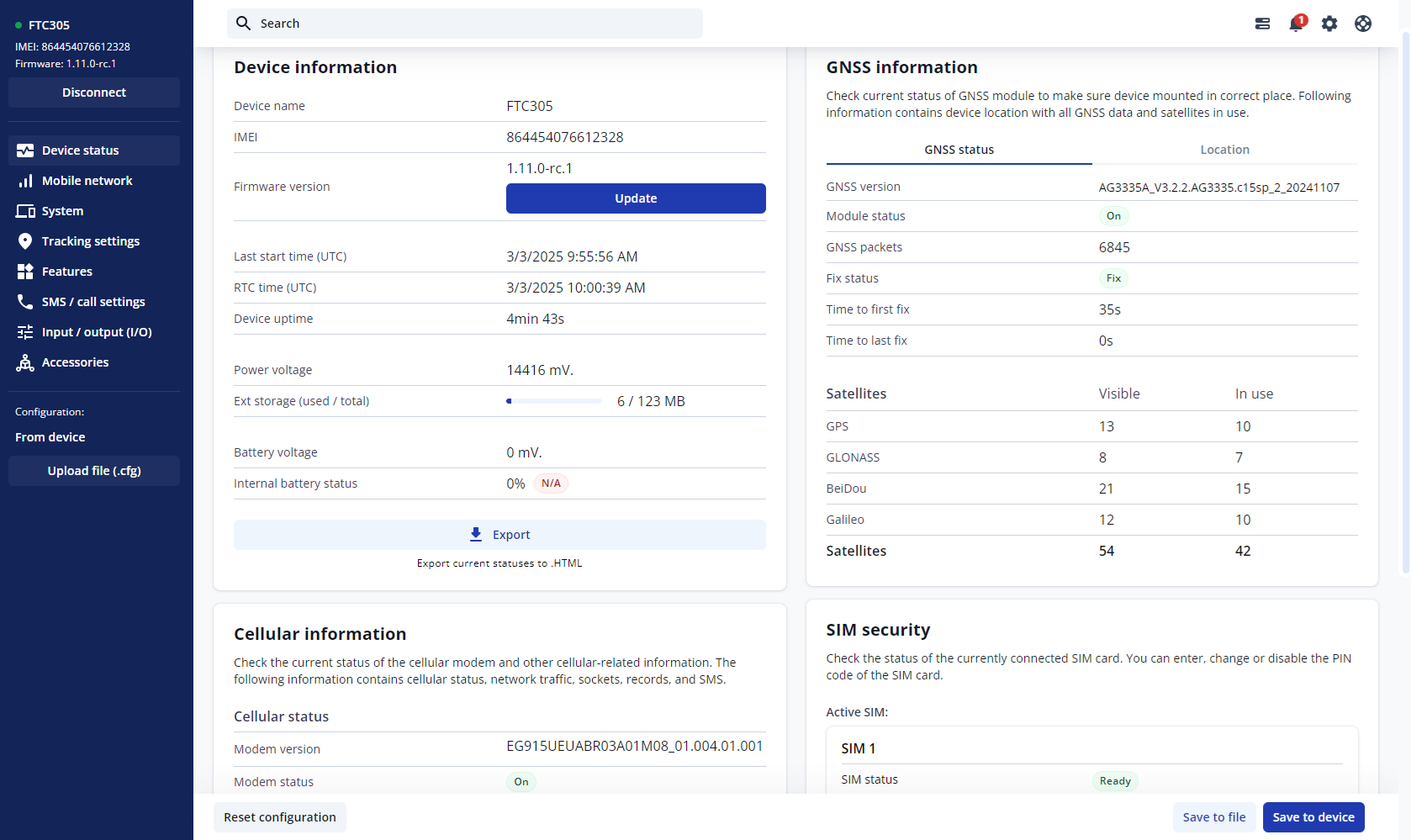
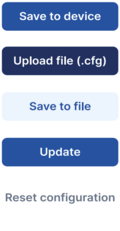


Save to device – saves configuration to device.
Upload file – loads configuration from file.
Save to file – saves configuration to file.
Update – update device firmware.
Reset configuration – sets device configuration to default.
Most important configuration sections are Mobile network (Server, Mobile network settings) and Tracking settings (data collection parameters). More details about {{{model}}} configuration using TCT can be found here.
QUICK SMS CONFIGURATION
The default configuration ensures best track quality and optimal data usage.
Quickly set up your device by sending this SMS command to it:

DEFAULT CONFIGURATION SETTINGS

After successful SMS configuration, {{{model}}} device will synchronize time and update records to configured server. Time intervals and default I/O elements can be changed by using TCT or Parameter list.
MOUNTING RECOMMENDATIONS
LED INDICATIONS
This section is an explanation of LED indications on {{{model}}} device.
BASIC CHARACTERISTICS
[[Category:{{{model}}}]]