Teltonika Configuration Tool Introduction: Difference between revisions
No edit summary |
No edit summary |
||
| (4 intermediate revisions by the same user not shown) | |||
| Line 105: | Line 105: | ||
===Search=== | ===Search=== | ||
Search bar allows to find any available device parameter or feature. More details on search are available [[Telematics_Configuration_Tool_Search|here]]. | Search bar allows to find any available device parameter or feature. Start typing the name of the required parameters and the search results will automatically appear. More details on search feature are available [[Telematics_Configuration_Tool_Search|here]]. | ||
===Tooltips=== | ===Tooltips=== | ||
Tooltips are an essential part of the TCT fields description. By hovering over the | Tooltips are an essential part of the TCT fields description. By hovering over the '''Information''' sign a popup window will open with the brief description of the field. | ||
===Saving configuration=== | ===Saving configuration=== | ||
Press "Save to File" to trigger configuration saving which will offer options to have a "Full Save" or "Only Changes". More info about the save options can be found [[Teltonika Configuration Tool Save Description|here]] | |||
[[Image:Save_Changes_Screen.png | <br /> | ||
[[Image:Save_Changes_Screen.png|link=|alt=]] | |||
Latest revision as of 14:18, 3 March 2023

Teltonika Configuration Tool (TCT) is a software that is dedicated for Teltonika device configuration. The application helps with device's first configuration, guiding the user on every necessary configuration step. New tool has an upgraded user interface that is intuitive and easy to use. It allows to update firmware, perform device diagnostics, status check and debug. Additionally, a search bar has been added to easily find the parameter that needs to be configured.
For more details on the specific parameters that can be changed in the Teltonika Configuration Tool, please go to the Configuration section of the wiki page of your device.
Supported Devices
Below you can find the list of devices that are supported by Teltonika Configuration Tool.
|
|
|


|
|
|


Teltonika Configuration Tool Features
Device Set-Up
Device Set-Up feature allows an easy and fast device configuration. It guides the user through the mandatory and optional fields in configuration to prepare the device for usage. For more details on device setup please refer to here.
Search
Search bar allows to find any available device parameter or feature. Start typing the name of the required parameters and the search results will automatically appear. More details on search feature are available here.
Tooltips
Tooltips are an essential part of the TCT fields description. By hovering over the Information sign a popup window will open with the brief description of the field.
Saving configuration
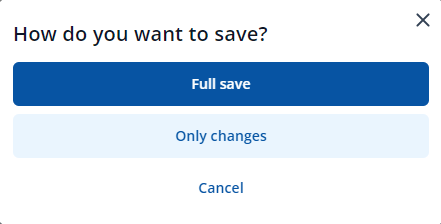
Press "Save to File" to trigger configuration saving which will offer options to have a "Full Save" or "Only Changes". More info about the save options can be found here