
1-Wire RFID Reader: Difference between revisions
Using common template "Template:1-Wire Accessory". Tag: Replaced |
[GTPGTM-10943] |
||
| Line 1: | Line 1: | ||
{{Template:1-Wire Accessory|accessory=RFID}} | {{Template:1-Wire Accessory|accessory=RFID}} | ||
[[Category:Accessories]] | [[Category:Accessories]] | ||
Latest revision as of 14:52, 30 January 2026
Main Page > Accessories > 1-Wire RFID ReaderIntroduction

1-Wire data protocol, implemented in many Teltonika devices, can be used to read RFID tags (by emulating them using iButton protocols).
1-Wire RFID readers are a convenient way to implement driver authorization and other functionalities.
Use cases:
- Immobilizer - prevent the starting of a vehicle without first scanning an RFID tag.
- Authorized driving - keep track of who is driving the vehicle according to the RFID tag they use to authenticate themselves.
- Auto Geofencing - get notified when a vehicle leaves a pre-defined area without authorization.
Specifications
| NAME | DESCRIPTION |
|---|---|
| Interface | 1-Wire |
| Wiring | White = 1-wire data, Brown = Power supply, Green = Ground. |
| Power Supply | 6.5-30 VDC |
| Frequency standard | 125 kHz |
| Type of transponder | Manchester, 64 cycles per bit |
| Antenna surface area | 6,8 cm² |
| Reading range | 4 cm |
| Reading frequency | 6 times per second for identification, 2 times per second when transponder is in range of reader |
| Supported 1-Wire commands | 0x33 (0x0F) - Read ROM, 0xF0 - Search ROM |
| Fastening method | M12 thread |
| Cable length | 40 cm |
| Operating temperature | -20 ºC to +55 ºC |
| Operating humidity | Up to 70% |
| Supported by | FMB110, FMB120, FMB122, FMB125, FMU125, FMM125, FMC125, FMB130, FMU130, FMC130, FMM130, FMB140, FMB202, FMB204, FMB640, FMC640, FMM640 |
Installation
Note! This chapter describes the installation of an accessory supplied by Teltonika. Accessories from other manufacturers may require different steps.
To connect the accessory to your system:
- Connect the ground wire to the same grounding used for the device.
- Connect the 1-Wire Signal wire from the reader to the 1-Wire Data pin on the device.
- Connect the 1-Wire Power wire to the VCC.

| PIN | NAME | DESCRIPTION |
|---|---|---|
| 1 | 1-wire Data (Dallas Data) | Sends iButton ID |
| 2 | VCC (+) | Power supply for the sensor (6.5-30 VDC) |
| 3 | GND (-) | Ground |
Tracker Configuration
Because this RFID reader emulates the received RFID values as iButton values, in configuration software it has identical functionality as the iButton reader.
The reader works as soon as it is connected, but the iButton isn't used anywhere other than displayed in the iButton I/O element. In order to use it for the Immobilizer scenario, the device must have the scenario enabled. Then, iButton check can be enabled to only accept iButtons specified in the iButton list under the 1-Wire tab.


Converting IO values to IDs
This short guide explains how to convert the iButton value in "I/O" menu to an ID usable in the iButton list in "1-Wire" menu.
Note! For FMx6 trackers, you do not need to convert these values.
- Connect your 1-Wire accessory to the tracker according to the wiring scheme.
- Connect the tracker to a PC, run Teltonika Configurator.
- Open the "I/O" menu and find the "iButton" parameter.
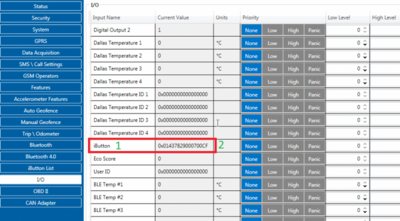
- Scan the 1-Wire accessory on the reader. The value in Configurator will shortly change.
- Take the value (here: 01437829000700CF) and convert it using the method shown below - then you will be able to use it in the iButton List.


Excel algorithm (copy-paste to a sheet):
- Column names:
- A1-iButton I/O
- B1-Removed Ox string
- C1-Final ID
- Column values:
- A2=
0x01437829000700CF - B2=
=MID(A2; 3; LEN(A2) - 2) - C2=
=MID(B2; 15; 2) & MID(B2; 13; 2) & MID(B2; 11; 2) & MID(B2; 9; 2) & MID(B2; 7; 2) & MID(B2; 5; 2) & MID(B2; 3; 2) & MID(B2; 1; 2)
- A2=