
How to read data from TZ-BT04/05/05B sensor
Main Page > Frequently Asked Questions - FAQ > How to read data from TZ-BT04/05/05B sensor

First the device Bluetooth® settings need to be configured. These are the required steps:
TZ-BT04_05_05B_data

Disclaimer
If you are not using Bluetooth®, please consider turning it off or change Bluetooth® PIN to remove potential risks.
If you are using Bluetooth® we strongly recommend using AES encryption for enhanced security.
Configuration
These are instructions on how to easily read data from TZ-BT04/05/05B Bluetooth® LE sensor with Teltonika device.First the device Bluetooth® settings need to be configured. These are the required steps:
- Press
Bluetooth®settings.
- Turn on BT Radio by pressing
Enable (hidden)orEnable (visible).
- Turn on BT Radio by pressing
- Press
Bluetooth® 4.0settings.
- Select
TZ-BT04/05/05B sensorin BLE connectionless functionalities section. - Type your TZ-BT04/05/05B ID in
IDfield. - After all these steps press
Save to deviceto save configuration. - To start BLE scan right away press
Discover BLE.
- Select
- Press

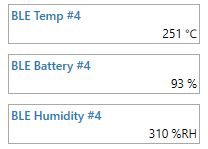
To check if the device has already received data from TZ-BT04/05/05B Bluetooth® LE sensor, follow these steps:
- Navigate to
Statussection. - Press
I/O Infoand look if BLE Temp, BLE Battery and BLE Humidity has any values.
- Navigate to