
EYE FAQ: Difference between revisions
No edit summary Tag: Manual revert |
|||
| (34 intermediate revisions by 6 users not shown) | |||
| Line 5: | Line 5: | ||
==== How to turn ON the device / does the device need to be turned on? ==== | ==== How to turn ON the device / does the device need to be turned on? ==== | ||
Devices | It depends on ordering code used. Devices can be turned ON from the factory or come in hibernate mode and will need to be turned on by placing a magnet on the device. | ||
==== What is the battery life for different advertising intervals? ==== | ==== What is the battery life for different advertising intervals? ==== | ||
| Line 12: | Line 12: | ||
|EYE Sensor / BTSMP1 | |EYE Sensor / BTSMP1 | ||
|- | |- | ||
|2 | |2 years | ||
(Tx=2 dBm; interval: 1 s) | (Tx=2 dBm; interval: 1 s) | ||
|1 | |1 year | ||
(Tx=2 dBm; interval: 1 s) | (Tx=2 dBm; interval: 1 s) | ||
|- | |- | ||
|5 | |5 years | ||
(Tx=2 dBm; interval: 3 s) | (Tx=2 dBm; interval: 3 s) | ||
|2.5 | |2.5 years | ||
(Tx=2 dBm; interval: 3 s) | (Tx=2 dBm; interval: 3 s) | ||
|- | |- | ||
|8 | |8 years | ||
(Tx=2 dBm; interval: 5 s) | (Tx=2 dBm; interval: 5 s) | ||
|4 | |4 years | ||
(Tx=2 dBm; interval: 5 s) | (Tx=2 dBm; interval: 5 s) | ||
|- | |- | ||
|10 | |10 years | ||
(Tx=2 dBm; interval: 10s) | (Tx=2 dBm; interval: 10s) | ||
|5 | |5 years | ||
(Tx=2 dBm; interval: 10s) | (Tx=2 dBm; interval: 10s) | ||
| Line 42: | Line 42: | ||
==== Can I disable not-used sensors to conserve the battery? ==== | ==== Can I disable not-used sensors to conserve the battery? ==== | ||
From firmware version 1.2.10.Rev.4 separate sensors can be disabled. These are movement, temperature, humidity and magnetic field. Disabling accelerometer sensor will improve battery lifetime. Disabling other sensors will disable advertising only without improving battery lifetime. | |||
However, there are options to create special order codes with assembly modifications with only one or selected sensors to be soldered and produced. | However, there are options to create special order codes with assembly modifications with only one or selected sensors to be soldered and produced. Such changes will only be considered for large quantity orders or high potential customers. | ||
If you | If you do not want to receive particular sensor data, but have no need for saving battery life, you can disable the related sensor IO element in Teltonika Configurator. EYE Sensor will be still sending data, but FM will filter it according to your choice. | ||
==== Is there any graph to estimate device lifespan with different advertising settings? ==== | ==== Is there any graph to estimate device lifespan with different advertising settings? ==== | ||
Yes, please see attached document. [[File:Power consumption calculator.png | Yes, please see attached document. [[File:Power consumption calculator.png | frameless]] | ||
[[File:CLIENT VERSION BTSXX1 power consumption calculator-1.xlsx|thumb]] | [[File:CLIENT VERSION BTSXX1 power consumption calculator-1.xlsx|thumb]] | ||
| Line 64: | Line 58: | ||
[[File:Battery lifetime datasheet.png|frameless|454x454px]] | [[File:Battery lifetime datasheet.png|frameless|454x454px]] | ||
==== What is the battery chemistry used in beacons/sensors and what is the self-discharge rate of these batteries? ==== | ==== What is the battery chemistry used in beacons/sensors and what is the self-discharge rate of these batteries? ==== | ||
CR2450 Lithium, Manganese Dioxide, Self-discharge 1% per 1 year | CR2450 Lithium, Manganese Dioxide(MnO2), Self-discharge 1% per 1 year | ||
==== What is the direction of EYE Senor's or Beacon's antenna? ==== | ==== What is the direction of EYE Senor's or Beacon's antenna? ==== | ||
BTS Beacon/Sensor antenna is | BTS Beacon/Sensor antenna is unidirectional. Antenna signal strength is very similar in all directions. | ||
==== What is the BLE transmission range of BTS devices? ==== | ==== What is the BLE transmission range of BTS devices? ==== | ||
| Line 78: | Line 72: | ||
==== Can you save configuration a template of a Sensor or Beacon and use it with another sensor/beacon when using the EYE app? ==== | ==== Can you save configuration a template of a Sensor or Beacon and use it with another sensor/beacon when using the EYE app? ==== | ||
You can save the configuration - this is available with EYE APP 1.2.0-60 | |||
Uploading the configuration according to saved template will come in the near future. | |||
You can follow EYE APP updates here: | |||
[[EYE APP errata]] | |||
==== Can you change configuration of EYE devices remotely? ==== | ==== Can you change configuration of EYE devices remotely? ==== | ||
No, the devices only have bluetooth chip, so you have to be relatively close to the device to update configuration. No implementation of updating EYE devices via services other than EYE APP is planned in near future. | No, the devices only have bluetooth chip, so you have to be relatively close to the device to update configuration. If you are using a 3rd party or developing your own application/software, GATT characteristics can also be used to configure the device. | ||
No implementation of updating EYE devices via services other than EYE APP or GATT characteristics is planned in the near future. | |||
==== Can you update firmware or configuration on a few sensors at the time via the EYE app? ==== | ==== Can you update firmware or configuration on a few sensors at the time via the EYE app? ==== | ||
| Line 100: | Line 98: | ||
Generally EYE Beacons are following format: | Generally EYE Beacons are following format: | ||
BTSID1 7CD9F4000001-7CD9F40FFFFF | BTSID1 7CD9F4000001-7CD9F40FFFFF | ||
BTSMP1 7CD9F4100000-7CD9F41FFFFF | BTSMP1 7CD9F4100000-7CD9F41FFFFF | ||
==== Does the app display the beacon's distance based on one or several signals it has received? ==== | |||
The app calculates distance based on the latest signal received from the beacon, not a fixed number of signals. | |||
The beacon broadcasts at a fixed interval (e.g., once per second). | |||
The app listens and updates when it receives a broadcast. | |||
If the signal is missed due to interference or power-saving logic (especially on mobile devices), the app may skip updates for one or more intervals. | |||
In short: beacon broadcasts regularly, but the app updates only when it receives those broadcasts so timing isn’t guaranteed to be exact every second. | |||
==== Does the application "refresh" every couple of seconds, or every second if the beacon is set to send signals in second mode, only to "miss" once it has been caught? ==== | |||
In broadcast mode (e.g., iBeacon): the phone listens passively. Updates are based on scan results, not on any active connection. | |||
In connection mode: the app establishes a BLE connection and requests data update actively. | |||
==== Does scanning depend whether the app is running in the background or in the foreground? ==== | |||
iOS: Scanning in the background is heavily limited. Only iBeacon-based region monitoring works reliably, and detailed data (like distance or scan response) is not available in the background. | |||
Android: Background scanning is allowed, but with reduced frequency unless a foreground service is used. Full access to signal data is possible, but may be delayed due to battery optimizations. | |||
===<big>Questions about FMBxxx compatibility with EYE Accessories</big>=== | ===<big>Questions about FMBxxx compatibility with EYE Accessories</big>=== | ||
==== How many sensors can you | ==== How many sensors can you use with FM device? ==== | ||
At the moment 4 sensors (Base firmware / advance mode), this is expanded up to 100 in | At the moment 4 sensors (Base firmware / advance mode), this is expanded up to 100 in base firmware release which includes new EYE features. It is available with 03.29.XX base firmware. You do not need to configure the MAC address but instead enter the name (or part of name) of the sensor and all sensors with that name (or part of name) will be scanned. In case there are more than 100 sensors found then the ones with the strongest RSSI will be saved and put into the data packet. | ||
==== How to configure FM device for reading data from EYE sensor with standard Teltonika configurator(advanced mode)? ==== | ==== How to configure FM device for reading data from EYE sensor with standard Teltonika configurator (advanced mode)? ==== | ||
Please follow the steps in EYE Sensor wiki page: https://wiki.teltonika-gps.com/view/EYE_SENSOR_/_BTSMP1#Teltonika_configurator_.28standard_functionality_.2F_advanced_mode.29 | |||
Please follow the steps in EYE Sensor wiki page: https://wiki.teltonika-gps.com/view/EYE_SENSOR_/_BTSMP1#Teltonika_configurator_.28standard_functionality_.2F_advanced_mode.29 | Please follow the steps in EYE Sensor wiki page: https://wiki.teltonika-gps.com/view/EYE_SENSOR_/_BTSMP1#Teltonika_configurator_.28standard_functionality_.2F_advanced_mode.29 | ||
| Line 118: | Line 135: | ||
==== Is magnet information broadcasted as true/false flag or with a counter? ==== | ==== Is magnet information broadcasted as true/false flag or with a counter? ==== | ||
At the moment only presence is sent(1 or 0). A counter is only included in movement sensor's data. | At the moment only presence is sent(1 or 0). | ||
A counter is only included in movement sensor's data. | |||
It is possible to get evaluation firmware version with magnet counter functionality. | |||
It is planned that it will be available in base firmware in one of the future updates. You can follow changes here [[BTS firmware errata]] | |||
Source:https://wiki.teltonika-gps.com/view/EYE_SENSOR_/_BTSMP1#Protocol_description | Source:https://wiki.teltonika-gps.com/view/EYE_SENSOR_/_BTSMP1#Protocol_description | ||
| Line 126: | Line 146: | ||
==== What data can be read from the accelerometer? ==== | ==== What data can be read from the accelerometer? ==== | ||
Only angle at the moment, with special development it | Only angle at the moment, with special development it is possible to receive accelerometer data. | ||
Angle consists of 3 Bytes, i.e.: Angle is received as 0BFFC7 in frame advertised by the sensor, it parses to: | Angle consists of 3 Bytes, i.e.: Angle is received as 0BFFC7 in frame advertised by the sensor, it parses to: | ||
C1 – Most significant byte represents | C1 – Most significant byte represents device pitch. Device pitch can be from -90 to 90 degrees. | ||
In this example device's pitch is 0000 1011 (2's complement) = 11° degrees. | In this example device's pitch is 0000 1011 (2's complement) = 11° degrees. | ||
FFC7– Two least significant bytes represent | FFC7– Two least significant bytes represent device's roll. Device's roll can be from -180 to 180 degrees. | ||
In this example device Roll is 1111 1111 1100 0111 (2's complement) = -57° degrees | In this example device Roll is 1111 1111 1100 0111 (2's complement) = -57° degrees | ||
Source:https://wiki.teltonika-gps.com/view/EYE_SENSOR_/_BTSMP1#Protocol_description | Source:https://wiki.teltonika-gps.com/view/EYE_SENSOR_/_BTSMP1#Protocol_description | ||
| Line 137: | Line 157: | ||
The TX power value - value of processors power output to antenna. | The TX power value - value of processors power output to antenna. | ||
RFU - reserved for future use as per BLE specification, always 0x0000. | |||
Calibrated Power - power of the BLE device, measured in dBm (decibels relative to 1 milliwatt), at a reference distance. Currently Teltonika is providing beacons with pre-calibrated RSSI at 1m for iBeacon and RSSI at 0m for Eddystone that should be suitable for most use cases, however we plan to introduce user calibration in the future. | |||
=== <big>EN12830 modification related questions</big> === | |||
==== What does having EN12830 mean? ==== | |||
EN12830 is a European standard specifying the requirements and test methods for temperature recording devices used in cold chain. It ensures these devices meet specific accuracy, resolution, and response time criteria to maintain product safety and quality. By adhering to the EN12830 standard, companies can ensure that their temperature recording devices are reliable and accurate, thereby maintaining the integrity of the cold chain and safeguarding the quality and safety of temperature-sensitive products. | |||
==== Are EYE sensors calibrated? ==== | |||
The EYE sensor holds an EN12830 certificate and delivers precise measurements with a 0.5°C accuracy class across all working ranges from -20°C to +60°C. Each temperature sensor used on EYE Sensor device is calibrated in an ISO 17025-certified laboratory to ensure reliability. | |||
==== Can you re-calibrate the sensors? ==== | |||
Yes, recalibration is possible. | |||
==== Are individual calibration certificates available? ==== | |||
Yes, see examples attached. | |||
[[File:Calib certificate example 1.png|frameless]][[File:Calib certificate example 2.png|frameless]][[File:Calib certificate example 3.png|frameless]] | |||
==== Do you need to recalibrate the sensors? ==== | |||
Recalibration is not mandatory under EN 12830. The frequency of verification is instead governed by EN 13486, which states that verification should align with the user’s needs and the manufacturer’s recommendations. | |||
If the temperature sensor is mounted on a vehicle that undergoes annual or periodic inspection at a test station (e.g., refrigerated trucks or trailers), EN 13486 recommends that the verification of the temperature measuring instrument shall(must) occur at the same time as the vehicle's scheduled inspection. | |||
Please note: Certain countries or regulatory environments may impose stricter requirements than EN 12830. In such cases, we encourage clients to submit their devices for periodic verification. Our sensors are designed to maintain accuracy and pass verification without the need for recalibration. | |||
==== Our recalibration guidelines: ==== | |||
The temperature sensor has a long-term drift of less than 0.01°C per year, meaning it should maintain its 0.5°C accuracy class throughout its expected service life. In other words, recalibration is not expected to be needed after purchase. | |||
===<big>Troubleshooting / rules of thumb</big>=== | |||
==== Scanning vs. Advertising Interval ==== | |||
As a general rule: Scanning Interval = 3 × Advertising Interval | |||
The scanning interval of your BLE receiver (e.g. gateway, FM device) should be at least three times longer than the beacon's advertising interval. | |||
Examples: | |||
If the EYE Beacon is set to 1s advertising, use 3s scanning | |||
If advertising is 10s, set scanning to at least 30s | |||
==== Dealing with Range Issues in Trailers ==== | |||
In heavy or metallic environments (e.g. trailers), the expected reliable Bluetooth range is 10–15 meters for most devices, including ours. | |||
Recommended configuration: | |||
EYE Beacon/Sensor: Tx Power 8 dBm, Advertising Interval 3s – balanced for performance and battery life | |||
FM Device: Enable non-stop scanning the fastest updates and BT power to 7 so scan response request reaches the beacon. | |||
If issues persist: | |||
If configuration changes don't help: | |||
Take photos of the beacon mounting | |||
Check whether issues occur only after the trailer is loaded or are always present. | |||
Export configuration files and Bluetooth logs(custom filters required, consult with our engineers). | |||
==== Beacon mapping with large fleets ==== | |||
If you're mapping non-powered assets with EYE Beacons and assign GPS positions by scanning them with your FM fleet – great! This is a powerful and scalable scenario to expand your telematics offering. | |||
However, you might face two common challenges: | |||
1. Assets appear stuck in an old location after transportation | |||
2. Delayed location detachment – e.g., a beacon left at home may still appear to be "traveling" with the vehicle for a few minutes or kilometers. | |||
Solutions: | |||
Use Proximity or Lost & Found scenarios, combined with RSSI averaging: | |||
The can be found @ Teltonika Configurator->Beacon List->EYE Beacon settings | |||
'''Proximity Scenario:''' | |||
Configure the RSSI threshold for when the FM device should treat the beacon as near, away, or lost – no need to implement this logic on your platform. | |||
[[File:Proximity1.png|frameless]] | |||
'''Lost & Found Scenario:''' | |||
Configure the system to only report: All beacons (default),Newly found beacons, Newly lost beacons | |||
[[File:Lost and found.png|frameless]] | |||
'''RSSI averaging const:''' | |||
Configure to adjust how quickly FM should react to RSSI changes. The bigger the constant the slower the FM reacts to changes, you can think of it as how many measurements it needs for to calculate moving average and use it to leverage against threshold for zones or lost/found. | |||
[[File:RSSI averaging .png|frameless]] | |||
===<big>Other questions (Questions without category)</big>=== | ===<big>Other questions (Questions without category)</big>=== | ||
==== What is the purpose of LED on the devices? ==== | ==== What is the purpose of LED on the devices? ==== | ||
One user touched magnet to wake up device from hibernate mode it indicates visually that it is powered and woke up correctly. | |||
==== Can EYE sensors detect temperature less than -20°C? ==== | ==== Can EYE sensors detect temperature less than -20°C? ==== | ||
It can detect less than -20°C | It can detect less than -20°C. We have tested devices in -40°C to +80°C. However, it is not recommended to use the device in temperature outside the compatible range for longer than a few hours. Temperature beyond recommended ranges will drain the battery faster than expected. | ||
==== Can the EYE Sensor store data in memory and send it later in case of BT connection issues? ==== | ==== Can the EYE Sensor store data in memory and send it later in case of BT connection issues? ==== | ||
Please refer to [https://teltonika-gps.com/products/accessories/sensors-beacons/eye-sensor-en12830 EN12830] sensor for temperature logging to internal memory. Temperature data stored in EN12830 modification is accessible via EYE App or your own custom solution. We are working on firmware for FM devices to retrieve historic data as well. | |||
Other data can be stored to internal memory but would require firmware development that is not currently planned. | |||
==== Do you need an additional magnet accessory to detect a magnet with the EYE Sensor? What is magnet detection range? ==== | ==== Do you need an additional magnet accessory to detect a magnet with the EYE Sensor? What is magnet detection range? ==== | ||
Yes, we offer the needed accessory order code on our [https://teltonika-gps.com/eye/ landing page] The maximum range for magnet detection is 4cm. Please refer to the below image for mounting recommendation. | Yes, we offer the needed accessory order code on our [https://teltonika-gps.com/eye/ landing page]. The maximum range for magnet detection is 4cm. Please refer to the below image for mounting recommendation. | ||
[[File:MAGNET TRAILER MOUNTING.png|frameless|676x676px]] | [[File:MAGNET TRAILER MOUNTING.png|frameless|676x676px]] | ||
Please see attached | ==== How to identify pitch/roll directions? ==== | ||
[[File: | Please see attached videos: | ||
{| class="wikitable" | |||
|- | |||
! Roll Axis !! Pitch axis | |||
|- | |||
| [[File:Eye beacon Roll axis v4.mp4|500x500px]]|| [[File:Eye beacon Pitch axis v2.mp4|500x500px]] | |||
|} | |||
[[Category:Sensors]] | [[Category:Sensors]] | ||
Latest revision as of 07:17, 9 September 2025
Main Page > Sensors > EYE FAQQuestions about Power and Electrical characteristics
How to change the battery / is the battery changeable?
It is not possible to change the battery with the current device models.
How to turn ON the device / does the device need to be turned on?
It depends on ordering code used. Devices can be turned ON from the factory or come in hibernate mode and will need to be turned on by placing a magnet on the device.
What is the battery life for different advertising intervals?
| EYE Beacon / BTSID1 | EYE Sensor / BTSMP1 |
| 2 years
(Tx=2 dBm; interval: 1 s) |
1 year
(Tx=2 dBm; interval: 1 s) |
| 5 years
(Tx=2 dBm; interval: 3 s) |
2.5 years
(Tx=2 dBm; interval: 3 s) |
| 8 years
(Tx=2 dBm; interval: 5 s) |
4 years
(Tx=2 dBm; interval: 5 s) |
| 10 years
(Tx=2 dBm; interval: 10s) |
5 years
(Tx=2 dBm; interval: 10s) |
Can I disable not-used sensors to conserve the battery?
From firmware version 1.2.10.Rev.4 separate sensors can be disabled. These are movement, temperature, humidity and magnetic field. Disabling accelerometer sensor will improve battery lifetime. Disabling other sensors will disable advertising only without improving battery lifetime.
However, there are options to create special order codes with assembly modifications with only one or selected sensors to be soldered and produced. Such changes will only be considered for large quantity orders or high potential customers.
If you do not want to receive particular sensor data, but have no need for saving battery life, you can disable the related sensor IO element in Teltonika Configurator. EYE Sensor will be still sending data, but FM will filter it according to your choice.
Is there any graph to estimate device lifespan with different advertising settings?
Yes, please see attached document. 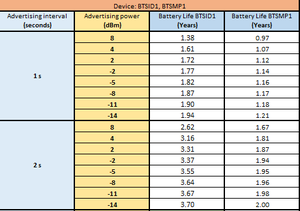

File:CLIENT VERSION BTSXX1 power consumption calculator-1.xlsx
What is battery voltage when the battery is considered empty?
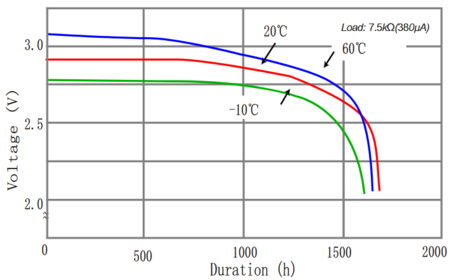
Around 2.2V is when the device's battery is low and around 2.0V battery can be considered depleted.
How does the battery voltage translate into the percentage of the battery?
At the moment voltage is not directly translated into percentage as the voltage varies depending on the temperature sensor is in. We are working on battery life tests depending on temperature and various advertising frequencies and signal strength and we will be evaluating the possibility to send battery percentage in the future once those tests are done. For now, you can refer to the graph from the battery datasheet for a rough estimation of the remaining battery life.

What is the battery chemistry used in beacons/sensors and what is the self-discharge rate of these batteries?
CR2450 Lithium, Manganese Dioxide(MnO2), Self-discharge 1% per 1 year
What is the direction of EYE Senor's or Beacon's antenna?
BTS Beacon/Sensor antenna is unidirectional. Antenna signal strength is very similar in all directions.
What is the BLE transmission range of BTS devices?
According to the tests done by us using FMB1YX trackers: the detection range in an open field in real conditions for the EYE Beacon/Sensor was 80 to 100m. Take note that the maximum range will also depend on the quality of the receiving device antenna.
Questions about EYE Accessory configuration (EYE APP)
Whats the default pin?
123456
Can you save configuration a template of a Sensor or Beacon and use it with another sensor/beacon when using the EYE app?
You can save the configuration - this is available with EYE APP 1.2.0-60
Uploading the configuration according to saved template will come in the near future.
You can follow EYE APP updates here:
EYE APP errata
Can you change configuration of EYE devices remotely?
No, the devices only have bluetooth chip, so you have to be relatively close to the device to update configuration. If you are using a 3rd party or developing your own application/software, GATT characteristics can also be used to configure the device.
No implementation of updating EYE devices via services other than EYE APP or GATT characteristics is planned in the near future.
Can you update firmware or configuration on a few sensors at the time via the EYE app?
Group updates are not available and are not planned to be available in the near future.
Why EYE APP does not show MAC on iOS (iPhone)?
The iOS operating system does not show MAC addreses on iBeacon or Eddystone protocols because of Apple introduced privacy policy. On iOS EYE app can request and display MAC address only when the device is connected in configuration mode.
Why EYE app does not display devices with iBeacon protocol on iOS (iPhone)?
Because of Apple introduced privacy policy iOS operating system does not return required data to identify Eye Beacons and EYE sensors configured with iBeacon protocol. Therefore we cannot identify our device and display it in the app.
Is it possible to configure the movement sensor to advertise only when movement is detected and if no movement is detected - no information is sent from the sensor?
It is not possible at the moment, and such a feature is not planned to be available in the near future. Movement status is advertising with every periodic data packet.
Do I need to configure UUID / Instance ID, how is UUID / MAC generated?
UUID/MAJOR/MINOR/Namespace/Instance IDs are automatically generated in the factory all are unique. MAC printed on the casing is assigned separately according to the list of available MACs and is not related to UUID/MAJOR/MINOR in any way.
Generally EYE Beacons are following format:
BTSID1 7CD9F4000001-7CD9F40FFFFF
BTSMP1 7CD9F4100000-7CD9F41FFFFF
Does the app display the beacon's distance based on one or several signals it has received?
The app calculates distance based on the latest signal received from the beacon, not a fixed number of signals.
The beacon broadcasts at a fixed interval (e.g., once per second).
The app listens and updates when it receives a broadcast.
If the signal is missed due to interference or power-saving logic (especially on mobile devices), the app may skip updates for one or more  intervals.
In short: beacon broadcasts regularly, but the app updates only when it receives those broadcasts so timing isn’t guaranteed to be exact every second.
Does the application "refresh" every couple of seconds, or every second if the beacon is set to send signals in second mode, only to "miss" once it has been caught?
In broadcast mode (e.g., iBeacon): the phone listens passively. Updates are based on scan results, not on any active connection.
In connection mode: the app establishes a BLE connection and requests data update actively.
Does scanning depend whether the app is running in the background or in the foreground?
iOS: Scanning in the background is heavily limited. Only iBeacon-based region monitoring works reliably, and detailed data (like distance or     scan response) is not available in the background.
Android: Background scanning is allowed, but with reduced frequency unless a foreground service is used. Full access to signal data is possible,  but may be delayed due to battery optimizations.
Questions about FMBxxx compatibility with EYE Accessories
How many sensors can you use with FM device?
At the moment 4 sensors (Base firmware / advance mode), this is expanded up to 100 in base firmware release which includes new EYE features. It is available with 03.29.XX base firmware. You do not need to configure the MAC address but instead enter the name (or part of name) of the sensor and all sensors with that name (or part of name) will be scanned. In case there are more than 100 sensors found then the ones with the strongest RSSI will be saved and put into the data packet.
How to configure FM device for reading data from EYE sensor with standard Teltonika configurator (advanced mode)?
Please follow the steps in EYE Sensor wiki page: https://wiki.teltonika-gps.com/view/EYE_SENSOR_/_BTSMP1#Teltonika_configurator_.28standard_functionality_.2F_advanced_mode.29
Please follow the steps in EYE Sensor wiki page: https://wiki.teltonika-gps.com/view/EYE_SENSOR_/_BTSMP1#Teltonika_configurator_.28standard_functionality_.2F_advanced_mode.29
Questions about Protocols
Are EYE Beacons and Sensors supported by other IoT devices?
EYE Beacons or EYE Sensor configured as Beacon should be supported by any device that supports iBeacon or Eddystone protocols.
EYE Sensors have Teltonika protocol and custom GATT characteristics, so most likely support has to be developed.
Please check with the manufacturer of the device in question if they support iBeacon, Eddystone, or Teltonika EYE Sensor's protocol.
EYE Sensors protocol link:https://wiki.teltonika-gps.com/view/EYE_SENSOR_/_BTSMP1#Protocol_description
Is magnet information broadcasted as true/false flag or with a counter?
At the moment only presence is sent(1 or 0).
A counter is only included in movement sensor's data.
It is possible to get evaluation firmware version with magnet counter functionality.
It is planned that it will be available in base firmware in one of the future updates. You can follow changes here BTS firmware errata
Source:https://wiki.teltonika-gps.com/view/EYE_SENSOR_/_BTSMP1#Protocol_description
Is it possible to receive the RSSI value from the sensor/ID?
Yes, both send RSSI voltage in the Eddystone/iBeacon protocol part.
Source: https://wiki.teltonika-gps.com/view/EYE_BEACON_/_BTSID1#EYE_Beacon_Protocol_overview
What data can be read from the accelerometer?
Only angle at the moment, with special development it is possible to receive accelerometer data.
Angle consists of 3 Bytes, i.e.: Angle is received as 0BFFC7 in frame advertised by the sensor, it parses to:
C1 – Most significant byte represents device pitch. Device pitch can be from -90 to 90 degrees.
In this example device's pitch is 0000 1011 (2's complement) = 11° degrees.
FFC7– Two least significant bytes represent device's roll. Device's roll can be from -180 to 180 degrees.
In this example device Roll is 1111 1111 1100 0111 (2's complement) = -57° degrees
Source:https://wiki.teltonika-gps.com/view/EYE_SENSOR_/_BTSMP1#Protocol_description
What is TX / RFU / Calibrated Power?
The TX power value - value of processors power output to antenna.

RFU - reserved for future use as per BLE specification, always 0x0000.

Calibrated Power - power of the BLE device, measured in dBm (decibels relative to 1 milliwatt), at a reference distance. Currently Teltonika is providing beacons with pre-calibrated RSSI at 1m for iBeacon and RSSI at 0m for Eddystone that should be suitable for most use cases, however we plan to introduce user calibration in the future.
What does having EN12830 mean?
EN12830 is a European standard specifying the requirements and test methods for temperature recording devices used in cold chain. It ensures these devices meet specific accuracy, resolution, and response time criteria to maintain product safety and quality. By adhering to the EN12830 standard, companies can ensure that their temperature recording devices are reliable and accurate, thereby maintaining the integrity of the cold chain and safeguarding the quality and safety of temperature-sensitive products.
Are EYE sensors calibrated?
The EYE sensor holds an EN12830 certificate and delivers precise measurements with a 0.5°C accuracy class across all working ranges from -20°C to +60°C. Each temperature sensor used on EYE Sensor device is calibrated in an ISO 17025-certified laboratory to ensure reliability.
Can you re-calibrate the sensors?
Yes, recalibration is possible.
Are individual calibration certificates available?
Yes, see examples attached.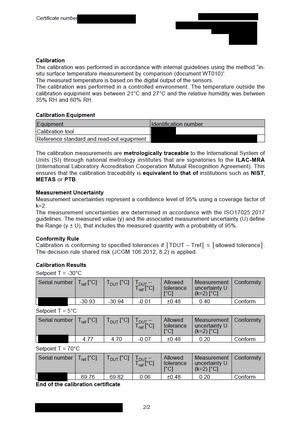


Do you need to recalibrate the sensors?
Recalibration is not mandatory under EN 12830. The frequency of verification is instead governed by EN 13486, which states that verification should align with the user’s needs and the manufacturer’s recommendations.

If the temperature sensor is mounted on a vehicle that undergoes annual or periodic inspection at a test station (e.g., refrigerated trucks or trailers), EN 13486 recommends that the verification of the temperature measuring instrument shall(must) occur at the same time as the vehicle's scheduled inspection.

Please note: Certain countries or regulatory environments may impose stricter requirements than EN 12830. In such cases, we encourage clients to submit their devices for periodic verification. Our sensors are designed to maintain accuracy and pass verification without the need for recalibration.
Our recalibration guidelines:
The temperature sensor has a long-term drift of less than 0.01°C per year, meaning it should maintain its 0.5°C accuracy class throughout its expected service life. In other words, recalibration is not expected to be needed after purchase.
Troubleshooting / rules of thumb
Scanning vs. Advertising Interval
As a general rule: Scanning Interval = 3 × Advertising Interval

The scanning interval of your BLE receiver (e.g. gateway, FM device) should be at least three times longer than the beacon's advertising interval.

Examples:

If the EYE Beacon is set to 1s advertising, use 3s scanning

If advertising is 10s, set scanning to at least 30s
Dealing with Range Issues in Trailers
In heavy or metallic environments (e.g. trailers), the expected reliable Bluetooth range is 10–15 meters for most devices, including ours.

Recommended configuration:
EYE Beacon/Sensor: Tx Power 8 dBm, Advertising Interval 3s – balanced for performance and battery life
FM Device: Enable non-stop scanning the fastest updates and BT power to 7 so scan response request reaches the beacon.

If issues persist:
If configuration changes don't help:
Take photos of the beacon mounting
Check whether issues occur only after the trailer is loaded or are always present.

Export configuration files and Bluetooth logs(custom filters required, consult with our engineers).
Beacon mapping with large fleets
If you're mapping non-powered assets with EYE Beacons and assign GPS positions by scanning them with your FM fleet – great! This is a powerful and scalable scenario to expand your telematics offering. However, you might face two common challenges: 1. Assets appear stuck in an old location after transportation 2. Delayed location detachment – e.g., a beacon left at home may still appear to be "traveling" with the vehicle for a few minutes or kilometers. Solutions: Use Proximity or Lost & Found scenarios, combined with RSSI averaging: The can be found @ Teltonika Configurator->Beacon List->EYE Beacon settings Proximity Scenario: Configure the RSSI threshold for when the FM device should treat the beacon as near, away, or lost – no need to implement this logic on your platform.Lost & Found Scenario: Configure the system to only report: All beacons (default),Newly found beacons, Newly lost beacons
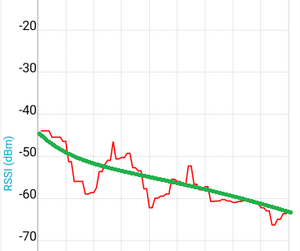
RSSI averaging const: Configure to adjust how quickly FM should react to RSSI changes. The bigger the constant the slower the FM reacts to changes, you can think of it as how many measurements it needs for to calculate moving average and use it to leverage against threshold for zones or lost/found.


Other questions (Questions without category)
What is the purpose of LED on the devices?
One user touched magnet to wake up device from hibernate mode it indicates visually that it is powered and woke up correctly.
Can EYE sensors detect temperature less than -20°C?
It can detect less than -20°C. We have tested devices in -40°C to +80°C. However, it is not recommended to use the device in temperature outside the compatible range for longer than a few hours. Temperature beyond recommended ranges will drain the battery faster than expected.
Can the EYE Sensor store data in memory and send it later in case of BT connection issues?
Please refer to EN12830 sensor for temperature logging to internal memory. Temperature data stored in EN12830 modification is accessible via EYE App or your own custom solution. We are working on firmware for FM devices to retrieve historic data as well.
Other data can be stored to internal memory but would require firmware development that is not currently planned.
Do you need an additional magnet accessory to detect a magnet with the EYE Sensor? What is magnet detection range?
Yes, we offer the needed accessory order code on our landing page. The maximum range for magnet detection is 4cm. Please refer to the below image for mounting recommendation.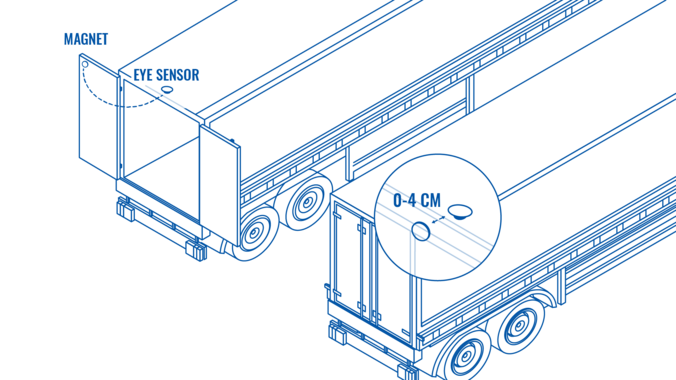

How to identify pitch/roll directions?
Please see attached videos:
| Roll Axis | Pitch axis |
|---|---|