
Pay as You Drive: Difference between revisions
EnginARISOY (talk | contribs) No edit summary |
→1. Prerequisites: Fixed link to FOTA WEB Getting started |
||
| (13 intermediate revisions by 4 users not shown) | |||
| Line 36: | Line 36: | ||
* Turn the ignition ON. | * Turn the ignition ON. | ||
* FMB003 must get VIN from the vehicle ([[FMB003_Teltonika_Data_Sending_Parameters_ID#OBD_elements|AVL ID: 256]]). If not? Check the [[Pay_as_You_Drive#FAQ|FAQ]] section. | * FMB003 must get VIN from the vehicle ([[FMB003_Teltonika_Data_Sending_Parameters_ID#OBD_elements|AVL ID: 256]]). If not? Check the [[Pay_as_You_Drive#FAQ|FAQ]] section. | ||
* FMB003 must connect to [[FOTA_WEB|FOTA WEB]] to get the OBD configuration for the vehicle. Please make sure [[ | * FMB003 must connect to [[FOTA_WEB|FOTA WEB]] to get the OBD configuration for the vehicle. Please make sure [[FOTA WEB Getting_Started#Network_requirements|the device configuration settings for FOTA WEB]] are correct. | ||
* FMB003 must get OBD OEM Total Mileage from the vehicle ([[FMB003_Teltonika_Data_Sending_Parameters_ID#OBD_OEM_elements|AVL ID: 389]]). If not? Check the [[Pay_as_You_Drive#FAQ|FAQ]] section. | * FMB003 must get OBD OEM Total Mileage from the vehicle ([[FMB003_Teltonika_Data_Sending_Parameters_ID#OBD_OEM_elements|AVL ID: 389]]). If not? Check the [[Pay_as_You_Drive#FAQ|FAQ]] section. | ||
| Line 315: | Line 315: | ||
* '''Track''' > Choose dates > Press "Advanced" > Press "Show" | * '''Track''' > Choose dates > Press "Advanced" > Press "Show" | ||
[[File:TAVL-Deividas.png|alt=|left|thumb| | [[File:TAVL-Deividas.png|alt=|left|thumb|1125x1125px]] | ||
| Line 408: | Line 404: | ||
| rowspan="1" style="text-align: left; style=" width: 150px; background: white; color: black;" |If the device is configured correctly and OBD OEM Total Mileage cannot be received from the vehicle: | | rowspan="1" style="text-align: left; style=" width: 150px; background: white; color: black;" |If the device is configured correctly and OBD OEM Total Mileage cannot be received from the vehicle: | ||
*Contact your Teltonika Sales Manager with the make, model and model year of your vehicle. | *Contact your Teltonika Sales Manager with the make, model and model year of your vehicle. | ||
*You can also contact Teltonika support via | *You can also contact Teltonika support via HelpDesk with the make, model and model year of your vehicle. Please also share device response to '''obdinfo''' SMS/GPRS command with ignition ON. | ||
|} | |} | ||
<!--[[Category: Usage scenarios]]--> | <!--[[Category: Usage scenarios]]--> | ||
Latest revision as of 10:44, 30 January 2026
Introduction
With the market penetration of telematics companies in the B2C segment being quite limited, this use case is a great platform for Telematics Service Providers to reach new target groups such as the owners of private vehicles. Pay As You Drive is a fairly well-known business model, which provides better risk management tools for insurance companies and better service quality and commercial conditions to the drivers willing to install GPS trackers and comply to road rules.
Solution description
This solution allows vehicles to be used in Pay As You Drive applications by retrieving the total driven distance, also known as odometer data directly from vehicle's CAN-BUS. Therefore, it is no longer necessary to obtain this value from GPS calculations. The accuracy of GPS calculations is suitable in most of the applications, but it still has some limitations – driving in tunnels and other locations where GPS signal is blocked might affect the overall value of a driven distance. Also, to calculate the total driven distance via GPS, a driver needs to enter the first value manually and synchronize it later. It might become a major administrative task. One of the most important features needed in Pay As You Drive applications is the ability to analyze a driver’s performance – harsh acceleration, harsh braking and harsh cornering. This can be analyzed with Overspeeding and Green Driving scenarios. Crash detection is another helpful scenario for insurance companies. It is a practical solution that collects and analyzes data right before the crash happened and during the crash. Even more, FMB003 has a unique feature providing a driver with both Real Fuel and Real Odometer data. It means you can read an actual odometer data from your vehicle dashboard now and get the correct data online.
What you need for a solution?
- FMB003 to read the real odometer data from the vehicle dashboard via the vehicle’s OBD port.
Other devices that work with this solution: FMP100/ It has the advantage of simple installation.
- Teltonika Configurator to set up FM device correctly for the solution.
- FOTA WEB to remotely send the configuration to the device for cloud-based VIN decoding combined with OEM data requests database.
- SIM card to access FOTA WEB and send data to the server by accessing the GSM network.
Installation
FMB003, our new generation ultra-small, plug and play OBDII tracker with the benefits of very fast and easy installation. Even end-users can install the device themselves. The new housing of FMB003 device is remarkably small which is advantageous in vehicles with limited space for GPS tracker installation.
Installing the OBDII device to the vehicle:
- Find OBDII connector in your vehicle (Figure 1). if you need more accurate location, please visit Location of OBD plug.
- Before connecting the device to the OBDII socket, make sure that ≥3A fuse is present on OBD connector power supply.

Configuration
1. Prerequisites
- The vehicle must be supported by the FMB003 device. How to learn? Please contact your Teltonika Sales Manager with the make, model and model year of your vehicle.
- Turn the ignition ON.
- FMB003 must get VIN from the vehicle (AVL ID: 256). If not? Check the FAQ section.
- FMB003 must connect to FOTA WEB to get the OBD configuration for the vehicle. Please make sure the device configuration settings for FOTA WEB are correct.
- FMB003 must get OBD OEM Total Mileage from the vehicle (AVL ID: 389). If not? Check the FAQ section.
2. Configuring scenario
- Configure the APN in GPRS settings.

- 2001 – APN
- 2002 – APN username (No APN username > leave the field blank)
- 2003 – APN password (No APN password > leave the field blank)
- Configure the server in GPRS settings.

- 2004 – Domain
- 2005 – Port
- 2006 – Data sending protocol (0 – TCP, 1 – UDP)
- Enable Codec 8 Extended in System settings.

- Parameter ID: 113 – Codec 8 Extended (0 – Codec 8, 1 – Codec 8 Extended)
AVL parameters greater than 255 (HEX 0xFF) require “Codec 8 extended” to be sent to the server.
- Enable OBD Feature in OBD II settings.

- Parameter ID: 40000 – OBD Feature (0 – Disable, 1 – Enable)
- Select Auto for VIN Source in OBD II settings.

- Parameter ID: 40005 – OBD Feature (0 – Auto, 1 – Manual)
- Enable (i.e. set a Priority for) OEM Total Mileage in OBD II settings.

- Parameter ID: 40430 – OBD Feature (Priorities: 0 – None, 1 – Low, 2 - High, 3 - Panic)
Quickstart: From default configuration to Pay As You Drive solution in one SMS:
<SMS Login> <SMS Password> setparam 113:1;40000:1;40005:0;40430:1
Please review other features to improve this use case:
- Overspeeding
- Eco/Green Driving
- Crash detection for the corresponding configuration settings.
Configuration changes also can be made via FOTA WEB or to some extent via FMBT Mobile application.
3. FMBT Mobile application
You can view the current status of the parameters including AVL ID: 389 - OBD OEM Total Mileage.
The application can also configure:
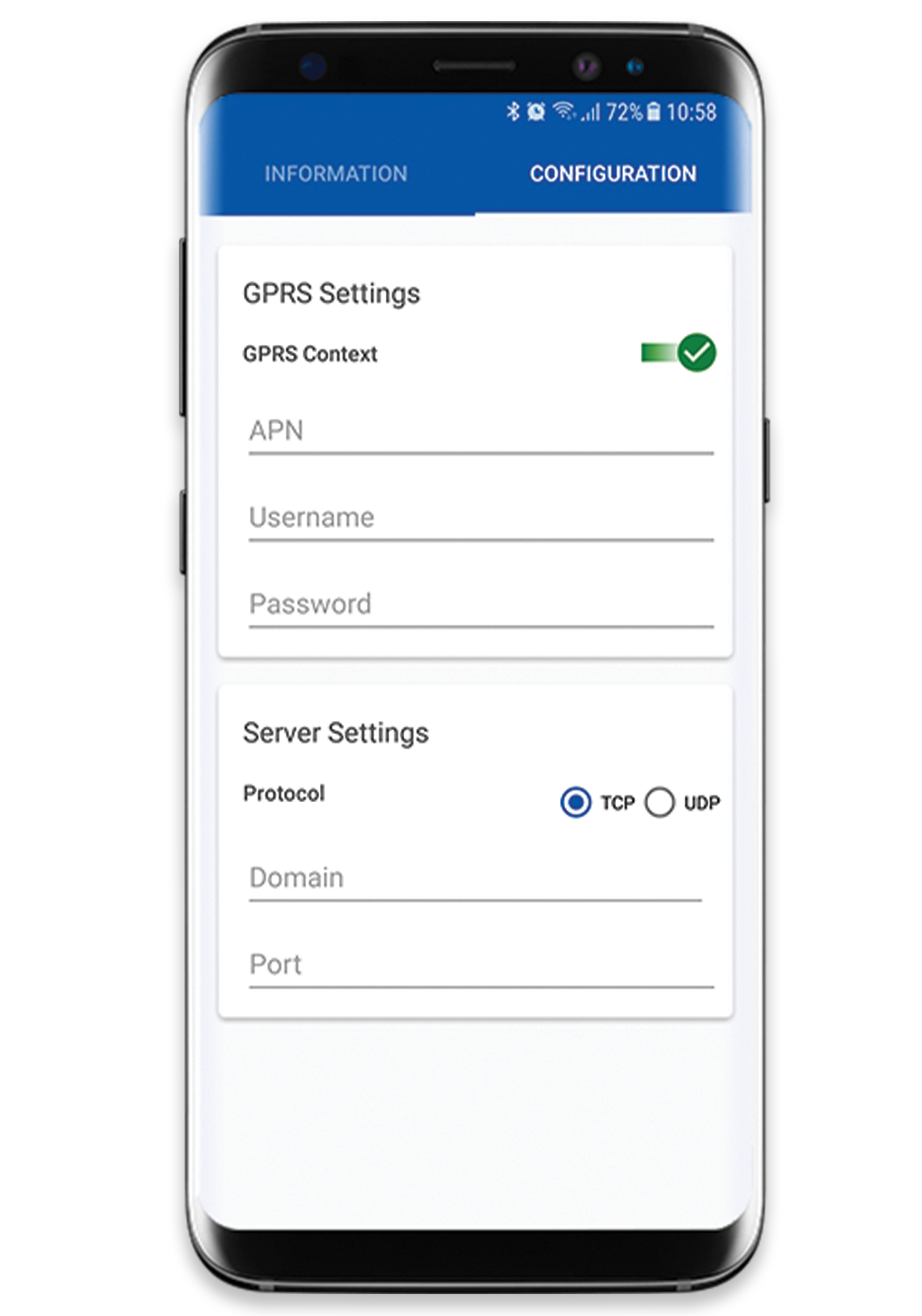
- APN (APN, APN username, APN password)
- Server (domain, port, data sending protocol)
4. Teltonika Data Sending Parameters
Teltonika Data Sending Parameter for OBD OEM Total Mileage is AVL ID 389 (Unit: km). You can get the current value from the vehicle with Ignition ON:
<SMS Login> <SMS Password> readio 389
Parsing information
1.Prerequisites
1.1. Open TCP/UDP port
1.2. Read Java parser first start guide
2. Parsing example
| Unparsed received data in hexadecimal stream |
|---|
| 00000000000000548E010000017CA68CAE50010F0E4D4D209A8D40005C00000B00000000000B000500EF0100F0010015
0300C8000025000004004238DD0043102F0044002800240340000201850003DC0C0186000000C8000000000100003C34 |
| AVL Data Packet Part | HEX Code Part |
|---|---|
| Zero Bytes | 00 00 00 00 |
| Data Field Length | 00 00 00 54 |
| Codec ID | 8E (Codec 8 Extended) |
| Number of Data 1 (Number of Total Records) | 01 |
| Timestamp | 00 00 01 7C A6 8C AE 50 |
| Priority | 01 |
| Longitude | 0F 0E 4D 4D |
| Latitude | 20 9A 8D 40 |
| Altitude | 00 5C |
| Angle | 00 00 |
| Satellites | 0B |
| Speed | 00 00 |
| Event IO ID | 00 00 |
| N of Total ID | 00 0B |
| N1 of One Byte IO | 00 05 |
| 1’st IO ID | 00 EF (AVL ID: 239, Name: Ignition) |
| 1’st IO Value | 01 |
| 2’nd IO ID | 00 F0 (AVL ID: 240, Name: Movement) |
| 2’nd IO Value | 01 |
| 3’rd IO ID | 00 15 (AVL ID: 21, Name: GSM Signal) |
| 3’rd IO Value | 03 |
| 4’th IO ID | 00 C8 (AVL ID: 200, Name: Sleep Mode) |
| 4’th IO Value | 00 |
| 5’th IO ID | 00 25 (AVL ID: 37, Name: Vehicle Speed) |
| 5’th IO Value | 00 |
| N2 of Two Bytes IO | 00 04 |
| 1’st IO ID | 00 42 (AVL ID: 66, Name: External Voltage) |
| 1’st IO Value | 38 DD |
| 2’nd IO ID | 00 43 (AVL ID: 67, Name: Battery Voltage) |
| 2’nd IO Value | 10 2F |
| 3’rd IO ID | 00 44 (AVL ID: 68, Name: Battery Current) |
| 3’rd IO Value | 00 28 |
| 4’th IO ID | 00 24 (AVL ID: 36, Name: Engine RPM) |
| 4’th IO Value | 03 40 |
| N4 of Two Bytes IO | 00 02 |
| 1’st IO ID | 01 85 (AVL ID: 389, Name: OBD OEM Total Mileage) |
| 1’st IO Value | 00 03 DC 0C |
| 2’nd IO ID | 01 86 (AVL ID: 134, Name: Trip Distance) |
| 2’nd IO Value | 00 00 00 C8 |
| N8 of Two Bytes IO | 00 00 |
| NX of X Byte IO | 00 00 |
| Number of Data 2 (Number of Total Records) | 01 |
| CRC-16 | 00 00 3C 34 |
Server response: 00000001
Please see Codec 8 Extended for more information.
Demonstration on Platform
For TAVL Users:
* TAVL > Select Client
* Objects > Press "Filter" > Find Object
* Track > Choose dates > Press "Advanced" > Press "Show"

FAQ
| Question | How to check? | What to do next? |
|---|---|---|
| How can I find out if my FMB003 device is correctly configured to receive OBDII parameters (with OBD OEM Total Mileage) from the vehicle? | Check the section Configuring scenario. |
|
| How can I find out if my FMB003 device can receive data from the vehicle? | Send the following SMS/GPRS command to the device with Ignition ON:
<SMS Login> <SMS Password> obdinfo |
Prot:6,VIN:WVWZZZAUZFW125650,TM:15,CNT:12,ST:DATA REQUESTING,P1:0xBFBFB993,P2:0x8007E019,P3:0xFED00000,P4:0x0,MIL:0,DTC:0,ID3,Hdr:7E8,Phy:0
Prot:0,VIN:N/A,TM:10,CNT:0,ST:OFF,P1:0x0,P2:0x0,P3:0x0,P4:0x0,MIL:0,DTC:0,ID0,Hdr:0,Phy:0
|
| How can I find out if VIN (Vehicle Identification Number) has been received from the vehicle by my FMB003 device so that the correct configuration can be obtained from FOTA WEB? | Send the following SMS/GPRS command to the device with Ignition ON:
<SMS Login> <SMS Password> obdinfo |
Prot:6,VIN:WVWZZZAUZFW125650,TM:15,CNT:12,ST:DATA REQUESTING,P1:0xBFBFB993,P2:0x8007E019,P3:0xFED00000,P4:0x0,MIL:0,DTC:0,ID3,Hdr:7E8,Phy:0
Prot:0,VIN:N/A,TM:10,CNT:0,ST:OFF,P1:0x0,P2:0x0,P3:0x0,P4:0x0,MIL:0,DTC:0,ID0,Hdr:0,Phy:0

<SMS Login> <SMS Password> setparam 40005:1 <SMS Login> <SMS Password> setparam 40003:<VIN> |
| How can I find out if OBD OEM Total Mileage can be received from the vehicle? |
Turn the ignition ON.
|
If the device is configured correctly and OBD OEM Total Mileage cannot be received from the vehicle:
|