for FMB003 03.27.07.Rev.562 Firmware must be installed in order to receive EV OEM data
FOR FMC001 03.27.12.Rev.143 Firmware must be installed in order to receive OEM data.
Configuration On the device side
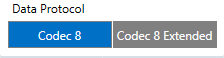
Move to the system, and enable the codec 8E :
Move to OBDII :
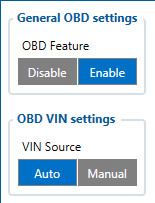
On OBD feature select OBD
On OBD VIN setting: Select Auto, this will gather the VIN number from the vehicle automatically
Note: If Auto didn't work Select Manual, and put the VIN of the Vehicle Manuale.
Enable the required IO by selecting the low priority
After the device configuration, keep the device connected to the vehicle, after the FOTA configured time, the device will automatically request to download the needed file from FOTAWEB to enable the OEM parameters.
Note: The device will request 1 or 2 files from the FOTAWEB
Configuration via GPRES/SMS Command
Send the following command to the device via SMS <username><space><password><space>setparam 40000:1;40005:1;40430:1;40440:1
ID:
40000 – OBD Feature
40005 – VIN Source
40430 – OEM Total Mielge
40440 – OEM Fuel
Value:
1 – Enable
1 – Auto
1 – Enable (low)
1 – Enable (low)
Note: If no username & password for SMS, two space symbols should be inserted before the command.
Verify The Status On FOTA
Open your FOTA account,
Search about the device IMEI
Under Details, OBD section, you should see the VIN number of your vehicle:
Under Tasks, you can verify if the file is delivered to the device or not:
If the file download is successful, kindly check your server data to confirm.
Server Side
The AVL ID for OEM parameters are:
389 OBD OEM Total Mileage
390 OBD OEM Fuel Level
Troubleshooting
Before testing, the car's ignition should be On
If you were not able to get OEM parameters using this method, you may have to check the following:
Device Firmware
check the device power and OBD cables
try to drive the vehicle for some time
If the previous steps were not beneficial, then the vehicle is currently not supporting the OEM parameters and needs to perform reverse engineering.