
ATC700 First Start

KNOW YOUR DEVICE

SET UP YOUR DEVICE
 |
Physical SIM card insertion/removal must be performed when device is powered off. Otherwise, the SIM card might be damaged or device will not detect it. |
| |
The asset tracker enclosure fits tightly. It has four locking clips that may require firm, individual pressure to snap into place. This applies only to the pilot batch and will be improved in future production. |

HOW TO REMOVE COVER
| |
Device casing is designed to be water-proof and match requirements for IP68. Please note that once the cover is fully clipped it will require additional plastic pry tools to be opened! |
PC CONNECTION (WINDOWS)
- Connect device to computer using USB Type-C cable.
- Install USB driver, see "HOW TO INSTALL USB DRIVERS (WINDOWS)".
HOW TO INSTALL USB DRIVERS (WINDOWS)
- Please download COM port drivers from here.
- Extract and run TeltonikaCOMDriver.exe.
- Click Next in driver installation window.
- In the following window click Install button.
- Setup will continue installing the driver and eventually the confirmation window will appear. Click Finish to complete the setup.
CONFIGURATION (WINDOWS)
Most Teltonika devices are shipped with default factory settings. Use Telematics Configuration Tool (TCT) to change these settings according to your needs.
| TCT | |
|---|---|
| Operating system | Windows 10 Windows 11 |
| MS .NET Framework version | MS .NET framework 6.0 |
| Version | 64 bit |
| Disk Storage | 1 GB of free disk space |
| Internet | Ethernet port or Wi-Fi w/ network access for auto-update |
TCT
- Download the TCT (compressed archive).
- Extract the archive and launch the executable. The TCT will be installed.
- Launch the TCT.
- Go to Settings -> User keys, copy the full key text from "BEGIN TCT KEY" to "END TCT KEY" and paste in Add new key field, then press Add key:
BEGIN TCT KEY
  description: ATx700 with development firmware
  type:        ExpFWKey
  key:         196b94ad-b3e4-4ab2-b092-258cc8c5fdb9
  expires:     2026-11-01
  signature:   v1|NRRBW8v8SlMvI6ICGtZAobRukuFVE1SUQYgBdZxqQmqsypy7Hxy/dw7TTjA0y8i09dtTjxBapLZAESIUT1T1XF29/nvb5jtNsjQKdQ3uzYYL1tlulAZ5l09JxrvEA28+aJEIHl91RgEZt0cmXbt9U5uQq0Yudf/3RlzGvrdc1tU4GqgO+yAvaSNO99ERFxTjVpRtJknx+4666LxBMZlNeOBupMdFupPZmxLwcrF+EBPf3wiDJVNl2SLwKAOpx1bR0yx5Ofk2zVfeRGO8OwifzcDDiUjBRw2vwFULbn6jjVEGCDOXqV84zqy0SE/ClLjJ1+7Alk49KR+nS+qCQKT+Fw==
END TCT KEY
Note: This TCT key will expire on 2026-11-01. Please contact us via HelpDesk to receive a new one before the expiration date.
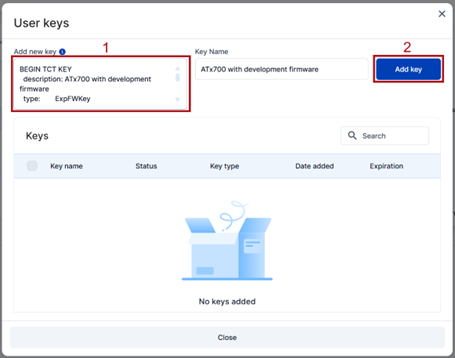

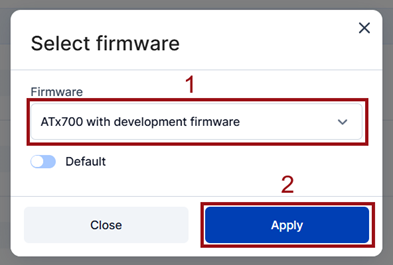
- Go to Settings -> Select firmware, then select ATx700 with development firmware and press Apply:
- In the Discovered devices list, select your device and press Configure.
- The Device status window opens. It contains device, GNSS, and Cellular information.
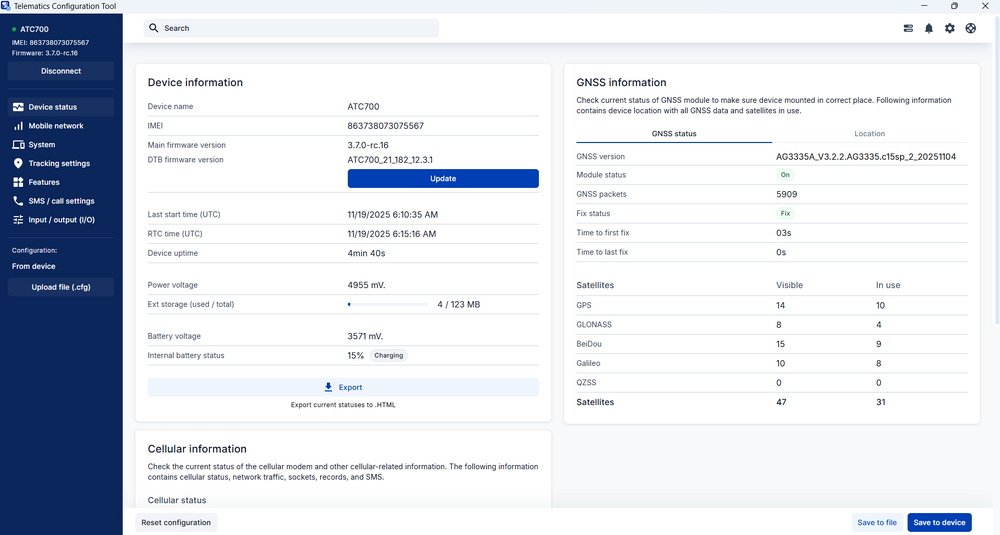
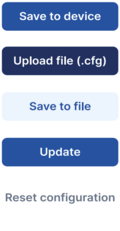
Save to device – saves configuration to device.
Upload file – loads configuration from file.
Save to file – saves configuration to file.
Update – update device firmware.
Reset configuration – sets device configuration to default.
Most important configuration sections are Mobile network (Server, Mobile network settings) and Tracking settings (data collection parameters). More details about ATC700 configuration using TCT can be found here.


QUICK SMS CONFIGURATION
The default configuration ensures best track quality and optimal data usage.
Quickly set up your device by sending this SMS command to it:

DEFAULT CONFIGURATION SETTINGS
RECORDS SENDING TO SERVER
A record with location will be transmitted to the server every 15 minutes, regardless of the product's movement status.
SLEEP MODE
The device is configured with Power Off Sleep mode enabled by default to ensure maximum operating time.The device will not send any records until the server parameters (Domain, and port) are configured. During this time, all records are stored in the device’s internal memory. Once configured, the stored data is automatically transmitted to the specified server.
Time intervals and default I/O elements can be changed by using TCT, Parameter list or FOTA Web.
MOUNTING RECOMMENDATIONS

LED INDICATIONS
This section is an explanation of LED indications on ATC700 device.
| Meaning | Colour | Behaviour | Duration |
|---|---|---|---|
| Power On | Green | Steady | 3 s |
| Low Battery (<20%; Not available with Power Off Sleep) |
Red | Blinking - 1 s ON / 1 s OFF | Until power off |
| Charging | Yellow | Pulsing - fade in 2 s / fade out 2 s | Until charged or USB disconnected |
| 100% charged | Green | Steady | Until USB disconnected |
| FW update | Blue | Blinking - 0.1 s ON / 0.1 s OFF | Until update finished |
| CFG uploading | Blue | Steady | 3 s |
| Periodic record sending | Yellow | Blinking - 0.2 s ON / 2 s OFF | Until record is sent or failed |
| Record sent with GNSS fix | Blue | Steady | 3 s |
| Record sent no GNSS fix | Yellow | Steady | 3 s |
| Record sending failed | Red | Steady | 3 s |
| Alarm | Red | Pulsing - 0.5 s fade in / 0.5 s fade out | 6 s |
| Normal operation (Not available with Power Off Sleep) |
Blue | Blinking - 0.5 s ON / 1 min OFF | In Idle |
| Power OFF | Red | Steady | 2 s |
BASIC CHARACTERISTICS
See the official device datasheet for detailed characteristics and specifications.