
FMC650 NMEA2000
Introduction
NMEA 2000 (NMEA2k) is a marine communication standard built on the CAN bus based on SAE J1939 standard. It defines a common network for sharing data between navigation, engine, sensor, and monitoring devices on a vessel. By connecting the FMC650 into the marine communication line, depending on the boat equipment you can receive data from the onboard systems such as water depth, wind direction, wind speed etc. as well as engine data (RPM, Oil pressure, fuel rate etc.) from up to 4 engines and information about up to 16 Fluid tanks (Fuel tank 1/2, Fresh water tank, Waste water tank, Oil etc.).
Connection methods
The FMC650 device can be connected to your NMEA 2000 network using one of two methods:
Method 1: M12 5-Pin connector
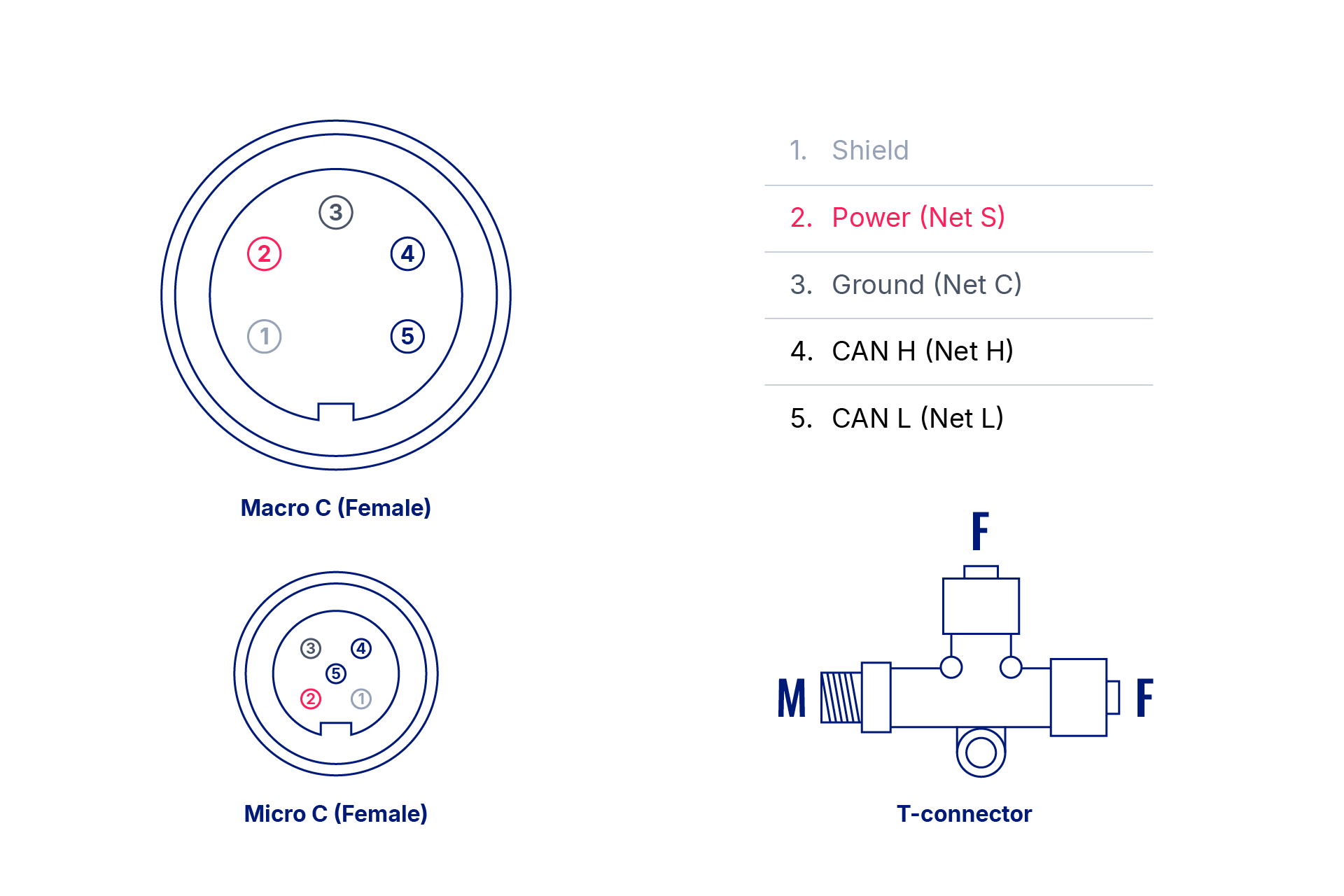
| PIN | Function |
|---|---|
| 1 | Shield |
| 2 | Power source (+) |
| 3 | Ground |
| 4 | CAN H |
| 5 | CAN L |
Method 2: NMEA 2000 Backbone wire connection
Connect directly to the backbone using:
- CAN1 H and CAN1 L wires
- Power source connection
- Ground connection

Important Note: The FMC650 is not a waterproof device. We strongly recommend installing it inside a custom waterproof enclosure to protect it from marine environments.
Configuration requirements
Network settings
Baudrate: The NMEA 2000 system operates exclusively at 250 kbps.
Termination Resistance: 120Ω termination resistors must be installed at both ends of the network.
FMC650 Resistance Setting: Disable the internal CAN resistance on the FMC650 to ensure proper network operation.

CAN Bus configuration
Configure the baudrate based on your connection method:
- If using CAN1 lines: Set baudrate to 250 kbps in CAN1 bus settings.
- If using CAN2 lines: Set baudrate to 250 kbps in CAN2 bus settings.
NMEA 2000 Source Configuration
- Navigate to the NMEA2000 tab.
- Configure the CAN source according to your physical connection (CAN1 or CAN2).

The “Engine Instance ID” parameter allows selection of a value from 0 to 255. However, according to the NMEA2000 protocol specification, the following values are reserved and should not be used:
- 253 – Reserved
- 254 – Error
- 255 – Not available
I/O Element Configuration
- Access the NMEA2000 I/O tab.
- Configure the I/O elements you want to collect from your vessel.
- In the General/Main window, select desired parameters:
- Fuel fluid levels
- Wind direction
- Water depth
- Additional environmental data
Engine Selection
- Use the engine number selector to choose which engine data to monitor.
- The system supports monitoring up to 4 engines simultaneously.
- Configure each engine's parameters individually as needed.

As an example, the following data is received:
0x11 0x6A 0x19 0x00 0x00 0x00 0x00 0x00
- Instance = (0x11 & 0xF0) >> 4 = 0x10 >> 4 = 1 → Data will be written to Fuel Fluid Level #2
- Type = 0x11 & 0x0F = 0x01 = 1
- Fluid level (raw) = 0x6A 0x19 = 0x1964 = 6500
- Value = 6500 * 4 / 1000 = 26 = 0x1A
If the “low level” or “high level” parameters are not set, the fluid level is calculated as:
Fluid Level = (Type << 12) | Value
= 0x1000 | 0x001A = 0x101A (Decimal: 4122)

But if “low level” or “high level” would be set, Type data will be ignored.

AVL ID lists
General AVL ID Lists
| Parameter name | AVL ID |
|---|---|
| Fuel Fluid Level | 10850 |
| Oil Fluid Level | 10851 |
| Oil Pressure | 10852 |
| Oil Temperature | 10853 |
| Engine Temperature | 10854 |
| Alternator Voltage | 10855 |
| Fuel Rate | 10856 |
| Engine Hours | 10857 |
| Coolant Pressure | 10858 |
| Fuel Pressure | 10859 |
| Engine Status 1 Warning | 10860 |
| Engine Status 2 Warning | 10861 |
| Engine Load | 10862 |
| Engine Torque | 10863 |
| Water Depth Transducer | 10864 |
| Trip Fuel Used | 10865 |
| Distance To Empty | 10866 |
| Trip Run Time | 10867 |
AVL ID list for engine selection
| Parameter Name | AVL ID Engine 1 | AVL ID Engine 2 | AVL ID Engine 3 | AVL ID Engine 4 |
|---|---|---|---|---|
| Oil Pressure | 10852 | 13601 | 13613 | 13625 |
| Oil Temperature | 10853 | 13602 | 13614 | 13626 |
| Temperature | 10854 | 13603 | 13615 | 13627 |
| Alternator Voltage | 10855 | 13604 | 13616 | 13628 |
| Fuel Rate | 10856 | 13605 | 13617 | 13629 |
| Hours | 10857 | 13606 | 13618 | 13630 |
| Coolant Pressure | 10858 | 13607 | 13619 | 13631 |
| Fuel Pressure | 10859 | 13608 | 13620 | 13632 |
| Status1 Warning | 10860 | 13609 | 13621 | 13633 |
| Status2 Warning | 10861 | 13610 | 13622 | 13634 |
| Load | 10862 | 13611 | 13623 | 13635 |
| Torque | 10863 | 13612 | 13624 | 13636 |
| RPM | 14216 | 14217 | 14218 | 14219 |