From Teltonika Telematics Wiki
Main Page > E-Mobility Trackers > FTM305 > FTM305 SMS/GPRS Command List This page lists SMS/GPRS commands for the FTM305 device.
General information:
A single SMS/GPRS command is limited to 160 characters.
GPRS commands require the Codec 12 protocol .
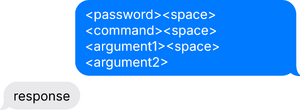
SMS and GPRS commands are not received while the device is in Deep Sleep or Power Off Sleep modes. In these modes, the GSM/GPRS module is powered down, meaning the device is not registered on the mobile network and cannot accept incoming commands. For more information on sleep modes, see Power saving settings . Command Syntax Before all SMS/GPRS commands, enter the password OR a whitespace (when password is not set).
<password><space><command><space><argument1><space><argument2>...
Examples:
getinfo command, password "1234": 1234 getinfogetinfo command, password not set: getinfo (note the whitespace before command)readavl command, password "1234", single argument: 1234 readavl 69getparam command, password not set, multiple arguments: getparam 2001;2002 (note the whitespace before command)setparam command, password "1234", multiple arguments with values: 1234 setparam 2001:wap;2002:user;2003:passNote! In some Apple iOS devices, any whitespace in the beginning of a message is automatically removed under certain conditions. This may affect SMS parsing in the receiving device.
Command List The following commands apply to FT platform devices with firmware version 3.7.0.rc.22 or newer.
Basic Commands These are the basic SMS/GPRS commands, applicable for most Teltonika devices.
COMMAND
DESCRIPTION
SYNTAX EXAMPLE
allver Returns information about device firmware and hardware.
allver
battery Returns information about battery status. If battery is not present voltage and current will return zero value.
battery
cpureset Restarts device.
cpureset
deleterecords Deletes all records inside device.
deleterecords
delkey Deletes current primary key.
delkey <old_keyword>
delsecondkey Deletes current recovery key.
delsecondkey <old_keyword>
extformat Quick formats external storage.
extformat
fall_down_reset Reactivates fall down scenario. Intended for use in case of a fake fall down event
fall_down_reset
fwstats Information regarding firmware update statistics.
fwstats
getgps Returns information string regarding GNSS.
getgps
getimeiccid Returns information about modem IMEI and SIM CCID.
getimeiccid
getimsi Returns IMSI code of currently used SIM card.
getimsi
getinfo Returns information string.
getinfo
getops Returns list of currently visible operators.
getops
getparam Get configured parameter value.
getparam <param_id1>;<param_id2>;...
getrecord Generates a high priority record so force device to send all records to the server.
getrecord
getstatus Get status about device.
getstatus
getver Returns code version, device IMEI, modem app version, RTC time, Init time, etc.
getver
ggps Returns information about current date, time, speed, device coordinates and a link to Google Maps with current position.
ggps
readavl Returns information string regarding AVL ID value.
readavl <AVL_ID>
setkey Set new or change current primary key.
setkey <old_keyword> <new_keyword>
setparam Change configurable parameter value.
setparam <param_id1>:<value>;<param_id2>:<value>;...
setsecondkey Set new or change current recovery key.
setsecondkey <old_keyword> <new_keyword>
towingreact Reactivates towing detection scenario. Intended for use in case of a fake towing detection event.
towingreact
wdlog Returns information about the recent watchdog events.
wdlog
web_connect Triggers FOTA service/connection.
web_connect
I/O Commands
COMMAND
DESCRIPTION
SYNTAX EXAMPLE
getio Returns information string with values of all available IO pin values.
getio
setdigout Controls specified digital output. Sets/clears DOUTs with optional timeouts and speed thresholds. Accepts as many parameter sets, as your device has DOUTs.
setdigout ### <Y1> <Y2> <Y3> <Z1> <Z2> <Z3>
setigndigout Controls the specified digital output when the ignition is off. DOUTs are controlled dynamically.
setigndigout ### <Y1> <Y2> <Y3>
Manual CAN Commands
COMMAND
DESCRIPTION
SYNTAX EXAMPLE
mcan_cmd Activates sending specified Manual CAN command.
mcan_cmd: <command_ID>
mcan_stop Stops sending specified Manual CAN command.
mcan_stop: <command_ID>
1-Wire Commands
COMMAND
DESCRIPTION
SYNTAX EXAMPLE
getcontsens Returns IDs of active and saved temperature sensors.
getcontsens
savecontsens Save active sensors IDs or IDs passed as argument.
savecontsens <id1>,<id2>,<id4>,<id4>,<id5>
SECO Commands
COMMAND
DESCRIPTION
SYNTAX EXAMPLE
secooff Deactivate SECO scenario.
secooff
secoon Activate SECO scenario.
secoon