
FTM800 First Start
KNOW YOUR DEVICE
File:FTM800 know your device.png
SET UP YOUR DEVICE
 |
Physical SIM card insertion/removal must be performed when device is powered off – external voltage disconnected. Otherwise, the SIM card might be damaged or device will not detect it. |
HOW TO REMOVE COVER
| |
Device casing is designed to be water-proof and match requirements for IP69K. Please note that once the cover is fully clipped it will require additional plastic pry tools to be opened! Please make sure to review short walkthrough video for more details: |
PINOUT
PC CONNECTION (WINDOWS)
HOW TO INSTALL USB DRIVERS (WINDOWS)
- Please download COM port drivers from here.
- Extract and run TeltonikaCOMDriver.exe.
- Click Next in driver installation window.
- In the following window click Install button.
- Setup will continue installing the driver and eventually the confirmation window will appear. Click Finish to complete the setup.
CONFIGURATION (WINDOWS)
Most Teltonika devices are shipped with default factory settings. Use Telematics Configuration Tool (TCT) to change these settings according to your needs.
| PIN NUMBER | PIN NAME | DESCRIPTION |
|
|---|
| TCT | |
|---|---|
| Operating system | Windows 10 Windows 11 |
| MS .NET Framework version | MS .NET framework 6.0 |
| Version | 64 bit |
| Disk Storage | 1 GB of free disk space |
| Internet | Ethernet port or Wi-Fi w/ network access for auto-update |
TCT
- Download the TCT (compressed archive).
- Extract the archive and launch the executable. The TCT will be installed.
- Launch the TCT.
- In the Discovered devices list, select your device and press Configure.
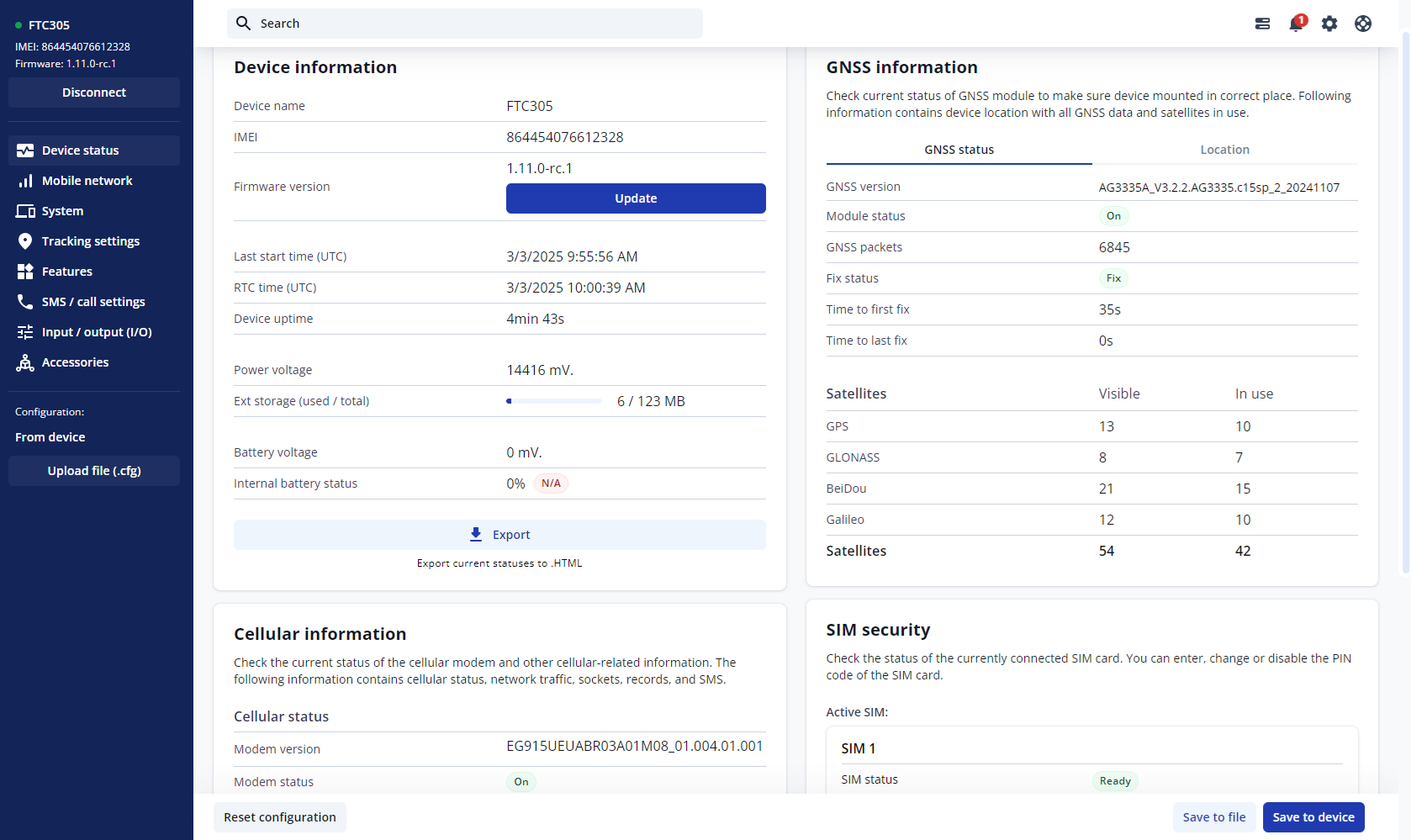
- The Device status window opens. It contains device, GNSS and Cellular information.


Save to device – saves configuration to device.
Upload file – loads configuration from file.
Save to file – saves configuration to file.
Update – update device firmware.
Reset configuration – sets device configuration to default.
Most important configuration sections are Mobile network (Server, Mobile network settings) and Tracking settings (data collection parameters). More details about FTM800 configuration using TCT can be found here.
QUICK SMS CONFIGURATION
The default configuration ensures best track quality and optimal data usage.
Quickly set up your device by sending this SMS command to it:

DEFAULT CONFIGURATION SETTINGS

After successful SMS configuration, FTM800 device will synchronize time and update records to configured server. Time intervals and default I/O elements can be changed by using TCT or Parameter list.
MOUNTING RECOMMENDATIONS
LED INDICATIONS
This section is an explanation of LED indications on FTM800 device.
BASIC CHARACTERISTICS
| Product | |
|---|---|
| Name | FTM800-Q3AB0 |
| Module | |
| Name | FTM800-Q3AB0: Quectel BG95-M3 with AG3335 |
| Technology | LTE CAT M1/NB-IoT/GSM/GPRS/GNSS |
| GNSS | |
| GNSS | GPS, GLONASS, GALILEO, BEIDOU |
| Receiver | L1: 75 channel |
| Tracking sensitivity | -165 dBm |
| Position Accuracy | < 1.8 m CEP |
| Velocity Accuracy | < 0.1 m/s (within +/- 15% error) |
| Hot start | - |
| Warm start | - |
| Hot start | - |
| Cellular | |
| Technology | LTE CAT M1/NB-IoT/GSM |
| 2G bands | FTC800-QJAB0: GSM: B2/B3/B5/B8 |
| 4G bands | FTM800-Q3AB0: LTE FDD (CAT M1): B1/B2/B3/B4/B5/B8/B12/B13/B18/B19/B20/B25/B26/B27/B28/B66/B85 LTE-TDD (CAT NB2): B1/B2/B3/B4/B5/B8/B12/B13/B18/B19/B20/B25/B28/B66/B71/B85 |
| Data transfer | LTE FDD (CAT 1): Max. 10 Kbps (DL) / Max. 5 Kbps (UL) GSM (GPRS): Max. 85.6 Kbps (DL) / Max. 85.6 Kbps (UL) |
| Transmit power | Class 5 for GSM850/900: 30±5dBm Class 3 for GSM1800/1900: 29±5dBm Class 3 for LTE-FDD: 26±5dBm |
| Data support | SMS (TEXT, PDU), Network protocols (TCP, UDP) |
| Power | |
| Input voltage range | 10 - 30 V DC |
| Back-up battery | 100mAh Li-Ion battery 3.7V (0.37 Wh) |
| Internal fuse | 3A |
| Power Consumption | TBA |
| Interface | |
| GNSS antenna | Internal High Gain |
| GSM antenna | Internal High Gain |
| USB | 2.0 USB Type-C |
| LED indication | 2 status LED lights |
| SIM | Nano-SIM |
| Memory | 128MB internal flash memory |
| Physical Specification | |
| Dimensions | TBA |
| Weight | TBA |
| Operating Environment | |
| Operating temperature (without battery) | -30 °C to +85 °C |
| Storage temperature (without battery) | -30 °C to +85 °C |
| Operating temperature (with battery) | 0 °C to +45 °C |
| Storage temperature (with battery) | -20 °C to +45 °C for 1 month -20 °C to +35 °C for 6 months |
| Operating humidity | 5% to 95% non-condensing |
| Ingress protection rating | IP41 |
| Battery charge temperature | 0 °C to +45 °C |
| Battery discharge temperature | -20 °C to +60 °C |
| Battery storage conditions | -10 °C to +50 °C for 1 month -10 °C to +35 °C for 3 months 0 °C to +30 °C for 1 year |
| Data Codec | |
| Codec support | Codec 8 Extended |
| Features | |
| Sensors | Accelerometer |
| Scenarios | Crash Detection, Over Speeding, Trip, Odometer, Eco Driving, Excessive idling, Network Jamming Detection, Unplug Detection, Auto Geofence, Towing Detection, Static Navigation, Custom Scenario |
| Sleep modes | Online sleep, Deep sleep, Power off sleep |
| Configuration and firmware update | FOTA WEB, Telematics Configuration Tool (TCT) |
| SMS | Configuration, Debug |
| GPRS commands | Configuration, Debug |
| Time Synchronization | GNSS, NTP, NITZ |
| Ignition detection | Accelerometer, External Power Voltage |
| Certification & approvals | |
| Regulatory | - |